USB 3.1 Type-C
USB 3.0
HD AUDIO
POWER SW
RESET SW POWER LED
+
POWER LED
–
11 12
ENGLISH ENGLISH
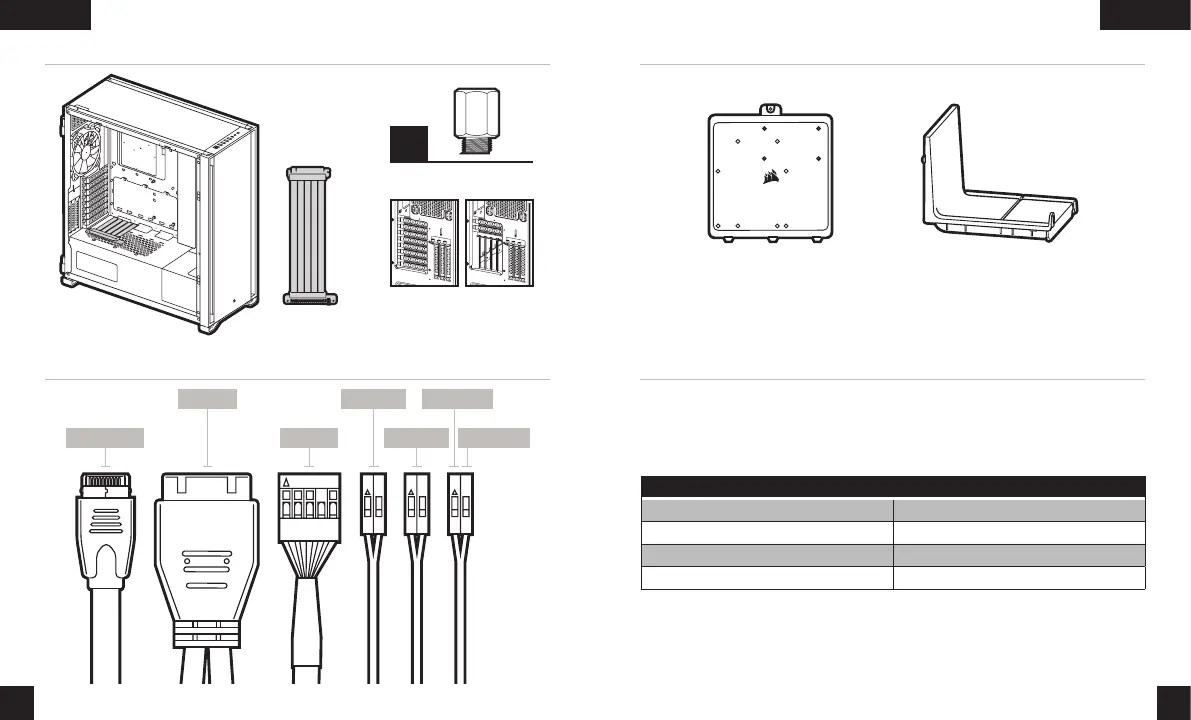
VERTICAL MOUNT GPU
INSTALLING THE FRONT I/O CONNECTORS
PSU optional cover plateMotherboard accessory tray
Shipping
conguration
Optional
vertical
conguration
ACCESSORIES IN THE BOX
FREQUENTLY ASKED QUESTIONS
1. Does the polarity matter with the I/O panel’s power and reset header?
No, only the LED headers.
2. Who should I contact if I received my case damaged or one of the fans is no longer working?
Please go to support.corsair.com and request an RMA so that we can replace
the damaged part(s).
3. Where can I mount a fan?
To learn more about this case visit the product page at corsair.com.
Fan mount locations
Front 4x 120mm / 3x 140mm
Top 3x 120mm / 3x 140mm
Rear 120mm / 140mm
Motherboard tray 4x 120mm
x2
Motherboard standoffs
CORSAIR PCIe
extension cable
*sold separately*

 To Next Page
 Loading...