Setup Guide
Parts Diagram and Functions
Rear Panel
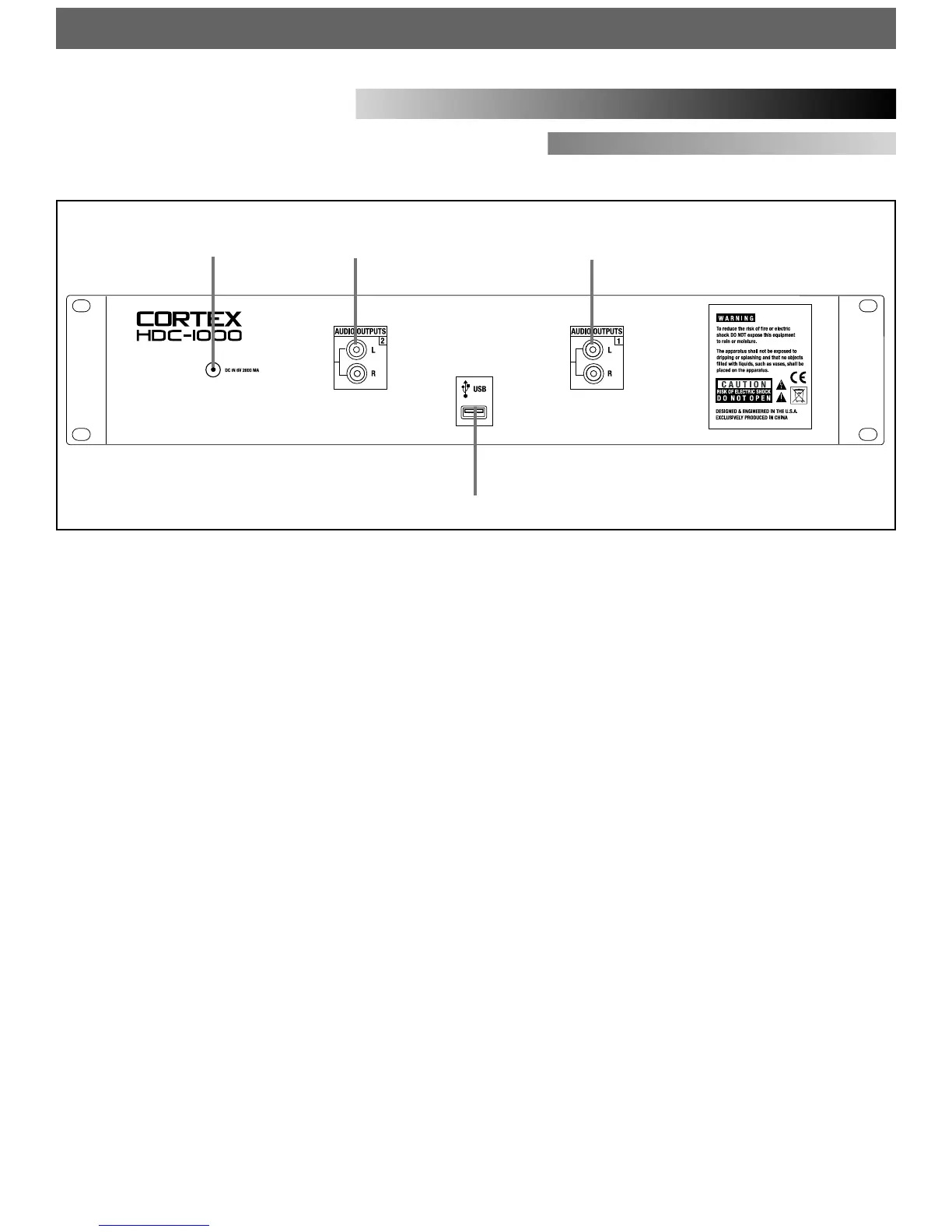
1. AUDIO OUT L/R RCA connectors, side 1
RCA type unbalanced stereo audio output. These connectors output
audio signal generated from Side 1 of the HDC-1000 unit.
2. AUDIO OUT L/R RCA connectors, side 2
RCA type unbalanced stereo audio output. These connectors output
audio signal generated from Side 2 of the HDC-1000 unit.
3. USB connector (type A)
This connector is used to attach the USB mass storage device that con-
tains your music library. Suitable mass storage devices include, but are
not limited to: external hard drives, flash memory, portable digital
music players, CD/DVD-ROM drives, memory card readers, and active
USB hubs.
4. DC inlet w/security clamp
This connector is used in conjunction with the AC/DC adaptor to power
the unit. Next to the DC inlet connector is a security clamp, which can
be fastened over top of the cable to prevent it from being dislodged.
12
3
4
7


 To Next Page