Setup Guide
Parts Diagram and Functions
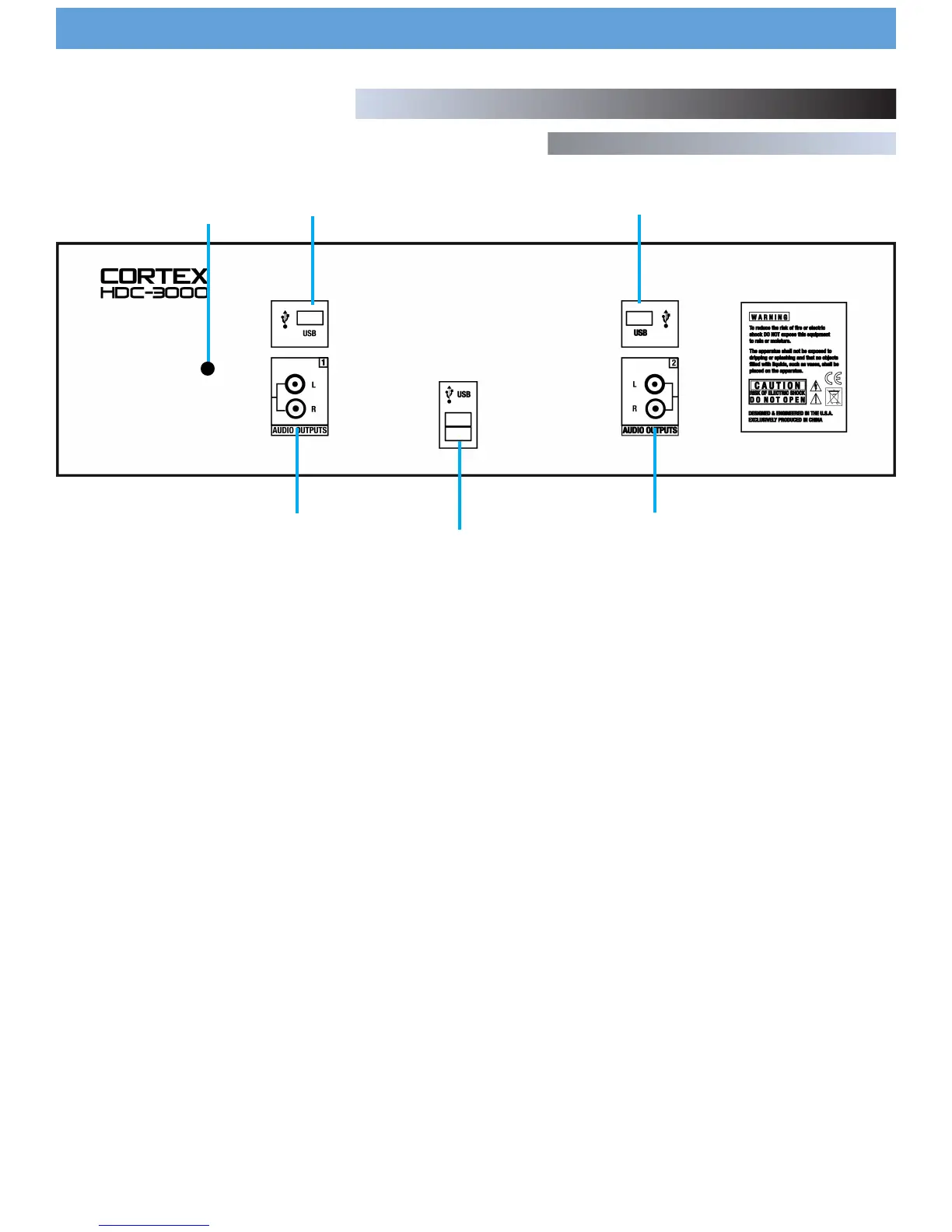
Rear Panel
1. AUDIO OUT L/R RCA connectors, side 1
RCA type unbalanced stereo audio output. These connectors output
audio signal generated from Side 1 of the HDC-1000 unit.
2. AUDIO OUT L/R RCA connectors, side 2
RCA type unbalanced stereo audio output. These connectors output
audio signal generated from Side 2 of the HDC-1000 unit.
3. USB connector (type A)
This connector is used to attach the USB mass storage device (MSD) that
contains your music library. Suitable mass storage devices include, but
are not limited to: external hard drives, flash memory, portable digital
music players, CD/DVD-ROM drives, memory card readers, and active
USB hubs.
4. DC inlet w/security clamp
This connector is used in conjunction with the AC adapter to power the
unit. Next to the DC inlet connector is a security clamp, which can be
fastened over top of the cable to prevent it from being dislodged.
1
2
3
4
7
3
3


 To Next Page