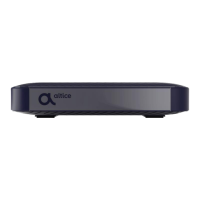
The Altice N8783C is an HD Digital Cable Set-Top-Box designed to provide access to digital cable television services. This device serves as an interface between your cable provider's network and your television, allowing you to view various channels and access program information.
Function Description
The primary function of the Altice N8783C is to receive and decode digital cable signals, converting them into a format that your television can display. It supports both High-Definition Television (HDTV) via an HDMI connection and Standard-Definition Television (SDTV) via a coaxial cable connection, offering flexibility depending on your television's capabilities. The set-top box processes incoming signals, enabling you to browse channels, view program guides, and access other interactive features provided by your cable service.
Usage Features
The N8783C offers a range of features to enhance your television viewing experience:
- Channel Navigation: Users can easily navigate through channels using the remote control, inputting channel numbers directly or using the CH+ and CH- buttons.
- Program Guide (EPG): A comprehensive Electronic Program Guide (EPG) is available, allowing you to view program schedules for up to two weeks in advance. This helps in planning your viewing and discovering new content.
- Main Menu Access: A dedicated "Menu" button on the remote provides access to the main menu, where you can find various settings and information.
- Settings Configuration: The device allows for extensive customization through its settings menu. This includes:
- Accessibility: Adjusting Closed Caption settings to suit individual needs.
- Audio/Video: Modifying audio language, video description, aspect ratio, video resolution, and other display preferences.
- Parental Controls: Implementing parental controls to block channels, ratings, or specific titles. This feature also includes the ability to set and modify a PIN password for restricted content.
- Favorite Channels: Users can create and manage a list of their favorite channels for quick access.
- Remote Pairing: The remote control can be paired with the cable box, enabling control without the need for direct line-of-sight, which can be convenient for hidden installations.
- Diagnostics: Accessing diagnostic information such as serial number, unit identifier, UI version, EPG data, software version, hardware version, and release time, which can be useful for troubleshooting or support.
- Remote Control Functionality: The included remote control is designed for intuitive operation, featuring dedicated buttons for TV power, set-top box power, menu, exit, page up/down, guide, info, volume control, channel selection, mute, and inputting channel numbers. It also includes buttons for Closed Caption (CC) and Secondary Audio Program (SAP) language selection.
- Flexible Installation: The N8783C can be connected to your television using either an HDMI cable for HDTV or a coaxial cable for SDTV, accommodating different TV setups. The device also includes Velcro strips for mounting the cable box to the back of your television or a wall, allowing for a clean and discreet installation.
- First-Time Power On: When the unit is powered on for the first time or after a factory reset, a "Please wait..." screen will appear, indicating that the service is being prepared.
Maintenance Features
While the N8783C is designed for reliable operation, some maintenance considerations and troubleshooting steps are provided to ensure optimal performance:
- Ventilation: Proper ventilation is crucial for the device's longevity. It should not be installed in confined spaces or near heat sources. A minimum of 5cm clearance around the apparatus is recommended for sufficient airflow. Blocking ventilation openings with items like newspapers or curtains should be avoided.
- Cleaning: The device should be cleaned only with a dry cloth to prevent damage.
- Power Cord Protection: The power cord should be protected from being walked on or pinched, especially at plugs and convenience receptacles.
- Lightning Storms/Extended Unuse: It is advisable to unplug the apparatus during lightning storms or when it will be unused for long periods to prevent potential damage.
- Servicing: All servicing should be referred to qualified service personnel, especially if the apparatus has been damaged, exposed to moisture, or is not operating normally.
- Battery Replacement: If the remote control batteries need replacement, only the same or equivalent type (AAA) should be used. Incorrect battery replacement carries a risk of explosion. Batteries should be recycled or disposed of according to state and local guidelines. The batteries should not be exposed to excessive heat.
- Troubleshooting Guide: The manual includes a troubleshooting section to address common issues:
- No Front Panel Light: Check if the power adapter is securely attached and plugged into a live outlet.
- No Sound: Ensure the mute function is off and the volume is turned up.
- No Sound/No Picture: Verify HDMI or CH3/4 Out port connections, confirm the TV is set to the correct input, and check if the unit is in standby mode.
- Video Pause/Stutters: Re-connect the signal cable securely, as this may indicate a weak signal.
- Channel Not Working: Contact your local operator for assistance.
- Unit Stopped Working: Check for poor ventilation or nearby heat-producing objects. Relocate the unit to a cool, well-ventilated area.
- Remote Control Not Working: Ensure the remote is aimed at the front panel, confirm successful pairing (if applicable), and replace batteries if necessary.
- FCC Compliance: The device complies with FCC rules, and any changes or modifications not expressly approved by the manufacturer could void the user's authority to operate the equipment. Users are advised to reorient or relocate the receiving antenna, increase separation between equipment and receiver, connect to a different circuit, or consult a technician if interference occurs.


 To Next Page
 General