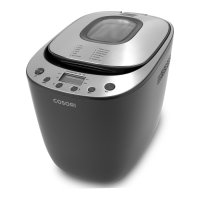
The Cosori Original Bread Maker (Model: BM201-CO Series) is a versatile kitchen appliance designed to simplify the bread-making process, offering a range of customizable controls and built-in functions to help users achieve perfectly baked loaves. It caters to both novice and experienced bakers, providing an efficient way to create various types of bread and dough.
Function Description
The primary function of the Cosori Bread Maker is to automate the process of making bread, from kneading and rising to baking. It features 12 preset programs, each tailored for specific bread types, allowing users to select the ideal settings with ease. These presets include:
- Basic: For standard white or mixed bread.
- Knead: Specifically for kneading dough without baking, useful for preparing dough for pizzas, rolls, or other baked goods that require manual shaping and baking.
- Bake: For baking pre-prepared dough or reheating.
- Quick: A faster cycle for certain types of bread.
- Rolls: Optimized for making various types of dinner rolls.
- Pizza Dough: Prepares dough specifically for pizza bases.
- Artisan Dough: For more complex doughs that may require longer fermentation.
- French Bread: Designed to produce crusty French-style loaves.
- Whole Wheat: Tailored for denser whole wheat breads.
- Fruit Bread: Accommodates recipes with added fruits or nuts.
- Ferment: A program dedicated to the fermentation process of dough.
- Gluten Free: Specifically designed for gluten-free recipes, which often require different kneading and rising times.
The bread maker also includes a "Delay Start" function, allowing users to program the machine to start baking at a later time, up to 13 hours in advance. This is particularly convenient for waking up to freshly baked bread. However, it's important to note that easily perishable ingredients should not be used with the Delay Start function.
A "Keep Warm" function automatically activates for 30 minutes after the baking cycle is complete, ensuring the bread remains warm until it's ready to be served.
Usage Features
The Cosori Bread Maker is designed for user-friendliness, with an intuitive control panel and a clear display.
- Control Panel: The control panel includes an On/Off button, Menu button, Set button, Start/Pause button, and directional arrows for navigation.
- Display: The display provides real-time information, including the selected preset number, remaining time, current stage (Knead, Rise, Bake, Warm), and selected crust color (Light, Medium, Dark) and loaf weight (700g, 900g).
- Ingredient Addition: For select presets, the bread maker will beep and display "Add" to prompt users to add additional ingredients like nuts, fruits, seeds, or cheeses during the second kneading cycle.
- Crust Color Selection: Users can choose from Light, Medium, or Dark crust settings to achieve their preferred level of browning, though this option is not available for all presets.
- Loaf Weight Selection: The bread maker supports two loaf weights: 700g and 900g. This setting influences the baking duration and is not adjustable for certain presets like Quick, Rolls, Pizza Dough, and Ferment.
- Pausing and Canceling: The Start/Pause button allows users to temporarily pause the cooking process, with the time remaining blinking on the display. Holding the button for 3 seconds will cancel the current cooking cycle.
- Force Shutoff: In case of an emergency or if the user needs to stop the machine immediately, holding the On/Off button for 5 seconds will force a shutoff.
- Overheat Protection: The device is equipped with an overheat protection feature. If the bread maker overheats, it will automatically shut down, and the display will show "HHH," indicating that the unit needs to cool down before further use.
- Ingredient Order: For best results, ingredients should generally be added in a specific order: liquids first, followed by butter, dry ingredients, and finally yeast. It's recommended to keep yeast separate from wet ingredients initially to prevent premature activation.
- Kneading Blade: The bread maker utilizes a kneading blade at the bottom of the bread pan to mix and knead the dough. Lightly coating the blade with nonstick spray or vegetable oil can make it easier to remove from the finished loaf.
- Bread Pan Removal: The bread pan is designed for easy removal and insertion. To remove, turn it slightly counterclockwise and lift. To lock it in place, turn it clockwise. The bread maker should never be used without the bread pan in place.
Maintenance Features
Proper care and maintenance are crucial for the longevity and optimal performance of the Cosori Bread Maker.
- Cleaning After Each Use: The bread pan and the interior of the bread maker should be cleaned after every use.
- Cooling Down: Before cleaning, the bread maker should be turned off, unplugged, and allowed to cool completely. Oven mitts can be used to safely remove the hot bread pan for faster cooling.
- Bread Pan and Kneading Blade Cleaning: The bread pan and kneading blade are dishwasher safe. Alternatively, they can be washed by hand with hot, soapy water and a non-abrasive sponge. Soaking may be necessary for stubborn residues. It's important to avoid using metal utensils or abrasive cleaning materials on the nonstick coating of the bread pan.
- Exterior Cleaning: The outside of the bread maker can be wiped with a moist cloth if needed.
- Interior Cleaning: The inside of the bread maker can be cleaned with a slightly moist, non-abrasive sponge or cloth. It is critical not to immerse the bread maker in water.
- Drying: All parts should be thoroughly dried before reassembly and storage.
- Ventilation: Ensure that ventilation openings are not blocked during operation to prevent overheating.
- Storage: Do not place anything on top of the bread maker or store anything inside it when not in use. Keep the bread maker away from flammable materials and on a flat, stable, heat-resistant surface.


 To Next Page
 General