Need help?
Do you have a question about the Costway EP24830 and is the answer not in the manual?
Explains hazard signal words (DANGER, WARNING, CAUTION) used in the manual.
Provides step-by-step guide for assembling the fan components, including base, pillar, and blades.
Details functions and usage of the remote control for fan speed, timer, oscillation, and modes.
Explains how to operate the fan using the control panel on the unit itself.
Instructions on how to safely replace a blown fuse in the fan's power plug.
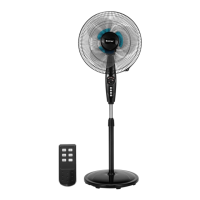
The Costway 16" Double Blade Pedestal Fan (EP24830) is designed to provide efficient air circulation and cooling in various indoor environments. This fan features a unique double-blade design, which enhances its ability to move air effectively, offering a more powerful and consistent airflow compared to single-blade fans. The fan is equipped with both manual controls and a remote control, providing users with flexible options for operation and convenience.
The primary function of this pedestal fan is to generate and circulate air to create a cooling effect. It operates by rotating a set of double blades at varying speeds, drawing in ambient air and expelling it in a directed flow. The fan's design allows for both vertical angle adjustment and horizontal oscillation, ensuring that air can be directed precisely where needed or distributed broadly across a room.
The fan offers multiple wind speed settings, typically including Low, Medium, and High, allowing users to select the intensity of the airflow according to their comfort preferences. In addition to standard wind speeds, the fan may feature different wind modes, such as Normal, Natural, and Sleep. The Normal mode provides a constant airflow at the selected speed. The Natural mode simulates a natural breeze by varying the fan speed intermittently, creating a more dynamic and refreshing feel. The Sleep mode is designed for quiet operation during rest, often featuring a gentler, less disruptive airflow and reduced noise levels.
An oscillation function is integrated into the fan, enabling the head to swing from side to side. This feature helps to distribute air over a wider area, making it effective for cooling larger spaces or multiple occupants. The oscillation can be turned on or off as desired.
The fan also includes a timer function, which allows users to set a specific duration for the fan to operate before automatically turning off. This is particularly useful for energy saving or for ensuring the fan operates only for a desired period, such as during sleep. The timer settings typically range from 0.5 hours up to several hours, providing ample flexibility.
For safety, the fan is equipped with an automatic reset limit control. If the fan overheats for any reason, this control will activate, stopping the fan to prevent damage or hazards. This safety feature ensures reliable and secure operation.
The Costway pedestal fan is designed for ease of use, offering both manual and remote control options.
Assembly: The fan requires some assembly upon receipt. This typically involves attaching the pillar to the base, securing the adjustable pole, and then assembling the blade and grill components onto the motor housing. Clear instructions are provided to guide users through the assembly process, which usually takes about 30 minutes. A Phillips screwdriver is required for assembly but is not included.
Height Regulation: The fan's height can be adjusted to suit different needs and environments. By loosening a height adjustment knob, the chrome pipe can be extended or retracted to the desired height, and then tightened to secure it in place.
Angle Adjustment: The fan head can be manually tilted up or down, allowing users to direct the airflow vertically. This feature is useful for targeting specific areas or for optimizing air circulation in a room.
Wind Speed and Mode Selection: Both the manual and remote controls allow users to cycle through different wind speeds (Low, Medium, High) and wind modes (Normal, Natural, Sleep). Indicator lights on the fan unit typically show the currently selected speed or mode.
Timer Function: The timer can be set using either the manual control or the remote. Users can select specific time intervals (e.g., 0.5h, 1h, 2h, 4h, up to 7.5h) after which the fan will automatically turn off. If continuous operation is desired, the timer function should not be activated.
Oscillation Control: The oscillation feature can be activated or deactivated with a dedicated button on both the manual control panel and the remote. It is important not to forcibly change the fan head direction manually while oscillation is active, as this can damage the fan mechanism.
Safety Precautions: Users are advised to always unplug the fan when not in use, when moving it, or during cleaning. Extreme caution is necessary when the fan is used near children or individuals with limited physical capabilities. The fan should not be operated with a damaged cord or plug, or if it has malfunctioned or been damaged. It is intended for indoor use only and should not be used outdoors. Foreign objects should not be inserted into ventilation openings to prevent electric shock or fire hazards. The fan should not be used in areas with flammable materials, and it should always be placed on a flat, steady, and stable surface to prevent tipping. The fan guards should always be in place during operation.
Proper maintenance ensures the longevity and safe operation of the Costway pedestal fan.
Cleaning: Regular cleaning is essential to maintain optimal performance and hygiene. Before cleaning, always unplug the unit from the power outlet.
Fuse Replacement: The fan is equipped with an overload protection fuse located within the plug. If the fan stops working due to an overload or short-circuit, the fuse may have blown.
Troubleshooting: The manual provides a troubleshooting guide to help users identify and resolve common issues. This includes solutions for problems such as the fan failing to operate (checking cord, fuse, voltage, switch, or limit control), operating noisily (tightening fan blade), or vibrating (placing on a level surface, cleaning or replacing fan blade). For more complex issues or if the problem persists, it is recommended to contact a factory-authorized service center.
By following these usage and maintenance guidelines, users can ensure the safe, efficient, and long-lasting performance of their Costway 16" Double Blade Pedestal Fan.
 General
| Brand | Costway |
|---|---|
| Model | EP24830 |
| Voltage | 120V |
| Power | 75W |
| Power Source | Corded Electric |
| Fan Speed Settings | 3 |
| Oscillation | Yes |
| Height Adjustment | No |
| Tilt Adjustment | No |
| Material | Plastic |
| Color | White |
| Frequency | 60Hz |
| Type | Evaporative Cooler |
| Dimensions | 11.8" x 11.8" x 42.5" |

 To Next Page