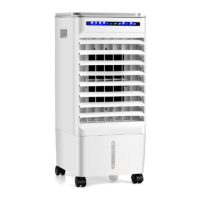
This document describes the Costway ES10011US-WH Evaporative Cooler, a versatile 3-in-1 appliance designed for indoor use, functioning as an air cooler, humidifier, and air cleaner with an ionizer. It aims to provide an economical and energy-saving cooling solution without the need for venting, making it suitable for rooms and spaces that cannot be sealed or traditionally air-conditioned.
Function Description:
The ES10011US-WH operates on an evaporative cooling mechanism. It cools the air by means of evaporation: as water evaporates into the air, it creates a mixture of air and water molecules. This chemical change requires heat, which is drawn from the water molecules, resulting in a spot cooling effect. The unit also functions as a humidifier, adding moisture to dry environments, and an air cleaner, utilizing a honeycomb filter and an ionizer to improve air quality. The ionizer helps to purify the air by releasing negative ions, which attach to airborne particles, making them heavier and causing them to fall out of the air.
Important Technical Specifications:
- Model Number: ES10011US-WH
- Air Flow: Up to 450 m³/hr
- Water Tank Capacity: 6 Litres
- Fan Speeds: 3 (Low, Medium, High)
- Timer: 7-hour timer function
- Cooling Pads: High-efficiency honeycomb cooling pads
- Control: Digital touch control panel and intelligent remote control
- Power Input: 45.8 W
- Voltage: 120 V
- Frequency: 60 Hz
- Maximum Fan Flow Rate: 3.6 m³/min
- Service Value: 0.079 (m³/min)/W
- Standby Power Consumption: <0.3 W
- Fan Sound Power Level: ≤56.6 dB(A)
- Maximum Air Velocity: 5.6 Meters/sec
- Size (LxWxH): 9 x 10 x 22 inches
- Net Weight: 8.5 lbs
- Ambient Operating Temperature Range: 41°F to 104°F
Usage Features:
The unit is designed for ease of use and mobility. It features a slim design that takes minimal space, and includes a handle and wheels for great mobility, allowing it to be easily moved from one room to another.
Control Panel and Settings:
The control panel includes buttons for:
- Power: Turns the unit on or off. After connecting the power cord, the air cooler is in standby mode.
- Speed: Cycles through Low, Medium, and High fan speeds. The selected speed is illuminated on the display.
- Mode: Offers three modes:
- Standard: Fan blows at maximum speed.
- Breeze: Fan speed fluctuates to imitate a natural breeze.
- Sleep: Fan speed decreases by one level per half hour and then continues to run at Low Speed, providing a restful and comfortable sleep environment.
- Timer: Allows setting a shutdown duration between 1 and 7 hours. The duration is calculated by adding up the illuminated lights (1H, 2H, 4H). These are single-use timers and cannot be combined or automatically repeated.
- Ioniser: Activates or deactivates the ionizer function for improved air quality. The button illuminates when activated.
- Cool: Turns the humidifying function on or off. When on, it cools the air using water evaporation. When off, the unit operates as a fan without using water for cooling.
- Swing: Activates or deactivates the oscillation function of the air outlet for improved air distribution. The swing indicator illuminates when active. The vertical direction of the airflow can be manually adjusted.
Remote Control:
An intelligent remote control is included, offering the same functions as the main control panel. It requires a CR2025 battery (installed by opening the rear cover) and has an effective control distance of 19.6 ft.
Water Tank and Ice Box:
The unit features a 6-liter water tank, which is part of the main unit and not removable. It is filled via the top water tank. For enhanced cooling, ice or charged ice packs can be added to either the top water tank or the ice box. The ice box can be frozen in a freezer and then placed into the top water tank to further lower the water temperature and make the airflow cooler. It's crucial to ensure the water level does not exceed the MAX limit when adding ice. The water level window on the front of the unit helps monitor the water level. The water level must not fall below the MIN line when cooling or humidifying.
Optimal Usage Conditions:
- For optimal cooling, the recommended relative humidity for operation is 60% or lower. Drier climates result in more noticeable cooling.
- The unit should not be used in enclosed or sealed spaces. Doors and windows should be open to allow free air flow, as evaporative air coolers require cross-ventilation.
- For humidification in dry environments (during cool weather), windows and doors should be closed to allow humidified air to accumulate.
- When used in low temperatures as a humidifier, it's recommended to fill the water tank with warm (but not hot) water.
- Always place the unit on a dry, flat, steady, and stable surface. Do not move or tilt the unit when the water tanks are full.
- For maximum performance, maintain a distance of at least 19.5 inches between the unit and walls or objects.
- Avoid direct sunlight for prolonged periods.
- Never use the mains plug as a switch; always use the ON/OFF button on the control panel.
- The appliance should not be installed in laundry or wet rooms, or environments with flammable or explosive gases.
Maintenance Features:
Regular cleaning and maintenance are essential for optimal performance and longevity.
- General Cleaning: Shut off the unit and unplug it from the mains before any cleaning or maintenance. Clean the plastic housing with a duster or a soft wet cloth. Avoid chemical solvents (benzene, alcohol, gasoline) as they can cause irreversible damage. Ensure no water enters the control panel.
- Water Tank Cleaning: Unplug the power cord and remove the honeycomb filter bracket. Wipe the water tank with a cloth dipped in a mild detergent. Rinse the tank by filling and draining it through the drain port. Draining and refilling the reservoir with fresh water at least once a week helps reduce mineral deposits and keeps filters clean. Do not run the unit in Humidify mode with stale water.
- Honeycomb Filter Pads Maintenance: The cleaning frequency depends on local air and water conditions. In areas with high mineral content (hard water), mineral deposits may build up, restricting airflow. If deposits remain, remove the filter and wash it under fresh water. For a deeper clean, use a mild detergent and a soft brush, then rinse in clean water and allow to dry. It is recommended to clean the honeycomb filter at least every two months.
- End of Season Maintenance: Empty and clean the water tank and honeycomb pad. Store the ice pack in the water tank. Cover the unit and store it in a dry place.
- Odor Emission: When first used, the honeycomb cooling media may have an odor, which should dissipate within a week. If odors persist or develop later, it may indicate mold or bacterial growth, requiring cleaning the filter pads with a mild antibacterial solution and drying before use.
- Drying the Honeycomb Filter: For best results, after each use, turn off the COOL function and run the unit as a fan for 15 minutes to allow the honeycomb filter to dry before turning the unit off completely.
Safety Instructions:
- Read all instructions carefully and retain them for future reference.
- This appliance is for indoor use only.
- Connect only to a 120 V / 60 Hz earthed outlet. Installation must comply with local regulations.
- If in doubt about electrical supply suitability, consult a qualified electrician.
- Use with care, as with any electrical appliance.
- Disconnect from the power socket before changing filters, dismantling, assembling, or cleaning.
- Avoid touching moving parts and never insert fingers, pencils, or other objects through the guard.
- Not intended for use by persons (including children) with reduced physical, sensory, or mental capabilities, or lack of experience/knowledge, unless supervised or instructed by a responsible person. Do not leave children unsupervised.
- Do not clean by spraying or immersing in water.
- Do not operate with wet hands.
- Never use an extension cord. If an outlet is unavailable, have one installed by a qualified electrician.
- Do not operate if the cord or plug is damaged. Ensure the power cord is not stretched or exposed to sharp objects/edges.
- A damaged supply cord must be replaced by the manufacturer or a qualified electrician.
- Any maintenance beyond regular cleaning or filter replacement should be performed by a qualified electrician.
- Do not use for purposes other than its intended use.
- Keep small parts and packaging materials away from babies and children due to choking hazards.
Troubleshooting:
The manual provides a troubleshooting guide for common issues:
- No power: Check power cord connection, honeycomb filter support installation, master switch, and power key.
- No dust elimination: Check if the honeycomb filter or air inlet is blocked.
- Odor emission from unit: For new units, this is normal and will dissipate. If it's an older unit, clean the filter pads with mild antibacterial solution and dry them.
If problems persist, contact the service center. Do not attempt to repair or disassemble the unit yourself, as unauthorized repairs can cause bodily harm.
Disposal:
Do not dispose of this product as unsorted waste. It must be handled separately as special treatment is necessary. Recycling facilities are available for old electrical products at civic amenity sites run by local councils. Contact your local council for details of your household waste recycling center.


 To Next Page
 General