Need help?
Do you have a question about the COUGAR 700M EVO and is the answer not in the manual?
Details default button assignments and notes about disabled fire/sniper buttons.
Highlights the lightweight and durable aluminum skeleton of the 700M EVO.
Explains how to adjust palm rest height using the knob.
Details sliding the palm rest forward/backward and switching between rests.
Describes the mouse body's airflow design for cooling.
Designed for easy access to secondary functions or weapons.
Explains the 45° inclination for low-DPI sniper mode.
Details the inclusion of 4 x 4g weights for customization.
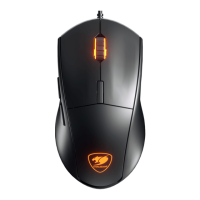
Allows 16.8 million color choices and DPI level indication.
Highlights macro arsenal and sharing capabilities.
Features PMW3389 sensor with 16000 DPI and on-the-fly DPI adjustment.
Includes 8 customizable buttons, adjustable palm rest, and ergonomic design.
Highlights aluminum frame, OMRON switches, and 2000Hz polling rate.
Instructions to download the COUGAR UIX™ SYSTEM installer from the official website.
Steps for plugging in the mouse, installing drivers, and updating firmware.
Lists the items included in the COUGAR 700M EVO package.
Details the operating systems compatible with the device.
Provides detailed technical data including sensor, memory, and dimensions.
Outlines the 1-year warranty period and legal rights.
Details terms of service and conditions where free maintenance is not provided.
States product usage limitations and copyright information.
General safety advice for home or office use.
Warning to avoid looking directly into the optical beam.
Explains how to find production year and month from the serial number.
Provides contact information for COUGAR USA and Compucase Enterprise.
Includes Arabic safety and installation guidelines.
 General
| Purpose | Gaming |
|---|---|
| Scroll type | Wheel |
| Buttons type | Pressed buttons |
| Polling rate | 2000 Hz |
| Buttons quantity | 8 |
| Device interface | USB Type-A |
| Acceleration (max) | 50 G |
| Scrolling directions | Vertical |
| Number of scroll wheels | 1 |
| Built-in memory capacity | 512 KB |
| Movement detection technology | Optical |
| Customizable movement resolution | Yes |
| Number of movement resolution modes | 12 |
| Material | Aluminium, Plastic |
| Form factor | Right-hand |
| Product color | Black |
| Illumination color | Blue, Green, Red |
| Surface coloration | Monochromatic |
| Cable length | 1.8 m |
| Power source | Cable |
| Windows operating systems supported | Windows 10, Windows 7, Windows 8 |
| Package type | Box |
 Weight and Dimensions
| Depth | 127 mm |
|---|---|
| Width | 83 mm |
| Height | 38 mm |
| Weight | 105 g |


 To Next Page