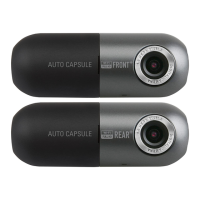
Need help?
Do you have a question about the Cowon AW1 Auro Capsule and is the answer not in the manual?
Copyright details, product use limitations, manual accuracy, and backup advice.
Full HD recording, wide angle, intelligent image sensor, G sensor, motion sensor.
Multiple recording options, easy search, and automatic recording functions.
Backup battery, safe memory card removal, video-out, and LED status indicators.
Smart Manager (Wi-Fi) and PC Manager for file access and device configuration.
Parking recording, auto shutdown timer/voltage, and high-temperature protection.
Connecting an external GPS receiver for location and speed data recording.
Covers installation, video quality factors, window tinting, cleanliness, lens care, product alteration, accident impact.
Warns about MicroSD slot, voltage, gas, high temperatures, and covering the device.
Covers driving operation, child safety, lens strength, visibility, and product heating.
Guides on memory card maintenance, safe removal, data backup, and battery lifespan.
Covers cleaning, genuine parts, personal info protection, and long-term storage.
Warns about cigar jack cable, MicroSD removal during use, power cord, and damaged cables.
Lists all standard and optional accessories provided with the Auto Capsule.
Details each part of the Auto Capsule and its specific function.
Step-by-step instructions for inserting the memory card and placing the device holder.
Instructions for attaching the device using tape and how to separate the product.
Guidance on adjusting the camera lens direction and understanding LED indicators during setup.
Explains how to connect the device for uninterrupted power using the vehicle's fuse box.
How to start recording, driving mode status, and file storage.
Parking mode activation, motion/impact detection, and end recording process.
Records 1 minute for impacts or manual button presses, saved as EVT files.
Records 1 minute for detected motion during parking, saved as MOT files.
Explains LED colors and blinking cycles for recording modes and system status.
Step-by-step guide for safely removing and formatting the memory card.
Explains the functions triggered by brief, double, and long presses of the device button.
Describes automatic recording pause due to high temperature and the reset procedure.
Details file naming conventions (yyyymmdd_hhmmss_type_mode.MP4) and file types.
Connecting to Smart Manager via Wi-Fi for video access and settings.
Turning Wi-Fi on/off and initial smartphone connection steps.
Searching files by date, filtering by type, playing downloaded files, Live View, and user preferences.
Overview of the PC Manager interface for file list, playback controls, and map display.
Details rewind/fast forward, play, previous/next, G sensor display, speed, volume, brightness, rotation, capture, full screen.
Setting auto shutdown timer and voltage levels for parking mode operation.
Setting voltage for auto shutdown, impact on standby time, and battery discharge risk.
Settings for non-stop parking recording and methods for automatic file deletion.
Adjusting sensitivity for G sensor (impact) and motion detection during parking.
Lists specifications for lens, image sensor, resolution, angle, video encoding, connection, audio, software, dimensions, storage, power, and others.
 General
| Brand | Cowon |
|---|---|
| Model | AW1 Auro Capsule |
| Category | Dash Cameras |
| Language | English |

 To Next Page