26
COWON SP2
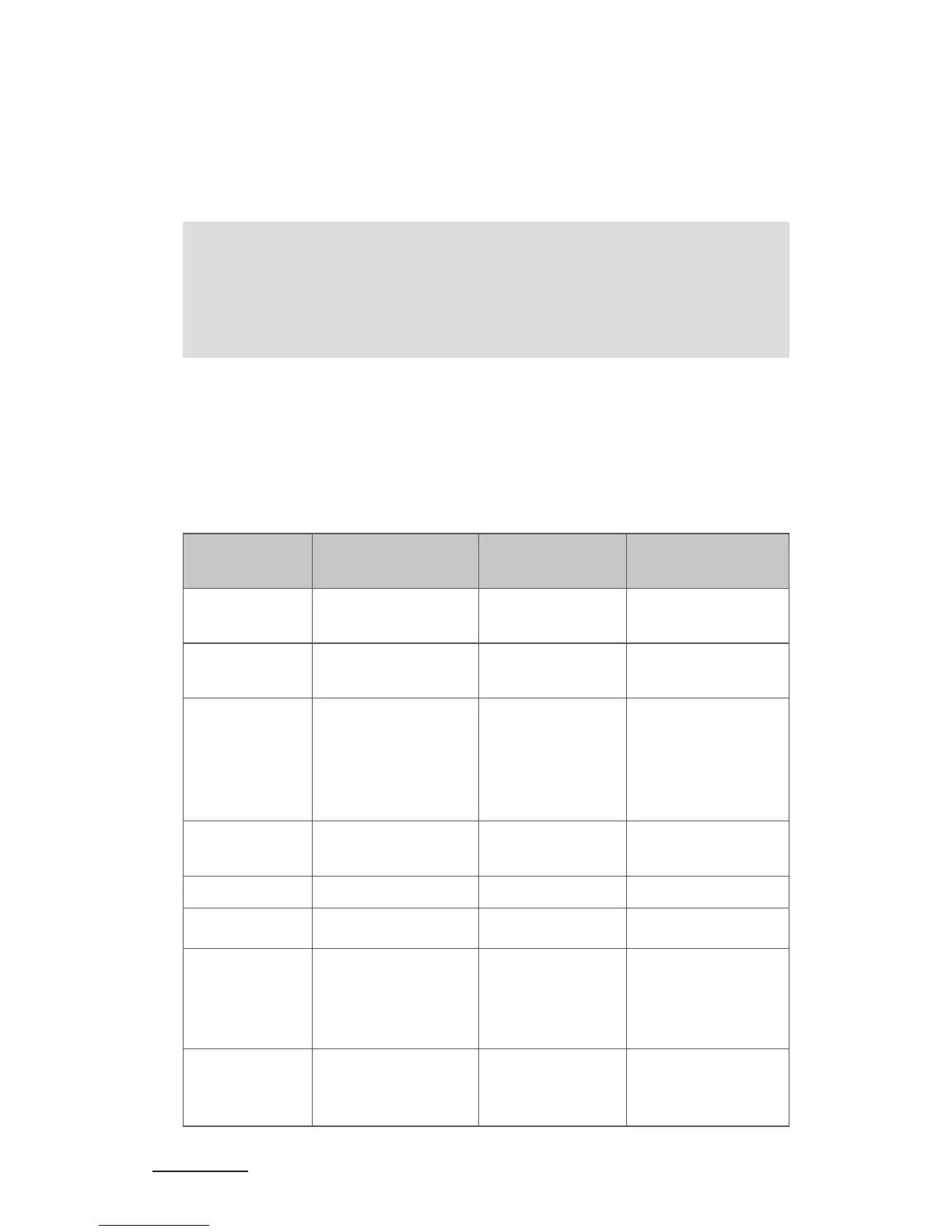
Functions Status of SP2 Operation Prompt tone
Cancel call Calling
Short press ▶ll
button once
One short tone
Answer call
Incoming call
ringing
Short press ▶ll
button once
Two rising tones
Reject a call
Incoming call
ringing
Long press
▶ll about 2
seconds and
release it until
listen a tone
Two falling tones
End a call During a call
Short press ▶ll
button once
One short tone
Volume up During a call press + button
Volume down During a call press - button
Transfer
conversation
to mobile
phone
During a call
Long press ▶ll
button about 2
seconds
One short tone
Transfer
conversation
to SP2
During a call
Long press ▶ll
button about 2
seconds
One short tone
3. When SP2 requests to enter a PIN No., the transmitter will response '0000'
automatically.
4. After successful pairing and connecting, blue LED of SP2 flashes twice every
4 seconds.
- Keep SP2 and a Bluetooth transmitter within 1 meter when pairing
- The pairing password of SP2 is '0000'. The speaker can only pair with a
Bluetooth transmitter whose pairing password is '0000'.
- If pairing still fails after several tries, please refer to the Bluetooth
transmitter’s user manual for further information.
+ Call with SP2
■ Basic operation
SP2's highly sensitive built-in microphone is suitable for answering calls
or redialing the last number.
Using This Product



 To Next Page