Need help?
Do you have a question about the CPI V2 COLIBRI 36B Series and is the answer not in the manual?
Provides an overview of the manual's content and structure.
Explains symbols used in the manual for clarity and safety.
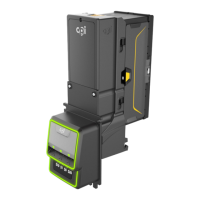
Introduces the v² colibri coin validator and its key features.
Details the key characteristics and advantages of the v² colibri.
Describes different versions and operational modes of the validator.
Explains the physical paths for coin insertion and return.
Outlines the ccTalk serial communication protocol used by the validator.
Details the Casino mode for faster coin acceptance.
Explains methods for protecting the validator from manipulation.
Specifies the intended use of the coin validator and liability.
Covers essential safety measures for users and the device.
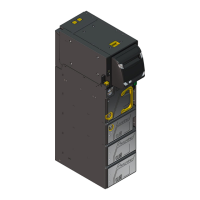
Presents the top entry and front entry versions of the validator.
Details the design of the standard top entry validator.
Details the design of the front entry validator with front plates.
Illustrates the internal path coins follow during validation.
Explains the data presented on the device's nameplate.
Describes the sticker indicating switch functions and coin channels.
Details the two switch blocks (S1 and S2) for device configuration.
Lists the functions controlled by DIL switches S1.1 through S1.10.
Lists the functions controlled by DIL switches S2.1 through S2.10.
Explains the operation of the coin return lever and button.
Describes the interfaces for machine and sorter connection.
Explains how the validator accepts coins and uses channels.
Details the Casino mode for accelerated coin processing.
Describes how coin data is managed in one or two memory blocks.
Explains the role of the accepted coin sensor for security.
Details how string tampering is detected and prevented.
Covers controlling external sorting devices like the NRI 3-fold sorter.
Explains the mechanism and control of coin sorting gates.
Details the integration with the NRI s² SSD-3000 sorting device.
Explains how to inhibit coins or use narrow acceptance bands.
Describes inhibiting coins via the machine's control system.
Explains inhibiting coins using the validator's switch blocks.
Details how to teach new coin types to the validator.
Provides step-by-step instructions for installing the validator.
Guides on attaching the s² SSD-3000 3-fold sorter.
Specifics for mounting the sorter on the top entry validator.
Specifics for mounting the sorter on the front entry validator.
Instructions for choosing between memory blocks for coin data.
How to disable coin acceptance or use specific channels.
Detailed functions of switch block S1 for coin inhibition.
Detailed functions of switch block S2 for coin inhibition.
Procedures for teaching new coin types using switch blocks.
Switch functions for teaching coins with double block management.
Switch functions for teaching coins with single block management.
Using ccTalk commands for teaching coin channels.
Steps to enable the high-speed Casino operating mode.
Procedure for cleaning the coin validator's internal path.
Guide to diagnose and resolve common validator malfunctions.
Overview of tools for validator configuration and diagnostics.
Details on using the WinEMP software for configuration.
Information about the HENRI+ tool for on-site setup.
Lists functions that can be set or modified on the validator.
Provides key electrical and physical specifications of the validator.
Information on validator interfaces, including ccTalk.
Specifics for connecting the validator to the machine via ccTalk.
Details the pinout for the ccTalk interface connector.
Lists the commands supported by the ccTalk protocol.
Reference for error codes generated by the ccTalk interface.
Default configurations applied after a device reset.
Specifics for teach mode operations via ccTalk.
Details the interface for connecting a 3-fold sorting device.
Lists optional accessories for the coin validator.
Describes available front plates for different mounting options.
Information on compatible sorting devices.
Lists available tools for servicing and configuring the validator.
 General
| Operating Voltage | 12V DC |
|---|---|
| Operating Temperature | 0°C to 50°C |
| Interface | RS-232, USB |
| Weight | 1.2 kg |
| Storage Temperature | -20°C to 60°C |
| Supported Currencies | Multiple currencies (configurable) |
| Acceptance Rate | 98% or higher |
| Note Insertion | Bidirectional |
| Acceptance Speed | Up to 2 seconds per note |
| Communication Interface | MDB / USB |
| Humidity | Up to 95% non-condensing |
| Hopper Capacity | Not applicable |


 To Next Page