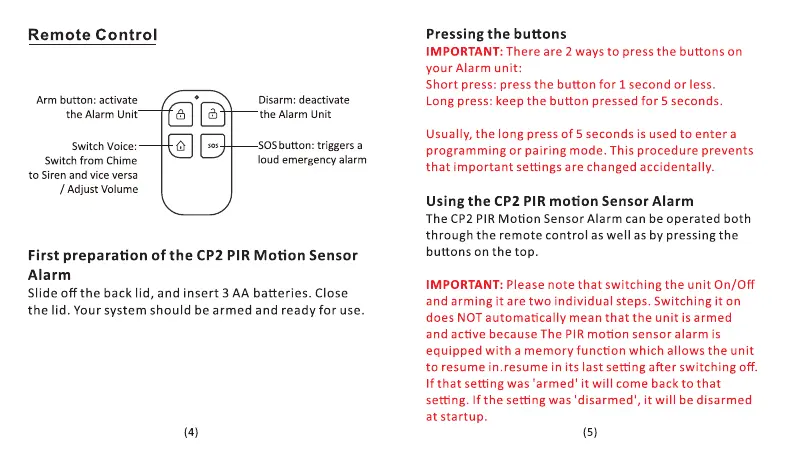
Remote Control
Arm button: activate
the Alarm Unit
Switch Voice:
Switch from Chime
to Siren and vice versa
/ Adjust Volume
Disarm: deactivate
the Alarm Unit
SOSbutton: triggers a
loud emergency alarm
First preparation of the CP2 PIR Motion Sensor
Alarm
Slide off the back lid, and insert 3 AA batteries. Close
the lid. Your system should be armed and ready for use.
Pressing the buttons
IMPORTANT: There are 2 ways to press the buttons on
your Alarm unit:
Short press: press the button for 1 second or less.
Long press: keep the button pressed for 5 seconds.
Usually, the long press Of 5 seconds is used to enter a
programming or pairing mode. This procedure prevents
that important settings are changed accidentally.
Using the CP2 PIR motion Sensor Alarm
The CP2 PIR Motion Sensor Alarm can be operated both
through the remote control as well as by pressing the
buttons on the top.
IMPORTANT: Please note that switching the unit On/Off
and arming it are two individual steps. Switching it on
does NOT automatically mean that the unit is armed
and active because The PIR motion sensor alarm is
equipped with a memory function which allows the unit
to resume in.resume in its last setting after switching Off.
If that setting was 'armed' it will come back to that
setting. If the setting was 'disarmed', it will be disarmed
at startup.


 To Next Page
 Loading...