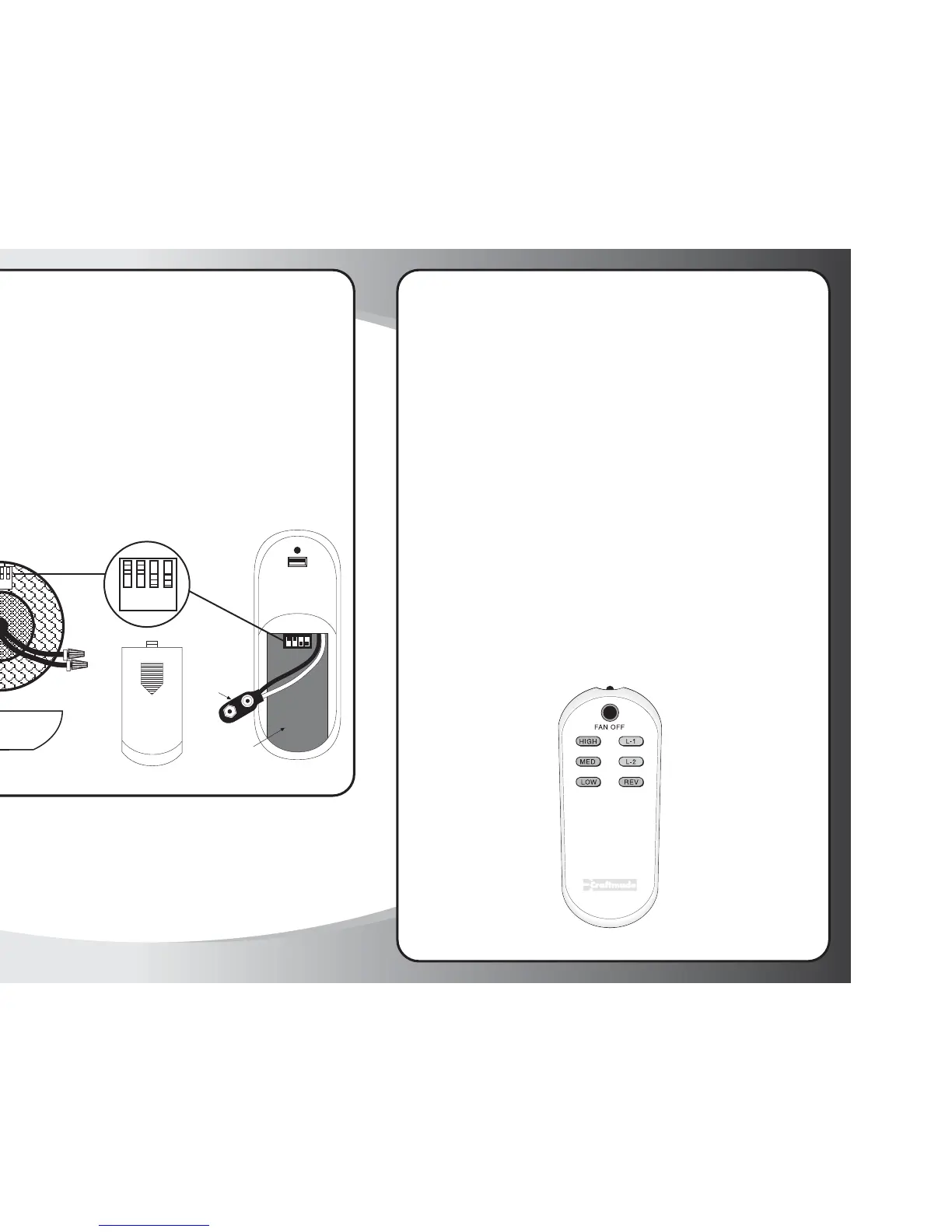
Setting Frequency Switches
The remote control unit is operated by a set of frequency switches and are
preset at the factory. The switches are located on the back of the remote
control unit and in the top motor housing of the fan on the receiving
module. The switches can be set in any position as long as both the wall
unit and receiving module switches are set the same. All (RF) modules &
Transmitters come from the factory with the dip switches set in the (ON)
position.
To replace battery, simply push down on tab and slide housing cover off.
Snap 9-Volt battery onto wire terminal and replace into remote housing.
Slide housing cover back onto remote control unit.
1234
ON
Remote
Control Unit
Battery
Terminal
PUSH
Housing
Cover
1234
ON
Remote
Housing
Operation Instructions
HIGH Controls fan motor speed. To select desired speed,
MEDIUM press button once and release
LOW
REVERSE Controls direction of fan blades. To reverse fan blades, press once
and release.
FAN OFFTurns fan motor speed off. Press once to turn off. To start motor
speed again, hit one of the motor speed buttons.
L-1 Controls the on/off and intensity for side body lighting (if
applicable). Push and release for on/off function. Hold down for
full range light dimming.
L-2 Controls the on/off and intensity for the integrated bottom light
kit. Push and release for on/off function. Hold down for full
range light dimming.
NOTE: The "High", "Medium" or "Low" buttons may be used to start
the fan motor. The speed of the fan may be changed at any time.



 To Next Page