6. Troubleshooting - Mechanical
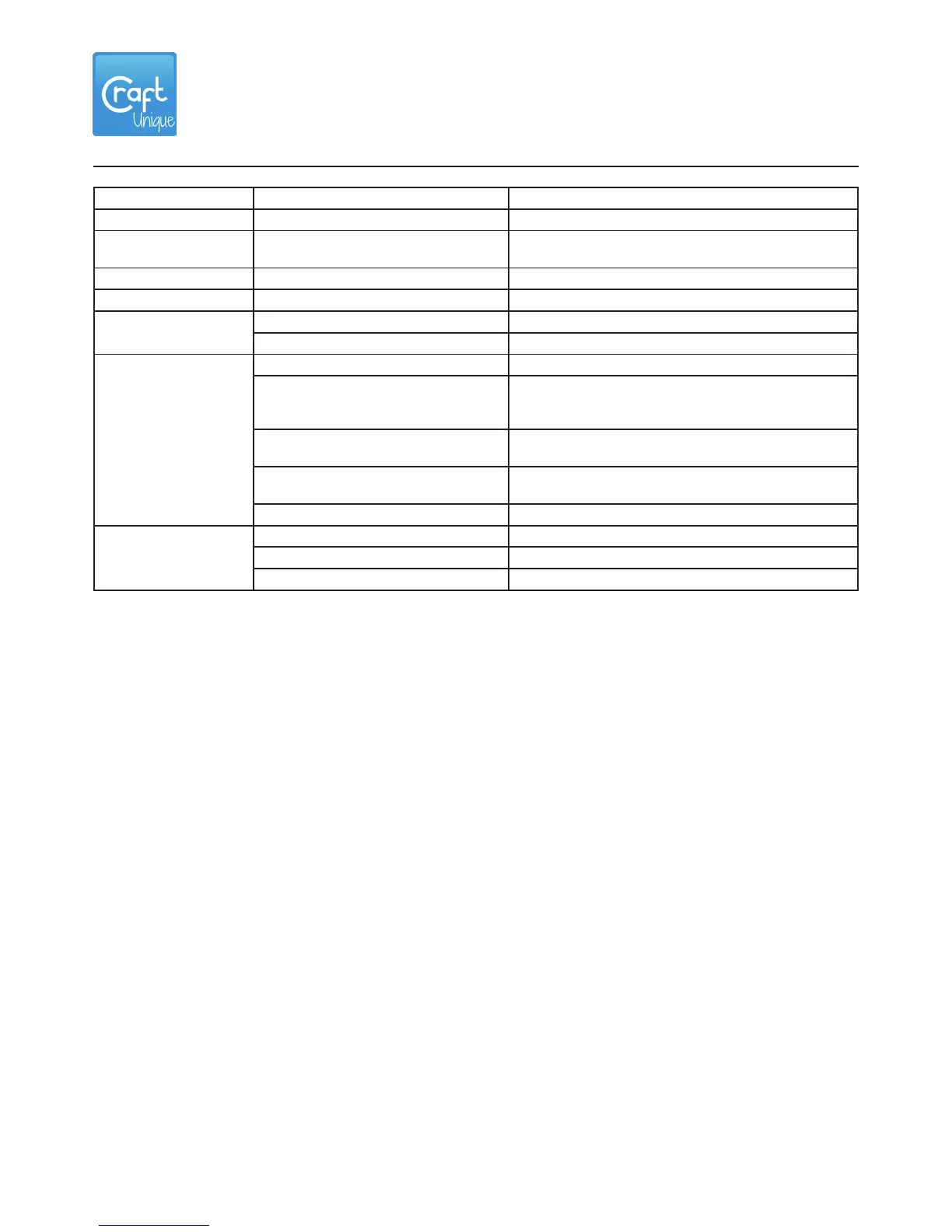
Problem Causes Check procedures /corrective measures
Pillowing. Too few top / bottom layers. Add more top / bottom shell layers.
Elephant foot. Build plate is too close the
the hotend.
Calibrate the build plate.
Irregular circles. Irregular circles. Adjust / equalize the belt tensions.
Stringing. Too high hotend temperature. Slice the object with lower temperature.
Ringing /
ghosting.
Too high print speed. Decrease the print speed.
Loose Z console screws. Tighten the loose screws.
Warping. Build plate is dirty. Clean the build plate with acetone.
The build plate is not
calibrated, the nozzle is too
far from the surface.
Calibrate the build plate.
The build plate is uneven. Try to straighten the build plate.
Replace if neccessary.
Bed temp is too low for the
lament.
Check the lament specications for the
correct temperature.
Bad lament quality. Use quality laments.
Shifted layers. Loose pulleys. Tighten the pulley screws.
Loose timing belts. Adjust the belt tension.
Overheating motor drivers. Check the case fan, replace if faulty.


 To Next Page
 Loading...