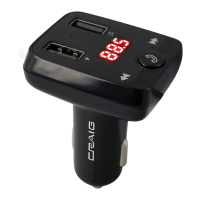
The CRAIG FM TRANSMITTER with Bluetooth® Wireless Technology (Model: CBT3348A) is a versatile in-car accessory designed to enhance your audio experience and provide charging capabilities for your portable devices. This owner's manual outlines its features, operation, and troubleshooting.
Function Description:
The primary function of the CBT3348A is to transmit audio from a Bluetooth-enabled device or a USB flash drive to your car's FM radio. This allows you to listen to music, podcasts, or make hands-free calls through your car's sound system. Additionally, it features two built-in USB ports that serve as chargers for external USB devices, such as smartphones or tablets.
Important Technical Specifications:
- Power Source: DC 12 or 24 V, 1.3A (Maximum) from car cigar lighter socket.
- USB Port 1 Output: DC 5V, 2.1 A (Maximum). This port is primarily for charging and does NOT support USB music playback.
- USB Port 2 Output: DC 5V, 2.1 A (Maximum). This port supports both charging and USB music playback.
- Total USB Output: 2.1A Maximum (shared between both ports).
- FM Transmitting Frequency: 88-108 MHz.
- Bluetooth Version: 5.0.
- Bluetooth Operation Distance: Up to 32 Feet in open area.
- USB Device Capacity: Supports a maximum capacity of 32GBs via USB Device (Flash Drive).
- Supported Audio Format (USB): MP3 format.
Usage Features:
Connecting to Your Car Radio:
- Plug the unit into your car's cigar lighter socket. The LED display will first show the vehicle battery voltage, then the FM radio frequency.
- Turn on your car radio and set it to FM mode. Find a blank FM channel without any radio signal (e.g., 107.0 MHz).
- Press and hold the "Call/FM Frequency" button (marked with a phone icon and musical note) for approximately 5 seconds until the FM radio frequency on the LED display starts blinking.
- Use the "Previous Track" and "Next Track" buttons to adjust the unit's FM radio frequency to match the blank channel on your car radio (e.g., 107.0 MHz).
Bluetooth Pairing and Playback:
- Once the unit is connected to your car radio, you will hear an audible prompt "Bluetooth ready for connection."
- Power on your external Bluetooth device (e.g., smartphone) and enter its Bluetooth searching mode.
- Search for "3348A" (the unit's model number) on your Bluetooth device and initiate pairing. If prompted for a code, try "0000" or "1234."
- Once paired, the unit will sound a prompt "Bluetooth connected."
- You can now play music from your Bluetooth device through your car radio.
- During Bluetooth Playback:
- Press the "Call/FM Frequency" button to pause/resume music.
- Press and hold the "Previous Track" or "Next Track" buttons to adjust the volume level. You can also use your car radio's volume controls or your paired Bluetooth device's volume controls.
- Press and release the "Previous Track" or "Next Track" buttons to skip tracks.
Hands-Free Calling (with a Cell Phone):
- If a call comes in during music playback:
- Press the "Call/FM Frequency" button to answer the call. Speak into the unit's microphone.
- To end the call and resume music, press the "Call/FM Frequency" button again.
- To decline an incoming call, press and hold the "Call/FM Frequency" button for approximately 3 seconds.
USB Music Playback:
- Insert an external USB flash drive (not included) into USB Port 2.
- Ensure your car radio is set to the preset FM radio frequency.
- Connect the unit to your car's cigar lighter socket. Audio from the USB device will automatically start after a few seconds.
- During USB Playback:
- Press the "Call/FM Frequency" button to pause/resume music.
- Press and hold the "Previous Track" or "Next Track" buttons to adjust the volume level.
- Press and release the "Previous Track" or "Next Track" buttons to skip tracks.
- Note: USB Port 1 does NOT support USB music playback.
Switching Between Bluetooth and USB Playback:
- If a USB device is already inserted into USB Port 2, press and hold the "Call/FM Frequency" button for approximately 2 seconds to switch to USB playback mode.
- Press and hold the "Call/FM Frequency" button again to switch back to Bluetooth playback mode.
USB Charging:
- Connect the unit to the car cigar lighter socket.
- Connect the full-size USB plug of your charging cable from your external USB device to either USB Port 1 or USB Port 2 on the unit.
- Charging will start automatically. Monitor the charging status using your external USB device's indicators.
- The unit can charge two external USB devices simultaneously.
- Note: Some Apple devices may require you to turn them on from standby mode (release screen lock and illuminate) before connecting to the charger.
Maintenance Features:
Troubleshooting Guide:
- Car Radio no sound:
- Possible Cause: Radio frequency mismatch between the unit and car radio.
- Solution: Find and set the radio frequency of the car radio and unit to the same frequency (refer to "Connecting to Your Car Radio" steps).
- No sound or sound weak:
- Possible Cause: Unit volume set to minimum, paired radio volume set to minimum, or paired BT device volume low.
- Solution: Increase the volume level of the unit (by pressing and holding the "Next Track" button), the paired radio, or the paired BT device.
- Sound distortion:
- Possible Cause: Unit volume too high or paired radio volume too high.
- Solution: Reduce the volume level of the unit (by pressing and holding the "Previous Track" button) or the paired radio.
- BT not functioning:
- Possible Cause: External BT device not paired to the unit or too far from the unit.
- Solution: Pair the external BT device to the unit (refer to "Bluetooth Pairing and Playback" steps) or place the external BT device closer to the unit.
General Notes:
- Always ensure the unit is unplugged from the car cigar lighter socket before replacing a USB device.
- When inserting a USB device, ensure the correct direction to avoid damage.
- Music files on the USB device must be in MP3 format.
- The unit has a built-in overload/overheat protector. If the output is overloaded or short-circuited, the charger will shut off. Unplug the external USB device, and the charger will auto-reset.
Limited Warranty:
Craig provides a 90-day limited warranty from the date of purchase against manufacturing defects in material and workmanship under normal use. For service, return the product to the store of purchase or ship it with all accessories, a copy of the sales receipt, and a $3.00 cashier's check/money order for shipping and handling to Craig Electronics Inc. The warranty is void if the product is used commercially, damaged by misuse/negligence/abuse, modified/repaired by unauthorized personnel, or improperly connected. This warranty does not cover ordinary adjustments, damage from improper connection, shipping costs for repair, or use outside the USA. The warranty is non-transferable and limits implied warranties to the duration of the expressed warranty. Craig is not liable for consequential damages.


 To Next Page
 General