OPERATION INSTRUCTIONS
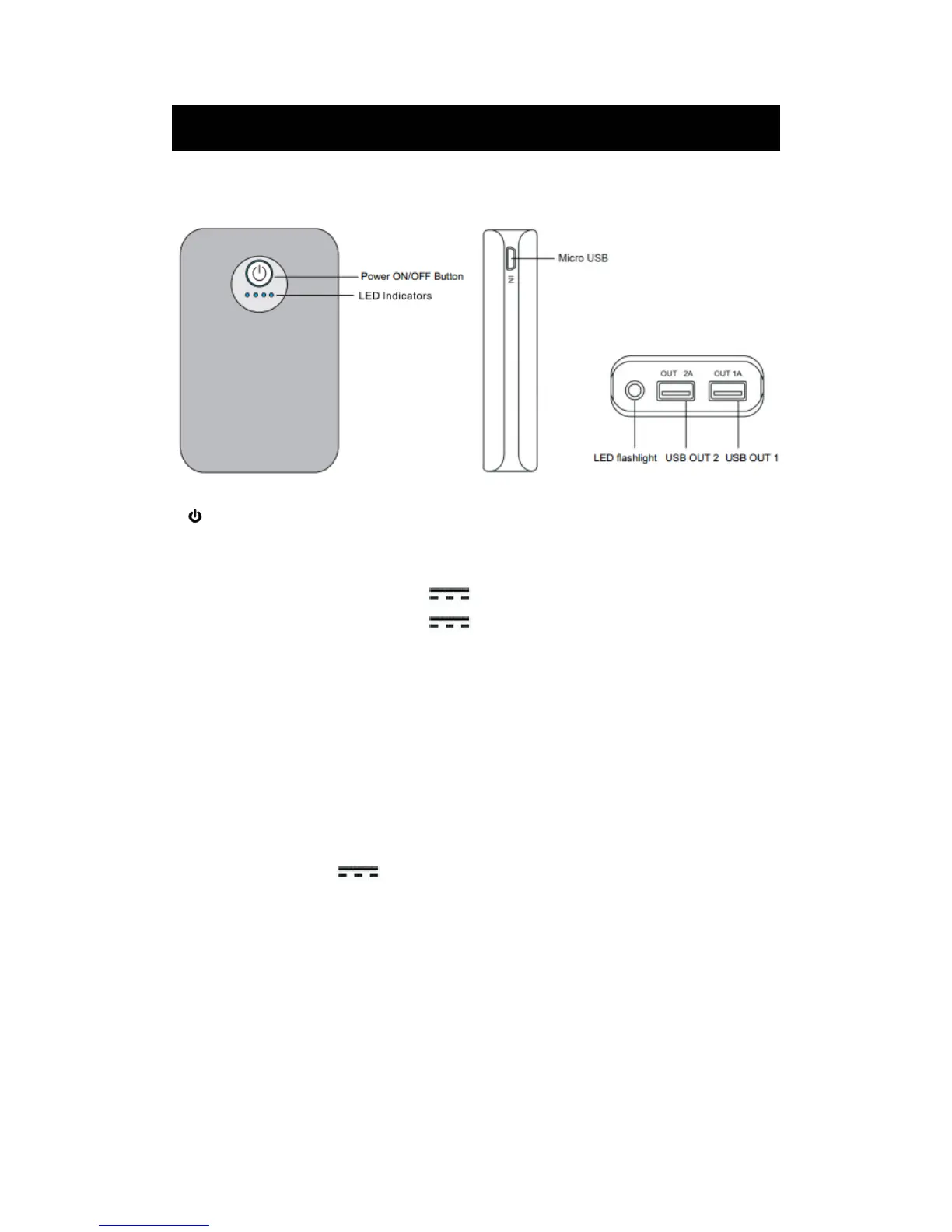
1. LOCATION OF CONTROLS:
1. Power ON/OFF Button
2. LED Indicators
3. Micro USB IN Port (For recharging this unit)
4. USB OUT 1 (Maximum Output: DC
5V,1A)
5. USB OUT 2 (Maximum Output: DC 5V,2A)
6. LED Flashlight
Recharging this unit:
This unit has built in DC3.7V, 3400mAh Li-ion rechargeable battery, recharge it before use
as follows:
1. Insert the Micro USB plug from the supplied Connection cable to the Micro USB Port
on the left of unit.
2. Insert the Full size USB plug to the USB Port on the Personal Computer or any USB
Charger having DC
5V,1000mA (or more than 1000Ma) output as the figures
below(PC and USB Charger not included):
2


 To Next Page