USING AN EXPRESSION PEDAL: By using an external pedal, you can remotely adjust several of the controls (gain, level, effect adjust,
reverb level, and reverb depth) on the DX amplifier through the DXJFC.
Here are some things you need to know about the expression pedal:
• The pedal must be a passive, unpowered type, such as the SLM OmniFex volume pedal VP-200, or the Dunlop
HighGain GCB-80 with a “blank” 1/4” plug (as explained later on).
• After connecting the pedal, it must be calibrated to the DXJFC – simply adjust the pedal to its minimum output posi-
tion, then to its maximum output position. This tells the DXJFC what kind of pedal you are using. If you forget to cali-
brate the pedal, the DXJFC will do it for you the first time you use the pedal through its full range. The pedal’s effect on
the DX amplifier control knob may change after calibration.
NOTE: If the pedal doesn’t seem to give you full range of control after calibration, unplug the pedal from the DXJFC,
wait five seconds, plug the pedal back in, and adjust it to its minimum then maximum output positions.
• Some pedals may require a “blank” 1/4” plug (just a plain plug, no wires) to be plugged into the input jack to activate
them – if your pedal doesn’t work with the DXJFC, try using the pedal with such a plug in its input jack.
• If the expression pedal is unplugged from the DXJFC, the DXJFC will stop sending expression messages – the DX ampli-
fier will revert to the knob setting stored in its current preset.
ASSIGNMENT OF A DX CONTROL KNOB: The default assignment for the expression pedal is the effect adjust control. To assign a
different DX control knob to the expression pedal, follow these steps:
• Step on BOTH the “1/6” and “2/7” buttons simultaneously (the “1/6” and “2/7” LEDs will flash rapidly to indicate the
footcontroller is in the “assign” mode.)
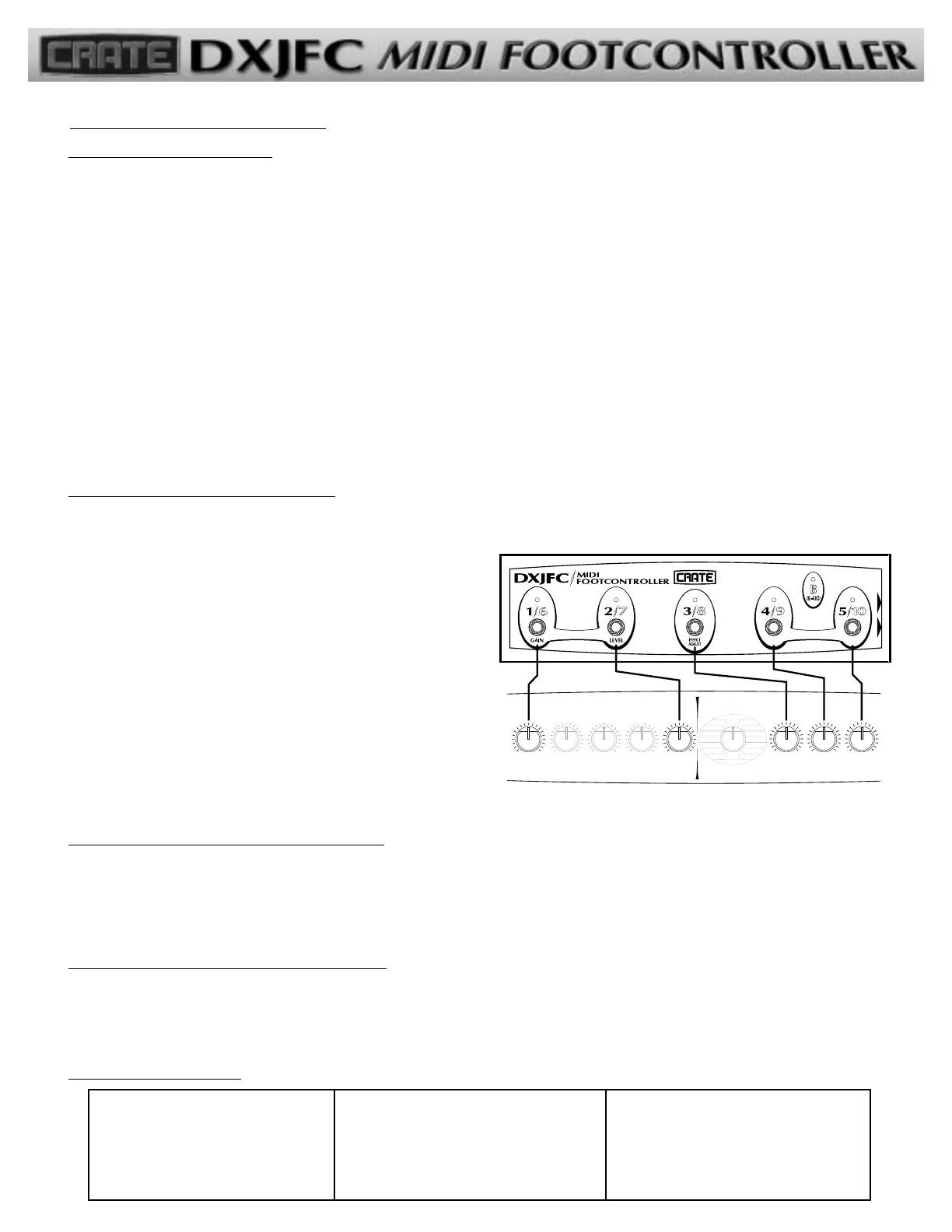
• Choose which DX control knob to assign to the pedal by
stepping on one of the selector buttons – the buttons are
labeled to correspond to the DX amplifier, as shown ––>
11//66
=
GGaaiinn 44//99
=
RReevveerrbb LLeevveell
22//77
=
LLeevveell 55//1100
=
RReevveerrbb DDeepptthh
33//88
=
EEffffeecctt AAddjjuusstt
• That’s it – the pedal is assigned – moving the pedal up and
down now acts the same as reaching over to the amplifier
and turning the assigned control (without actually having to
reach over to the amp!)
(You can reassign the expression pedal at any time by repeating the above steps.)
STORING AN EXPRESSION PEDAL ASSIGNMENT: The DXJFC has no internal memory, so any assignments made must be stored in
the amplifier’s preset memory or they will be lost when the amplifier is turned off or when a different preset is selected. Follow the
instructions in your amplifier’s owners manual for saving/storing presets, and save the pedal assignment before turning off the power.
When you store the preset, the DXJFC assignment is stored with that preset and will remain there until you store the preset with a
different assignment or store it with no assignment (cleared).
CLEARING AN EXPRESSION PEDAL ASSIGNMENT:
• Step on BOTH “1/6” and “2/7” buttons simultaneously
• Step on BOTH “1/6” and “2/7” buttons again – the expression pedal is no longer assigned to any of the DX controls
for the current preset
Troubleshooting:
Using the DXJFC (con’t):
Pedal doesn’t control setting
• Pedal plugged in?
• MIDI cable connected?
• “Blank” plug needed by pedal?
• Pedal assigned to correct control?
No lights on DXJFC
• Standard 5-wire MIDI cable used?
• MIDI cable connected?
• Power button depressed on DX amp?
• DX amp turned on?
Pedal control range inaccurate
• Pedal calibrated? (unplug pedal, wait five
seconds, plug back in – adjust pedal to its
minimum then maximum output positions)
• Pedal impedance too low? (compatible
impedance: 50k ohms to 1M ohm )
-3-


 To Previous Page
 Loading...