10
ENGLISH
OPERATION USING THE REMOTE CONTROL
• Insert the plug in a suitable power socket.
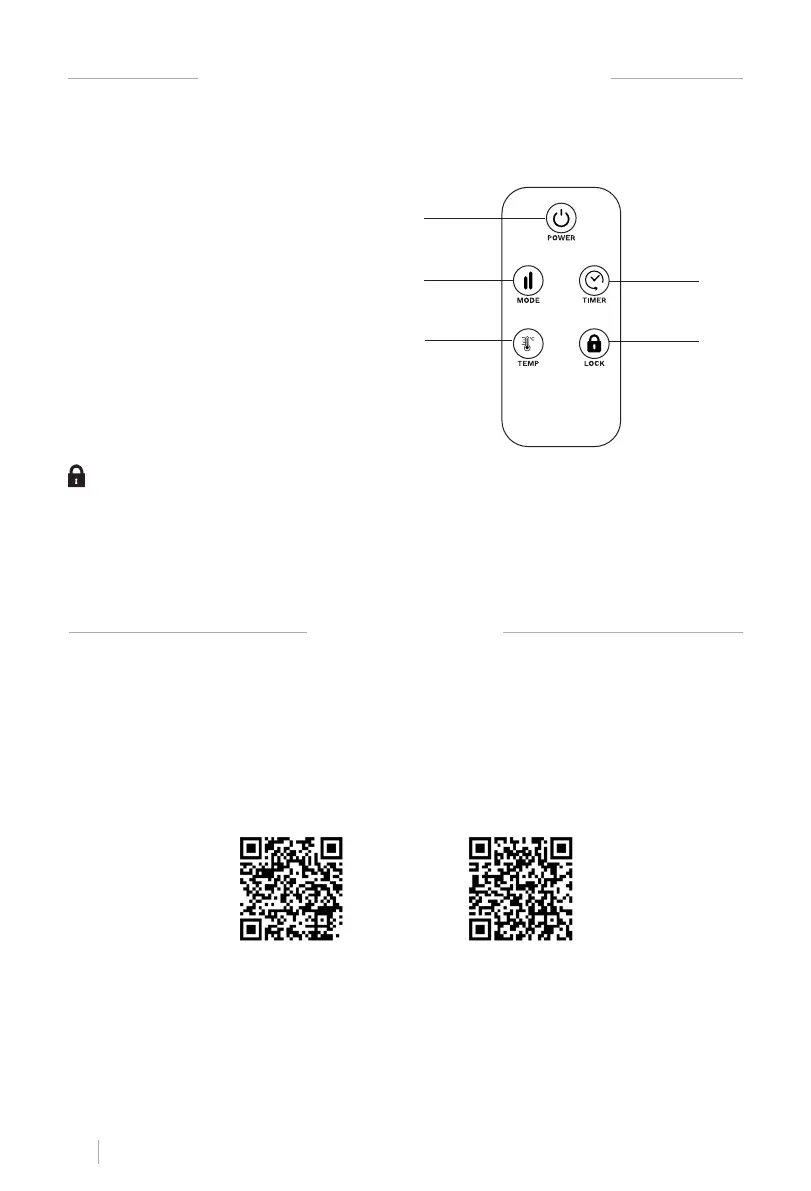
• The touch screen buttons located on the product correspond to the remote control functions.
1. Power button
2. Mode
3. Temperature
4. Timer
5. Lock
Press the child clock button for three seconds to lock the heater. After pressing the Child
Lock button for three seconds again, the heater is unlocked.
You can also press the mode button on the control panel for 3 seconds to lock the screen or
unlock it.
Child Lock
APP CONNECTION
• CREATE HOME application is available for Android and iOS, look for the app on Google Play or
App Store or scan the QR code below.
• This appliance allows you to operate the appliance via your home network. A prerequisite is a
permanent WiFi connection to your router and the free app CREATE HOME.
• We recommend disconnecting the appliance from the power supply when you are away from
home to prevent unintentional switching on while you are away.
iPhone OS Android OS
1
2
3
4
5


 To Next Page