17
ENGLISH
• A clean coffee maker is essential for making tasty coffee. It is necessary to clean the cof-
fee maker as specied in the “CLEANING AND MAINTENANCE” section regularly.
• Always use fresh, room temperature water when brewing coffee.
• Store unused coffee grounds in a cool, dry place. After unpacking a new bag of ground
coffee, reseal it and store it in the refrigerator to maintain freshness.
TIPS
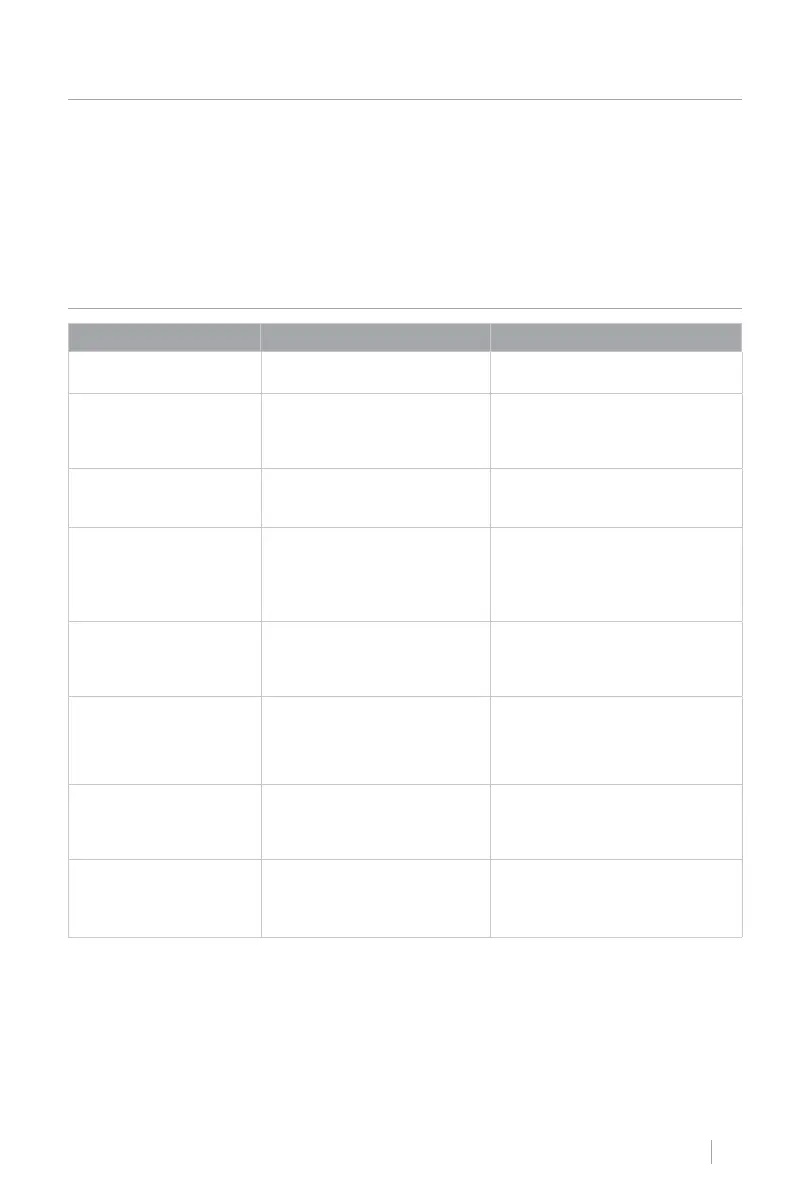
TROUBLESHOOTING
PROBLEM CAUSE SOLUTION
The low water indicator
light ashes.
• There is no water in the tank. • Fill the water tank.
The indicator of
warning ashes.
• The grinder adjustment knob,
door, and/or inner drip tray are
not installed properly in their
correct position.
• Install the grind adjustment knob,
door and/or inner drip tray securely
in position.
The indicator of
warning
keeps on.
• The coffee maker or the inner
drip tray are not installed cor-
rectly in their correct position.
• Install the coffee maker or inner
drip tray in its correct position.
The coffee bean indicator
light stays on.
• The bean container does not
have coffee.
• Fill the container with coffee beans
and then operate the coffee maker
to prepare coffee.
• The grain out warning will disap-
pear.
The indicator of
tank full of
waste remains
switched on.
• The waste storage container
needs to be cleaned.
• Remove the waste storage tank
and inner drip tray for cleaning,
after 2 seconds, the waste full
indicator will turn off.
The indicator of
Processing unit cleaning
remains on.
• The processing unit must be
cleaned.
• Pull out the unit from the coffee
maker to clean it, after 2 seconds,
the coffee maker cleaning indicator
will turn off.
The espresso cup indicator
and the warning indicator
ash at the same time.
• The grinder is not working
properly.
• Turn off the device and turn it on
again.
The tank ll indicator lights
up permanently and the hot
water indicator ashes.
• There is no water in the tank
and it is necessary to empty the
steam from the steam outlet to
release the pressure.
1. Fill the water tank.
2. Place a container under the steam
outlet and touch the hot water
icon to drain the steam.


 To Next Page