10
ENGLISH
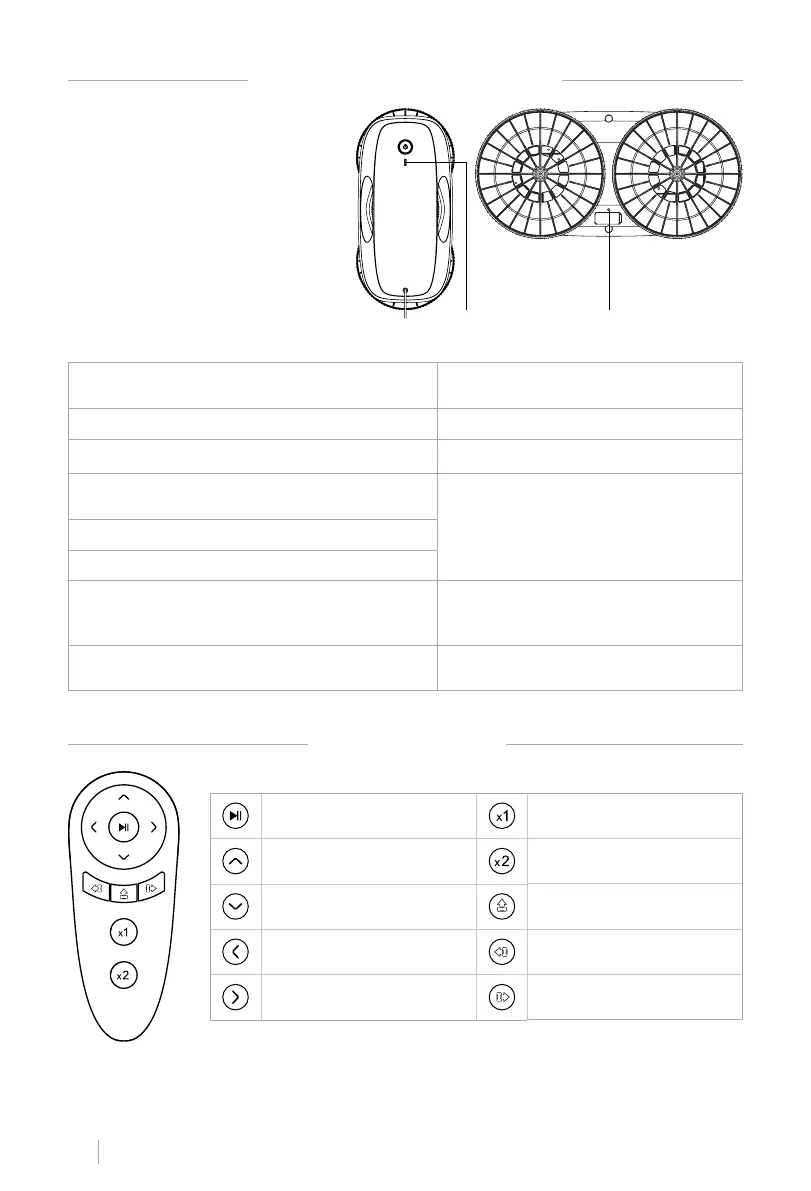
LIGHT AND SOUND INDICATIONS
REMOTE CONTROL
1. Error indicator light
2. Error indicator light
(green/red)
Normal condition
The error indicator (red/green) keeps on
in green.
Built-in battery too low to start The indicator is on in red.
Built-in battery charged enough to start The red indicator turns off.
The friction coefcient is too big or too small
during the self-inspection
The indicator is on in red and it emits a
short and continuous sound.
Power off
Low suction
Hardware trouble
The error indicator (red/green) is
ashing red and green alternately. The
alarm sound is on.
Window cleaning is completed
Long alarm sound repeated for three
times.
1 2
Pause/Continue Cleaning once
Move up to the end of the glass Cleaning twice
Move down to the end of the
glass
Continue to clean and move up
from the current position
Move left to the end of the
glass
Continue to clean and move left
from the current position
Move right to the end of the
glass
Continue to clean and move
right from the current position


 To Next Page