HansVision PX2201 User Guide 5
g
ADDITIONAL INPUT TIPS
No matter which input method and to help with ease of
search, the PX2201 provides many more eective search
options to aid word searches.
Wildcard Input
Wildcard symbols “ * ”, “ ? ” is used in the system to help
students determine the words they are unable to conrm.
“ * ” represents possibility of a few words
“ ? ” represents possibility of one word
e.g: 不? 不? =不卑不亢,不三不四……
*日? =风和日丽……
Cross Searching Function
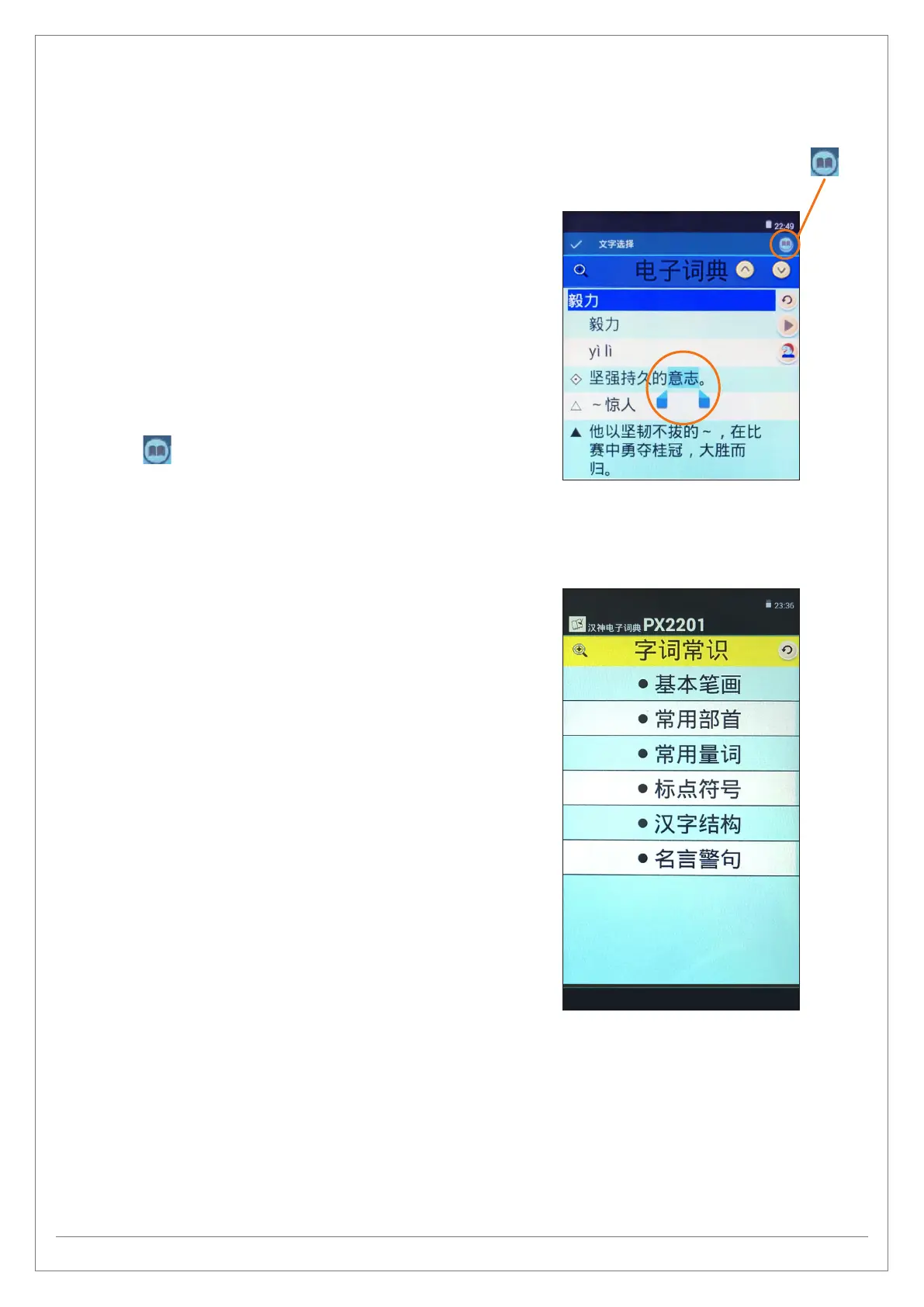
If you would like to know the meaning of certain words
displayed in the explanation, you may touch and hold the
words and it will be highlighted by the system.
Tap on this icon and the system will bring up the
explanation for those words/phrases.
g
COMPOSITION WRITING TIPS
PX2201 helps students in understanding words and phrases,
providing various writing resources to help students
complete their compositions/essays. This includes:
- 基本笔画 Basic strokes
- 常用部首 Commonly used Bushou
- 常用量词 Commonly used quantiers
- 标点符号 Symbols
- 汉字结构 Structure of a Chinese character
- 名言警句 Aphorisms
Tip: It is recommended for students to read this part
whenever they have the time as this will greatly improve
their use of words and grammer.
Cross Search icon


 To Next Page