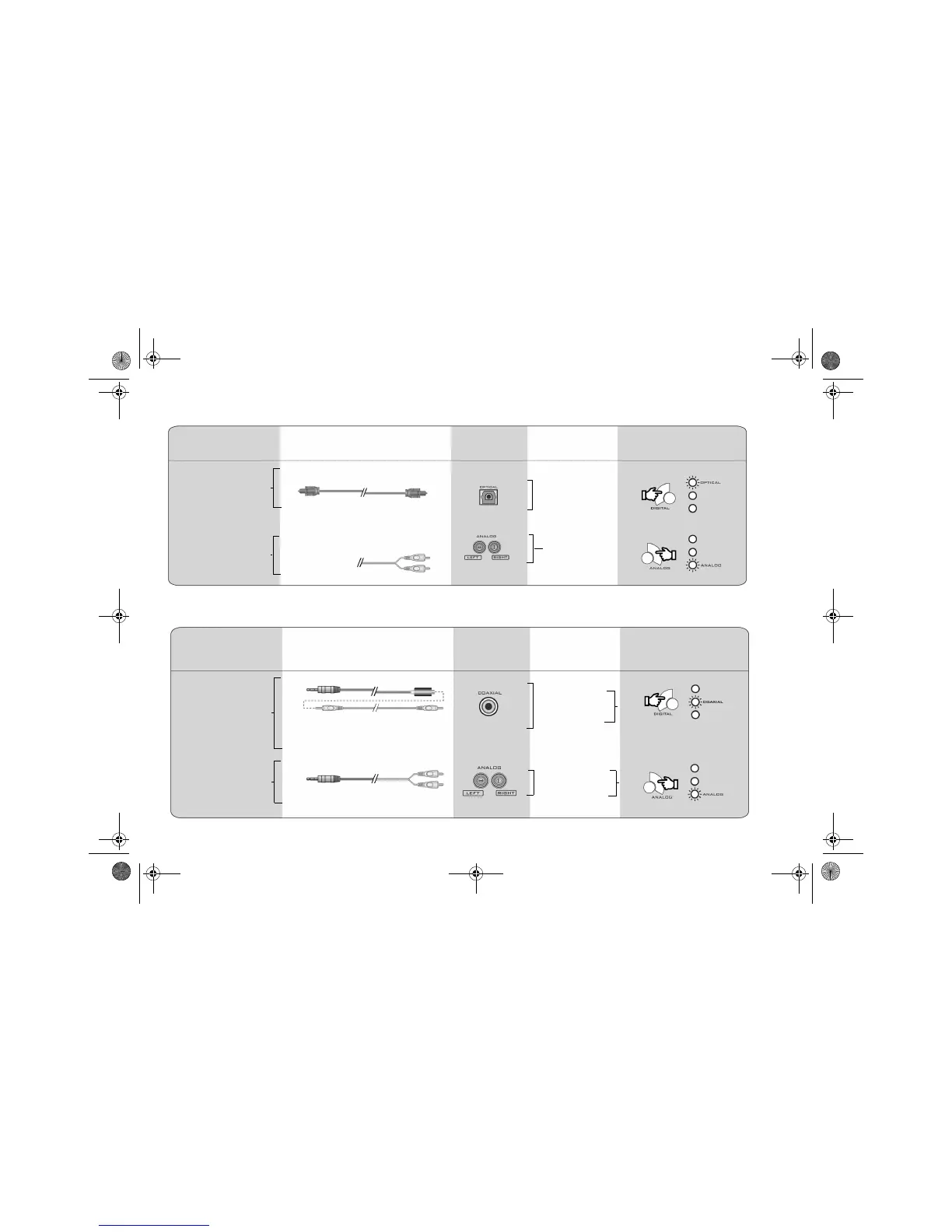
2-2 Connecting Devices and Selecting Input Sources
Game Console User’s Chart
Personal Computer User’s Chart
From Device To Decoder
Devices Decoder
Inputs
Signals Decoder Input
Selection
Cables
- DTS
- Dolby Digital
- PCM
Analog Stereo
Optical
- Sony PlayStation
®
2
- Microsoft Xbox
™
*
- Nintendo GameCube
™
- Sony PlayStation
®
2
- Microsoft Xbox
™
- Nintendo GameCube
™
Select Optical
Select Analog
From the game
console
Devices
From Device To Decoder
Decoder
Inputs
Signals Decoder Input
Selection
Cables
4 Conductor Miniplug to RCA (female)
RCA-to-RCA (male)
(Both cables must be used together)
Stereo to Dual RCA
- DTS
- Dolby Digital
- PCM
- Analog Stereo
Creative Sound Blaster
Live 5.1 or Audigy
series audio cards
(Software DVD)
2-channel audio cards
Select Analog
Select Coaxial
* For movie DVD playback and Dolby Digital gaming, other accessories may be required.
English.book Page 2 Friday, August 1, 2003 12:04 PM




 To Next Page