THE SOUND BLASTER ROAR 2: AN OVERVIEW
THE SOUND BLASTER ROAR 2 PRODUCT GUIDE 10
CONNECTIVITY
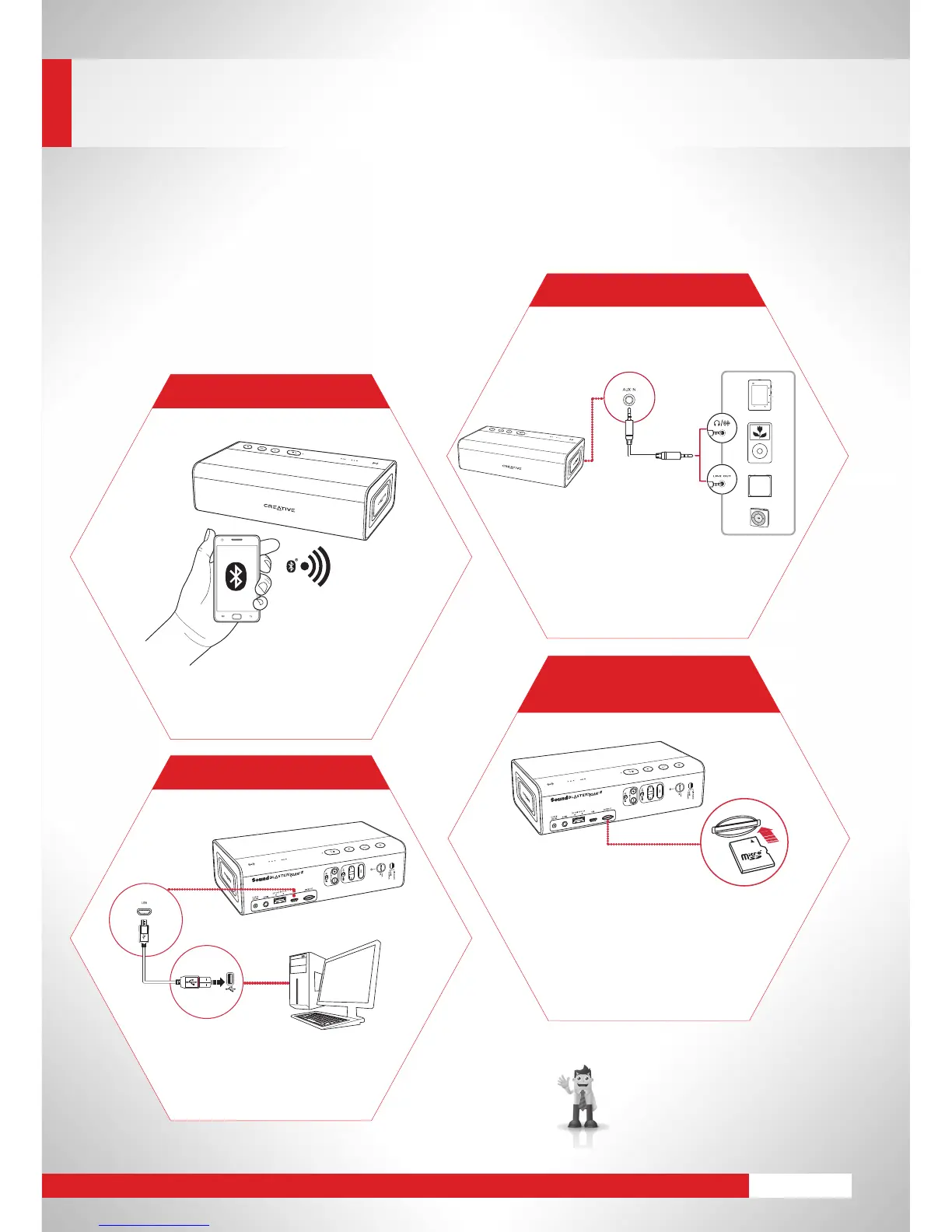
4 Simple Ways to Connect
FindouthowtoenhanceyourPC/Mac
audio and personalize it. Go to page 21.
Connect to
Bluetooth
devices with
robust high-quality aptX
®
andAAC
music streaming.
WIRELESS
Connect a portable audio device
viaanaudiocabletotheAux-in
jacktoexperiencepowerful
analog audio playback via
the Sound Blaster Roar 2.
ANALOG
DIGITAL USB
Play all your favorite songs
continuously from a microSD card
withthestandaloneWMA/MP3
player.Avoidthehorrorofaat
phone battery after draining it to
play music, or the awkward
silence after that.
STANDALONE
MODE
FlicktheswitchtoUSBaudio,
and connect to a laptop or
desktopforafullydigitalUSB
audio experience.










 To Next Page