THE SOUND BLASTER ROAR 2 PRODUCT GUIDE 5
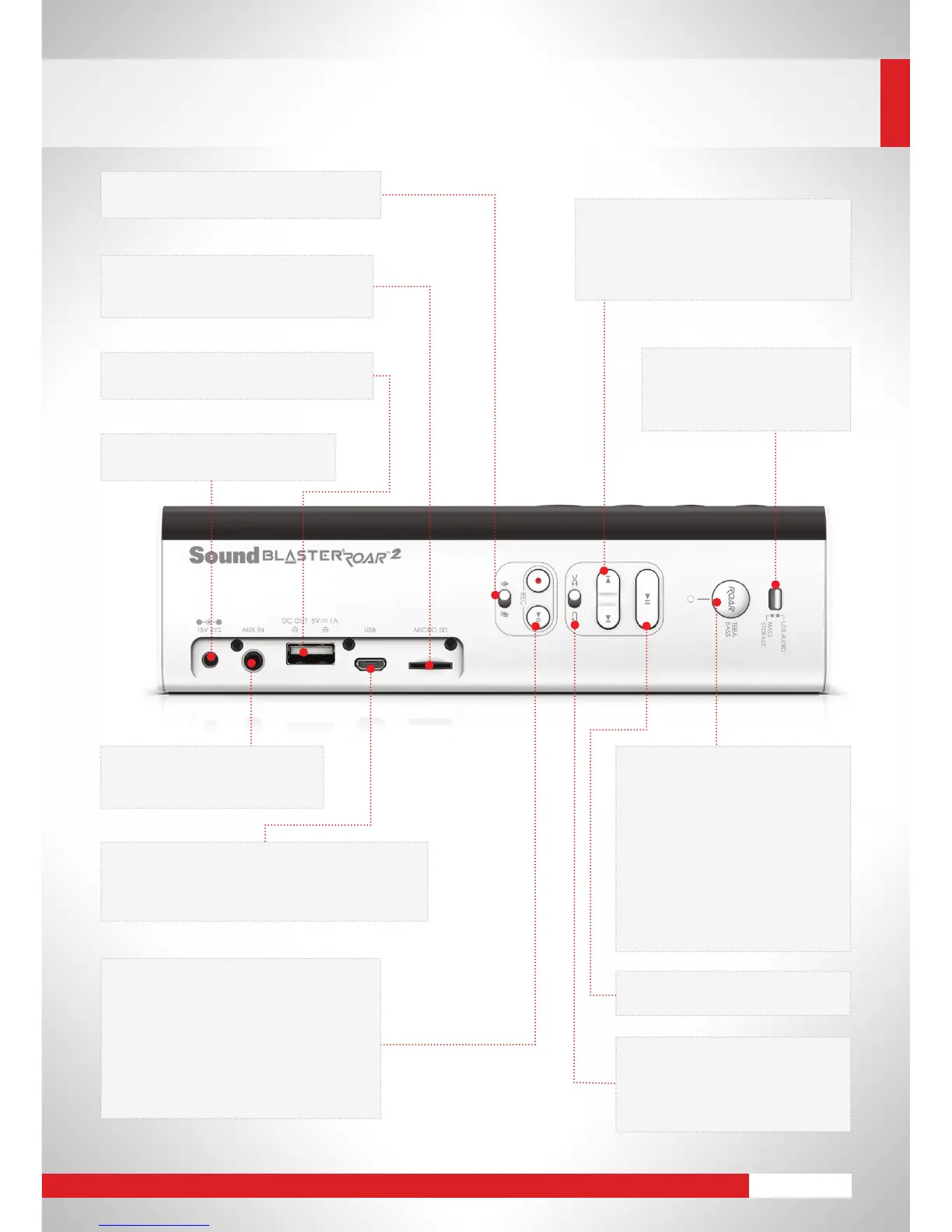
Mic On / Mute
• Fliptheswitchtoturnonormutethemic
Micro-USB port
• ConnecttoaPC/Macforenhancedaudiolistening
• PlayaudioandchargeyourSoundBlasterRoar2
at the same time
MicroSD card slot
• Built-inWMA/MP3player
• Storesyourvoicerecordingstoo
USB port
• Chargeyourmobilephonesanddevices!
Previous track/folder
Next track/folder
• Pressduringplaybacktoskiptracks
• Pressandholdduringplaybacktoskip
folders
Roar / TeraBass Button
• TogglesfromTeraBassONto
TeraBasswithROARON,followed
byOFF
- TeraBass
Intelligently boost bass when
audio levels are low
- ROAR
Boost the loudness, depth and
spaciousness for sheer audio
power
DC input
• ChargeyourSoundBlasterRoar2
Aux-in jack
• Playbackmusicfromaportable
device via audio cable
Voice recording
• Simpleaccuratevoicerecordingontothe
microSD card
Voice playback
• Immediateplaybackofvoicerecordings
Bedtime Mode
• Audioplaybackthatgraduallyfadesout
USB Audio / Mass Storage
mode switch
• TogglesbetweenUSBAudio
orMassStoragemode
Play / Pause
• Fuss-freemusicplaybackcontrol
Random / Repeat All
• Toggletheswitchtoplaytracks
on the microSD card in random
order or to repeat all tracks in
continuous order










 To Next Page