EN
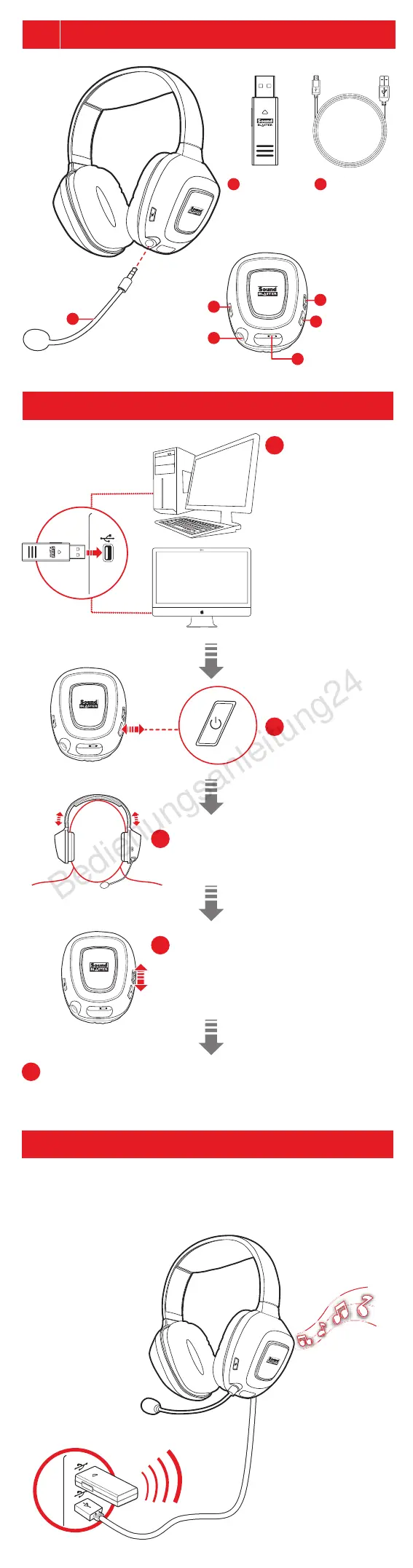
Connecting the Headset
Using the Headset
Connect the USB
wireless transmitter
to your computer’s
USB port.
Your headset is
paired to the USB
wireless transmitter
out of the box.
If you need to pair
your headset
manually (such as in
the event of errors),
please refer to the
user guide for details.
Wear the headset, adjusting the
headband so that the headset rests lightly on
your head without being excessively tight.
Adjust the volume to a comfortable
level using the volume wheel.
CAUTION: Do not listen to audio on your
headset at high volumes for prolonged periods
of time as hearing loss might result.
Congratulations! Your headset is ready for use without any software.
To enjoy all the features it has to offer, we have provided you with an
optional software suite that you may download from
www.creative.com/soundblaster/products/gaming/.
Power on
the headset
Using the Headset while Charging
After the initial 8hr charging process, your headset can be used while it is
charging. The USB wireless transmitter must remain connected to your
computer’s USB port. The power LED flashes white while charging and
stabilizes when fully charged.
1
2
4
5
3
(a) USB wireless
transmitter
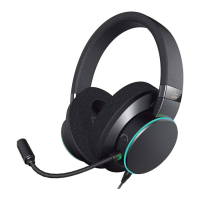
Noise-canceling
microphone
USB wireless
transmitter
Micro
USB-to-USB
cable
Microphone
Mute
Volume
Control Wheel
Power Button
Micro USB port
for charging
Microphone
Jack
Sound Blaster Tactic
3D
Rage Wireless
b
c
d
e
h
f
g
a










 To Next Page