2
Using the Vertical Touch Pad
In this document, we will use the term "Select," to mean that you should move your thumb
up and down the Vertical Touch Pad to scroll through menu options, and then select the
option by firmly tapping the Vertical Touch Pad.
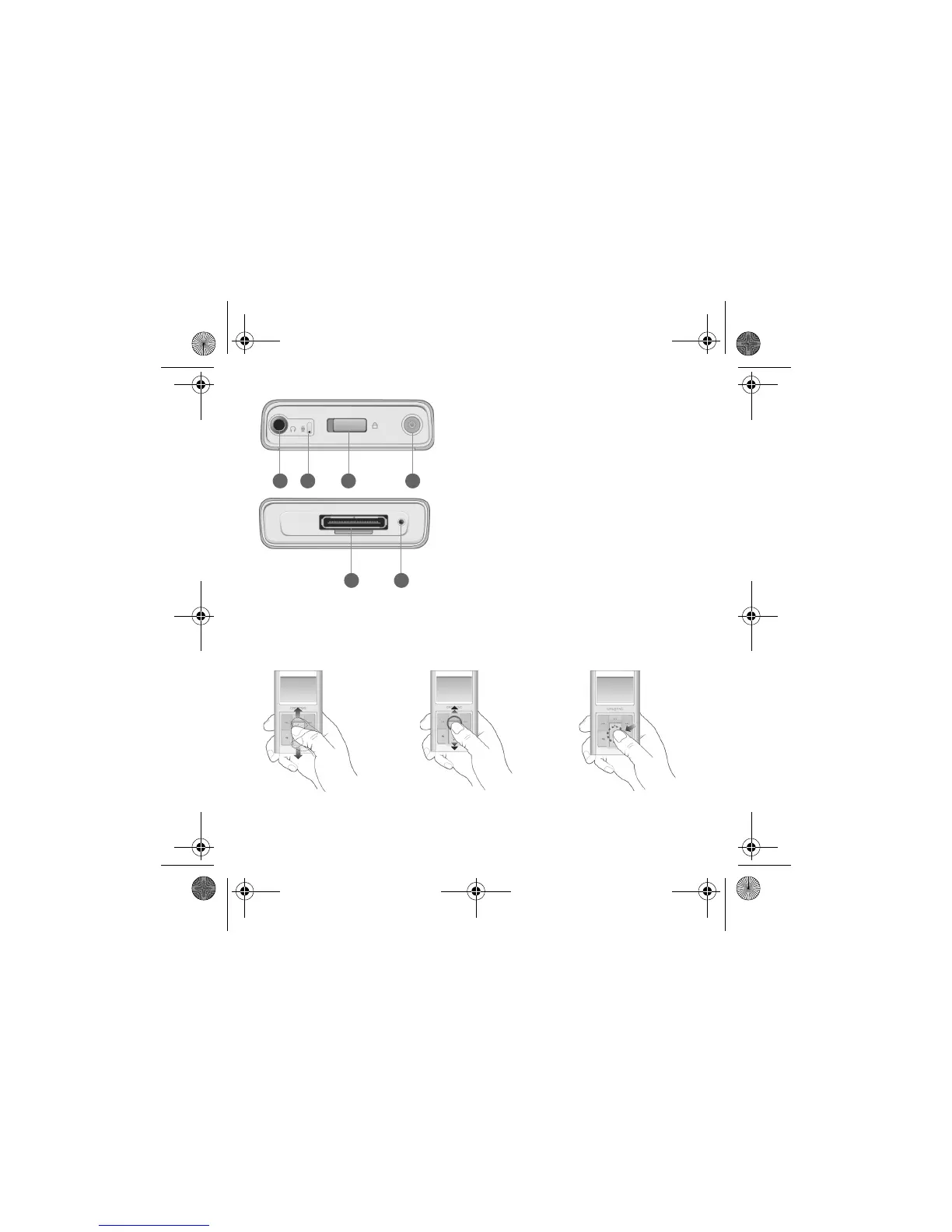
6 5
21 43
1. Headphone jack
2. Microphone
3. Lock switch
To lock the buttons on your player,
slide the switch to the right.
4. Power button
For more information, see “Turn On
Player” on page 5.
5. Reset hole
6. Dock connector
Move your thumb up and
down the Vertical Touch Pad
to scroll through menu items.
To rapidly scroll through menu items,
hold down the top or bottom portion of
the Vertical Touch Pad with your thumb.
To select a menu item,
firmly tap the Vertical
Touch Pad.
CLE_Zen Sleek QS.book Page 2 Friday, May 20, 2005 2:44 PM








 To Next Page