Brake bar
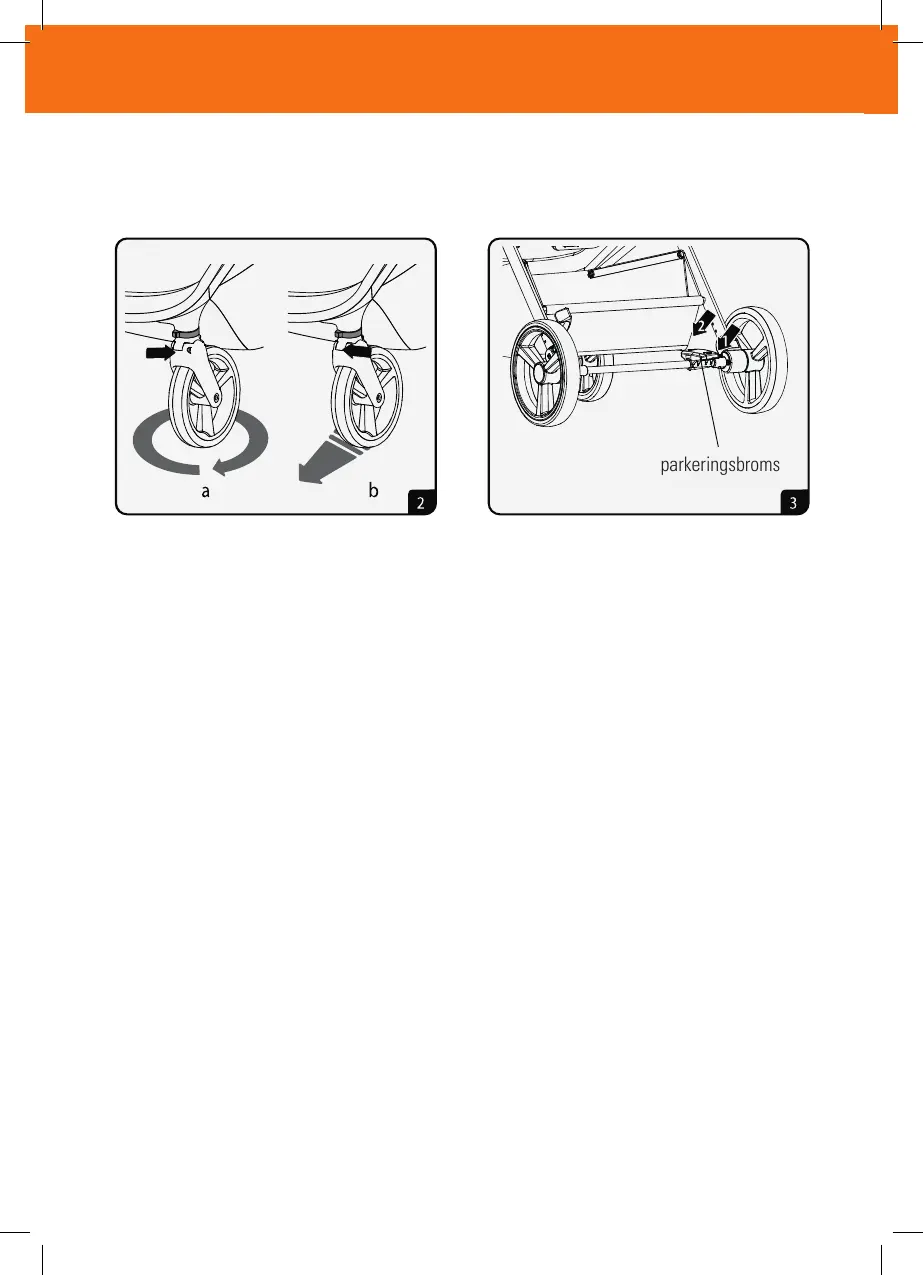
2.Front wheels rotating: As the picture shown: pulling the rotary
button to the outside, and the wheel is in the state of free rotating.
Front wheel orientation: as the picture shown. pulling the rotary
button to the inside, and the wheel is in the orientation state.
3.Rear wheel brake: As the picture shown, steping on the brake bar
like“1”position, indicating braked now, steping on the
brake bar
like“2”position. the stroller can work normally now.
Attention: when the stroller is not moving, the stroller must be in
the braking state.
Instruction for using
8
användarinstruktioner
2. Svängbara framhjul: Som bilden visar: dra knappen utåt och då kan hjulet rotera fritt. (a)
Framhjulets orientering: som bilden visar. dra vridknappen inåt och hjulet är i fast körläge. (b)
3. Bakhjulsbroms: Som bilden visar, trampa på bromsen till ”1”-läget, vilket indikerar bromsad.
Tryck bromsen uppåt till ”2”-läget. vagnen är nu i olåst läge.
Observera: när vagnen inte körs måste vagnen vara i bromsat tillstånd.
parkeringsbroms



 To Next Page