Brake bar
2.Front wheels rotating: As the picture shown: pulling the rotary
button to the outside, and the wheel is in the state of free rotating.
Front wheel orientation: as the picture shown. pulling the rotary
button to the inside, and the wheel is in the orientation state.
3.Rear wheel brake: As the picture shown, steping on the brake bar
like“1”position, indicating braked now, stepin
g on the brake bar
like“2”position. the stroller can work normally now.
Attention: when the stroller is not moving, the stroller must be in
the braking state.
Instruction for using
8
Seat unit adjusting lever
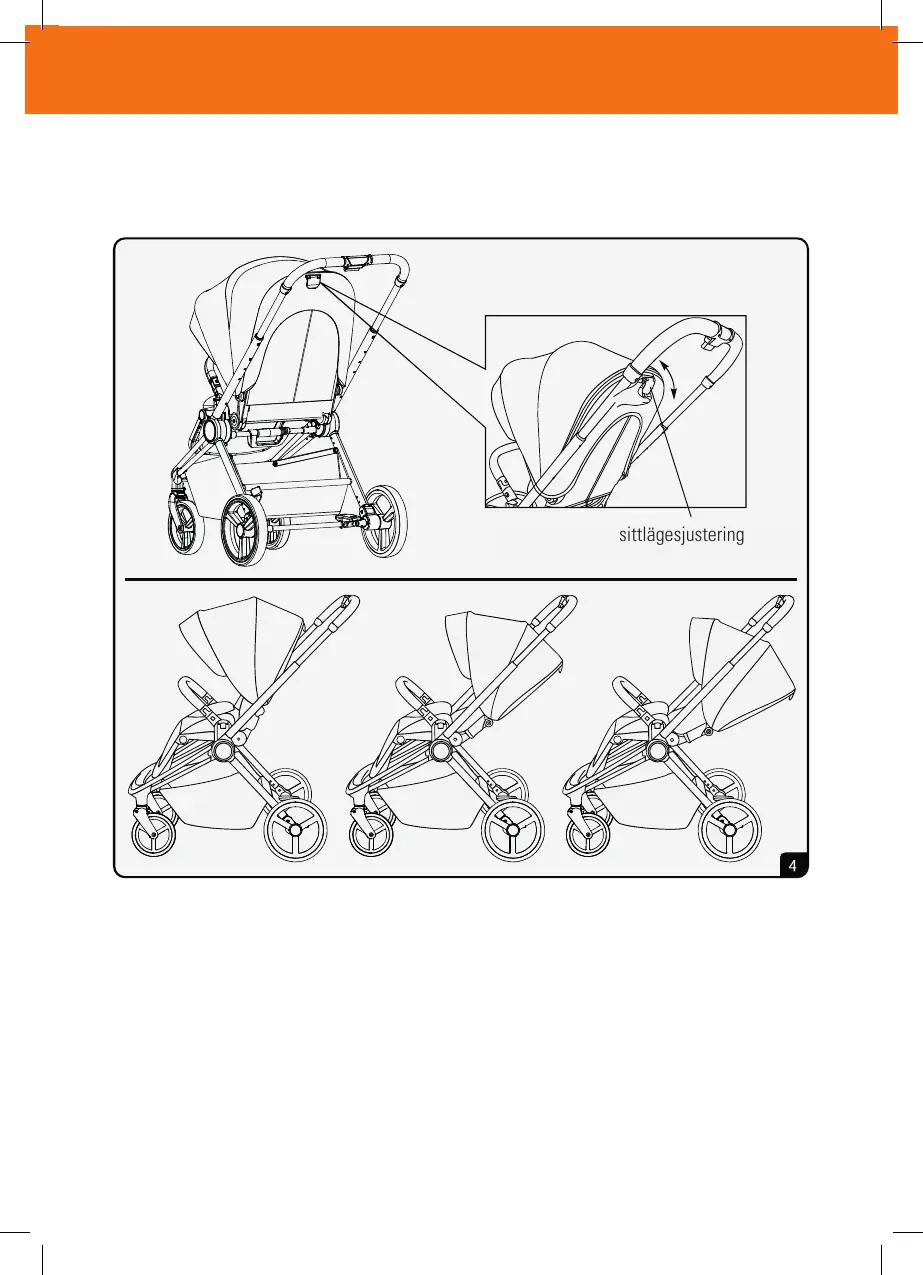
4.Backrest angel adjusting: As the picture shown, pulling
angel adjusting level, up and down, three different angel can
be adjusted .
Instruction for using
9
användarinstruktioner
4. Justering av ryggstödet: Som bilden visar, dra i justerings spaken, justera sedan sitsen upp
och ner, tre olika lägen nns.
sittlägesjustering



 To Next Page