Waterproof Wireless Handheld Remote Crestron WPR-48
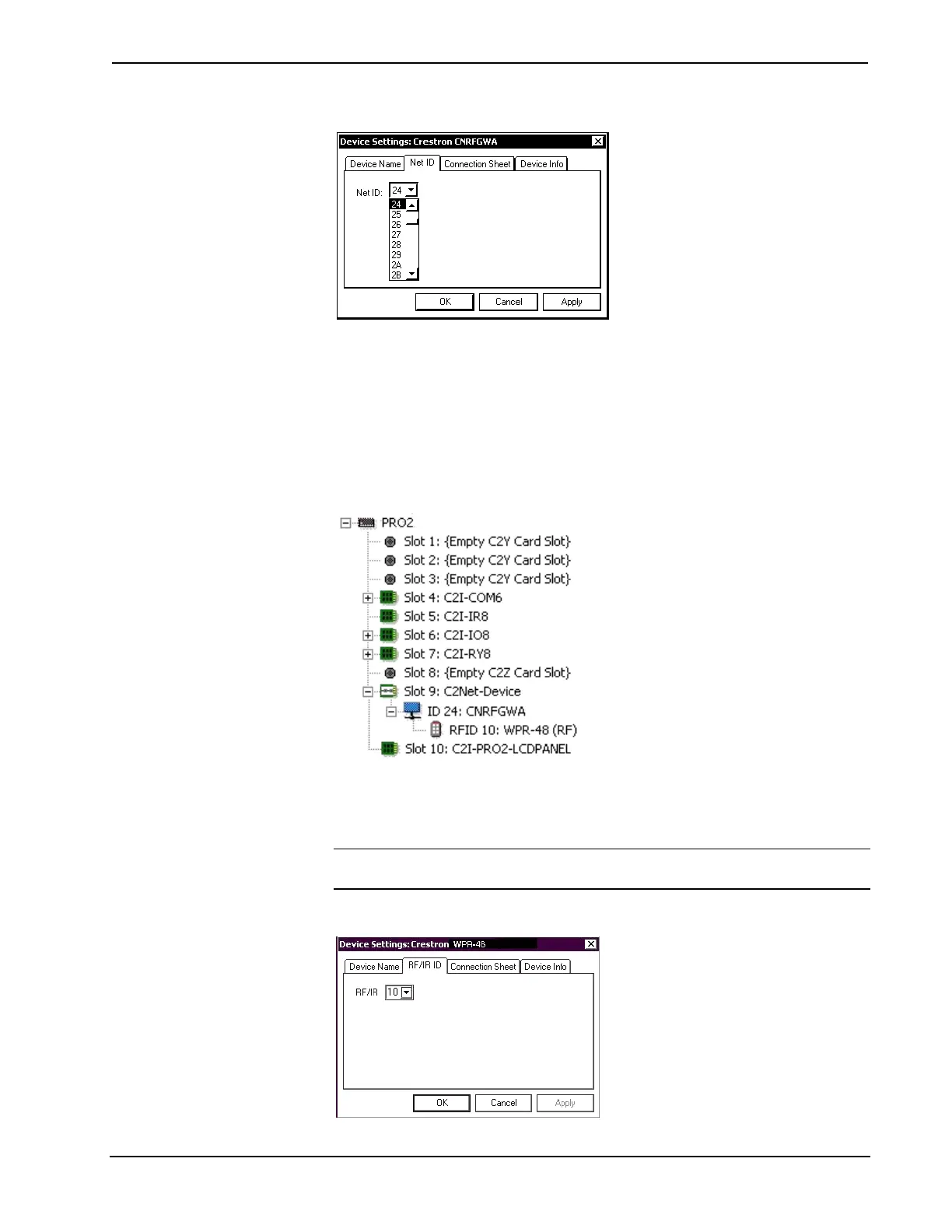
“Device Settings” Window for the CNRFGWA
Drag the WPR-48 from the Wireless Remotes | Wireless Remotes (RF) folder of the
Device Library and drop it on the CNRFGWA symbol in System Views. The
CNRFGWA displays the WPR-48 at the transmitter’s default RF ID location, “10,”
as shown in the PRO2 system tree illustration. The procedure for the WPR-48 IR
configuration is almost the same, except that you drag the WPR-48 (IR) from the
Wireless Remotes | Wireless Remotes (IR) folder of the Device Library and drop it
on the CNXRMIRD symbol in System Views. The CNXRMIRD then displays the
WPR-48 with the transmitter’s default RF/IR ID, “0F.”
Pro2 System Tree
Double-click the WPR-48 icon in the lower pane of the expanded system tree to
open the “Device Settings” windows for the transmitter. Select the RF/IR ID tab to
change the transmitter RF/IR ID, as shown in the following figure.
NOTE: The hardware configuration settings, which were described in “Configuring
the WPR-48” on page 5, and the software settings of the RF/IR ID must match.
Transmitter “Device Settings” Window
16 • Waterproof Wireless Handheld Remote: WPR-48 Operations Guide – DOC. 6254A



 To Next Page