U). The user defined target zone will appear on the display. Repeatedly press SEL
to select the desired target zone: User defined (ZN-P/ZN-U), Leisure (ZN-1),
Fitness (ZN-2), Sport (ZN-3). The following table contains an overview of the
zones 1-3. To set the user defined target zone press set while displaying the user
defined target zone (ZN-P/ZN-U) to enter setting mode. The lower limit will blink
on the display. Set the lower limit by pressing SEL and confirm your setting by
pressing SET. Set the upper limit in the same way.
MHR
MHR
MHR
Activating/deactivating the heart rate alarm
Press SET while viewing the current heart rate and target zone sub-feature, press
SET briefly to activate or deactivate the target heart rate alarm. If the alarm is
activated, the symbol will appear on the display.
Resetting the heart rate data
The heart rate data is reset daily at midnight.
Memory mode (SPEICH/MEMORY)
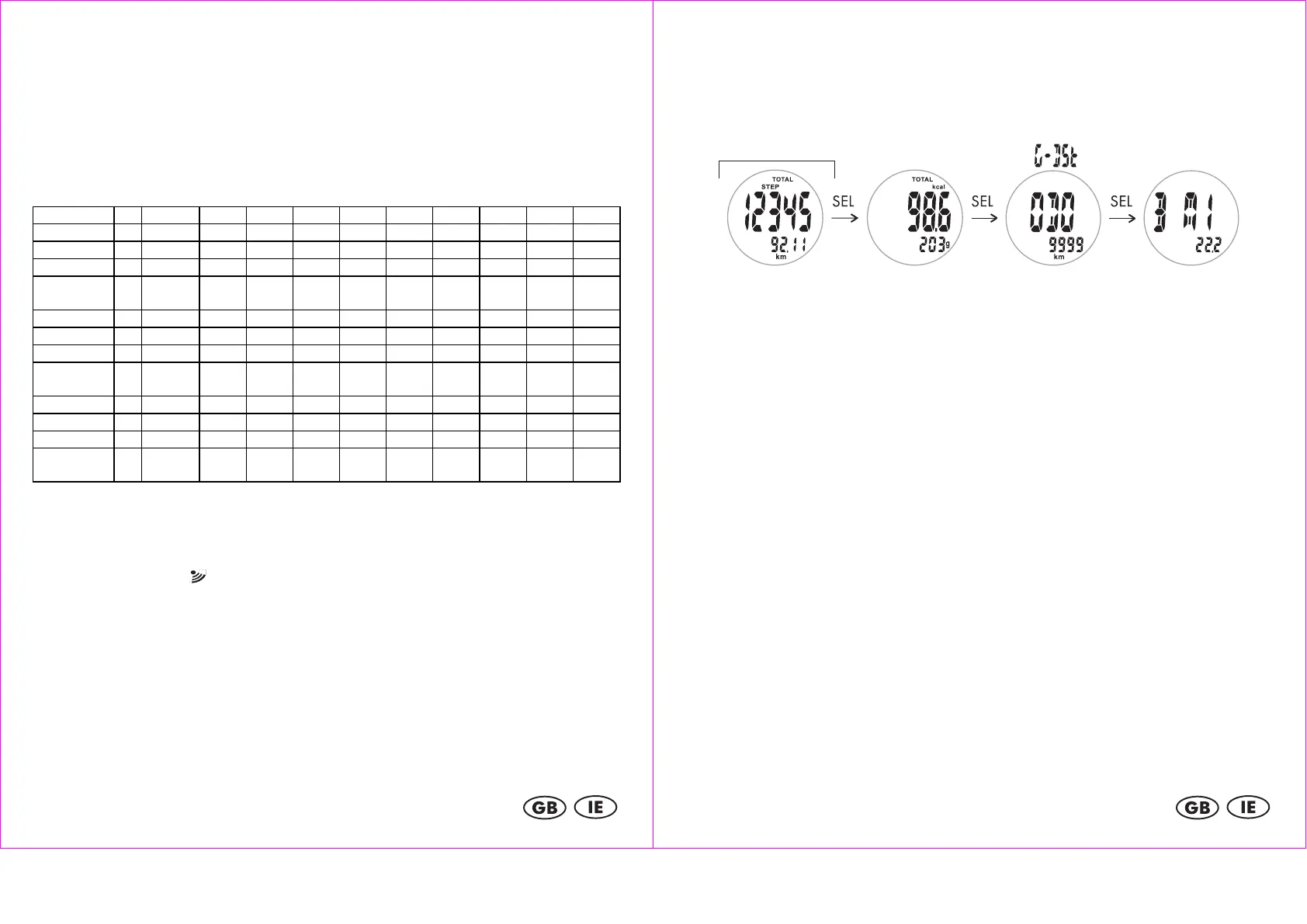
First, press MODE to select memory mode (SPEICH/MEMORY). The data for the
past 14 days can now be viewed. Press SEL to access the next feature. The data
for steps, distance (km), calories, fat burn (g) and odometer (G-Dst/ODO) is
saved for 14 days.
Total memory (14 days)
The order of the features is: Total Step/Total Distance (Total Step/Total Distance)
> Total Calories/Total Fat Burn (Total Calories/Total Fat Burn) > Odometer (G-
Dst/ODO) > BMI (BMI)
Note:
The stored daily values for calories, fat burn, average speed and maximum speed
are reset nightly at 0:00 but are stored in the 14-day memory.
BMI (Body Mass Index)
The BMI is a statistical measurement that can be used to judge a persons weight.
For adults, a value between 18.5 and 25 is considered normal. Values below
18.5 are considered "underweight". Values above 25 are considered
"overweight". Values above 30 are considered "Obese".
The BMI is only a coarse guideline because it does not take a persons body type
and body composition into consideration.
The watch automatically calculates your BMI from the values entered during setup.
Troubleshooting
The distance measurements are very imprecise
The watch uses the step length measured during calibration to estimate the
traveled distance.
Recalibrate the step counter. Calibrate it for walking and for running and use extra
care during the calibration.
Running on uneven surfaces may also result in bad calibration.


 To Next Page