3. Interface
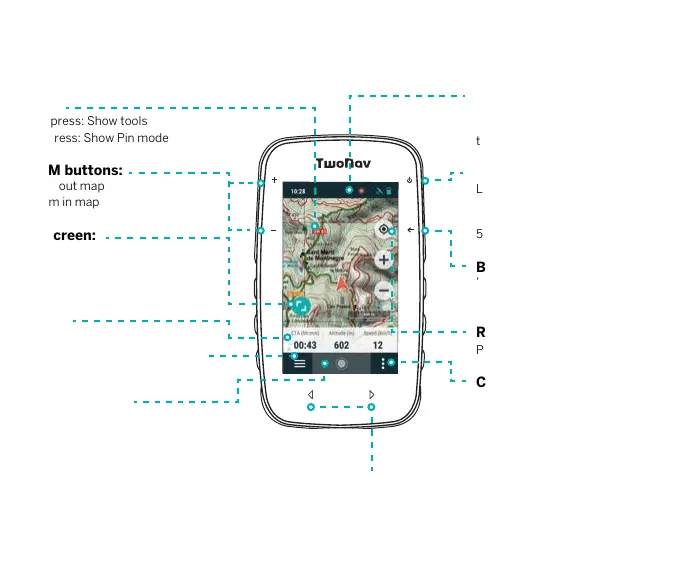
Map:
Short press: Show tools
Long press: Show Pin mode
ZOOM buttons:
- Zoom out map
+ Zoom in map
Full screen:
Press to hide panels
Data bar:
Press to access the data pages
Main menu:
Manage the files and settings on
your device
Activity control:
Start, pause and finish an activity
Status:
Press to check the status of the
most frequently used features of
the device (sensors, GPS…)
POWER button:
Long press: Turn GPS on / Turn
GPS off
Short press: Lock screen
5 sec. press: Force shutdown
BACK button:
‘Back’ in menus / ‘Re-center’ in
map
Re-center:
Press to center current position
Contextual menu:
Press to access options available
for the current page
Note: The content of the map page is adjustable and varies depending on the situation.
PREV./NEXT PAGE keys:
Navigate data pages


 To Next Page