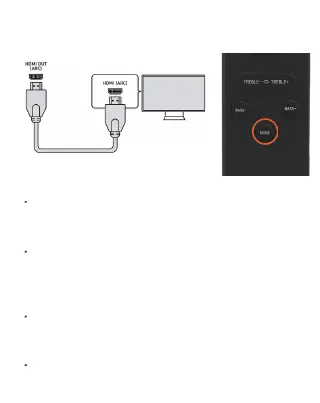
HDMI ARC Mode
Connect one end of the HDMI(ARC) audio connecting
cable to the HDMI output interface, and the end to
the HDMI input interface of the soundbar.
Switch the sound source by pressing the mode key
repeatedly or the HDMI('ARC') key on the remote
control, connection will be indicated with the white
light with 'ARC' on the soundbar.
To switch to HDMI mode, after which the white
indicator showing the 'ARC' mode, Set the sound
source audio to HDMI setting.
Play your round source equipment with the device


 To Next Page