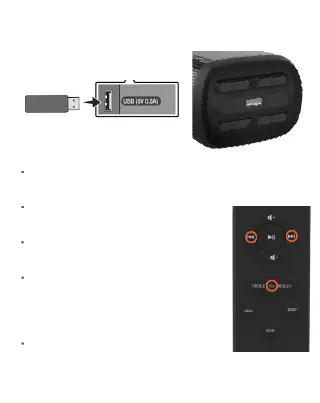
USB Mode
Insert a USB memory device to the
USB port.
Press mode button repeatedly on the
remote control to switch to USB
mode.
Ensure that your USB is stored with
MP3 Audio.
Use the controls on the soundbar or
remote control to make adjustments
Pause/Play and switch between
Previous/Next Track.
Replay: Replay single track by
pressing
Replay Key once or all tracks by
ressing Replay key twice.


 To Next Page