4
PANIC ( 1 &3 )
& PRESS 1& 3 FOR 2
seconds
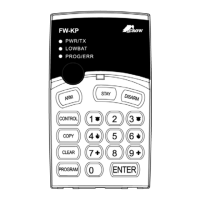
PWR/TX
(blink )
PW8 –
& PROG&611-618&
ENTER
RUNNER –
& PROG&18&
ENTER
21-100 &
ENTER
FW-64 –
& PROG&550&
ENTER
21-100 &
ENTER
HOW TO USE THE PLUG-IN DATA TRANSFER MODULE (DTU)
Plug the DTU module (CROW P/N 0060330) to the black socket located at the back of the
FW-KP.
Read from DTU module
& PROG&INSTALLER CODE&
ENTER
©&9&
ENTER
Write to DTU module
& PROG&INSTALLER CODE&
ENTER
©&1&
ENTER
NOTE: When the SWITCH is not in WRITE position,
the data in the DTU can not be written over.
HOW TO RESTORE ALL TO FACTORY DEFAULTS?
Remove the lithium battery and insert the battery again within 30sec'
& PROG & INSTALLER CODE &
ENTER
& CLEAR & 9
Note: Press "CLEAR & 9" until the 3 panel indication LED's are blinking
HOW TO INSTALL THE FW-KP?


 To Next Page