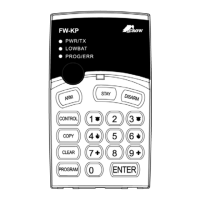
Need help?
Do you have a question about the Crow Power Wave CR16M and is the answer not in the manual?
Introduces the PowerWave alarm control system and its capabilities.
Explains how the premises can be divided into zones and partitions.
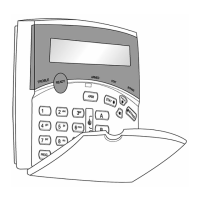
Describes the LCD display and keypad's role in system operation.
Explains the purpose of function keys for system control.
Details the use of alphanumeric keys for codes and programming.
Describes the keypad's audible feedback signals.
Lists and explains the function of each LED indicator on the keypad.
Describes the LCD window's capacity and what it displays.
Initiates full arm or arming of a specific partition.
Initiates a full arm of the security system.
Disarms the system during the exit delay period.
Disarms the security system.
Arms partition A or B.
Initiates partial alarm when the user is home.
Disarms the system when in Stay mode.
Bypasses selected zones.
Activates an emergency alert.
Activates a medical emergency alert.
Activates a fire emergency alert.
Initiates display of events from memory.
Enables or disables the chime function.
Activates or deactivates outputs and devices.
Activates program mode to add or change users' codes.
Enters Local Edit Program Mode.
Increases the LCD backlight level.
Decreases the LCD backlight level.
Increases the LED backlight level.
Increases the LCD backlight.
Decreases the LCD backlight.
Increases the keyboard backlight.
Decreases the keyboard backlight.
Increases the buzzer volume.
Decreases the buzzer volume.
Guides on preparing and arming the system before leaving.
Details the process of arming the system when ready.
Explains the quick arm function for arming the system.
Describes how to disarm the system using a user code.
Details how to stop an active alarm.
Guides on arming the system when occupants are present.
Explains arming the system in Stay mode for home occupancy.
Describes the quick stay function for arming.
Explains how to arm specific partitions (A or B).
Describes how to disarm the system.
Guides on bypassing zones that cannot be closed.
Describes how to disable the chime function.
Describes how to enable the chime function.
Explains how to initiate a panic alarm.
Explains how to initiate a medical alarm.
Explains how to initiate a fire alarm.
Explains using a duress digit to disarm under threat.
Lists and explains system error and status messages.
Lists and explains trouble messages and events.
Guides on viewing past system events and memory readout.
Explains how to control external devices like AC or heaters.
Guides on accessing user or client programming modes.
Describes the procedure to exit program mode.
Explains how to change or add master and user codes.
Details the steps to change the master code.
Guides on adding new user codes or modifying existing ones.
Explains the process for deleting user codes.
Guides on entering edit mode to describe zones textually.
Explains how to program textual descriptions for zones.
Details how to program telephone numbers for the panel.
Guides on setting the current day of the week.
Explains how to set the current time in HHMM format.
Guides on setting the current date (day and month).
Explains how to set the current year (YY).
Explains how to activate the electric door lock release function.
Guides on starting the walk-test mode for detector testing.
Explains how to end the walk-test mode.
Guides on making the system answer an incoming call.
Summarizes the functions of alphanumeric keys based on presses.
Guides on entering a name for the alarm system.
Guides on entering textual descriptions for areas.
Increases the LCD backlight.
Decreases the LCD backlight.
Increases the keyboard backlight.
Decreases the keyboard backlight.
Increases the buzzer volume.
Decreases the buzzer volume.
Outlines the product warranty period and conditions.
Details limitations on Crow's liability for damages.
Explains how to assign addresses to keypads to avoid conflicts.
Guides on setting the type of control panel for the keypad.
Explains how to set the keypad tamper mode.

 To Next Page
 General