Tuner Type is Cable
Tuner Type is Antenna
TV Menu
12
Network ID
Press button to select Network ID:Auto or nter digital numbers. e
Frequency
Press button to select Frequency:Auto or nter digital numbers. e
Symbol Rate
Press button to select Symbol Rate:Auto or nter digital numbers. e
Start
.
.
Press Enter / button to start the auto searching.
It will search digital channels first,then analog channels.
Before execute auto channel search,please confirm your antenna
type is Antenna or Cable.
Wrong setting of Signal Type may not find the channel.
Found numbers do not include
encryption programs.
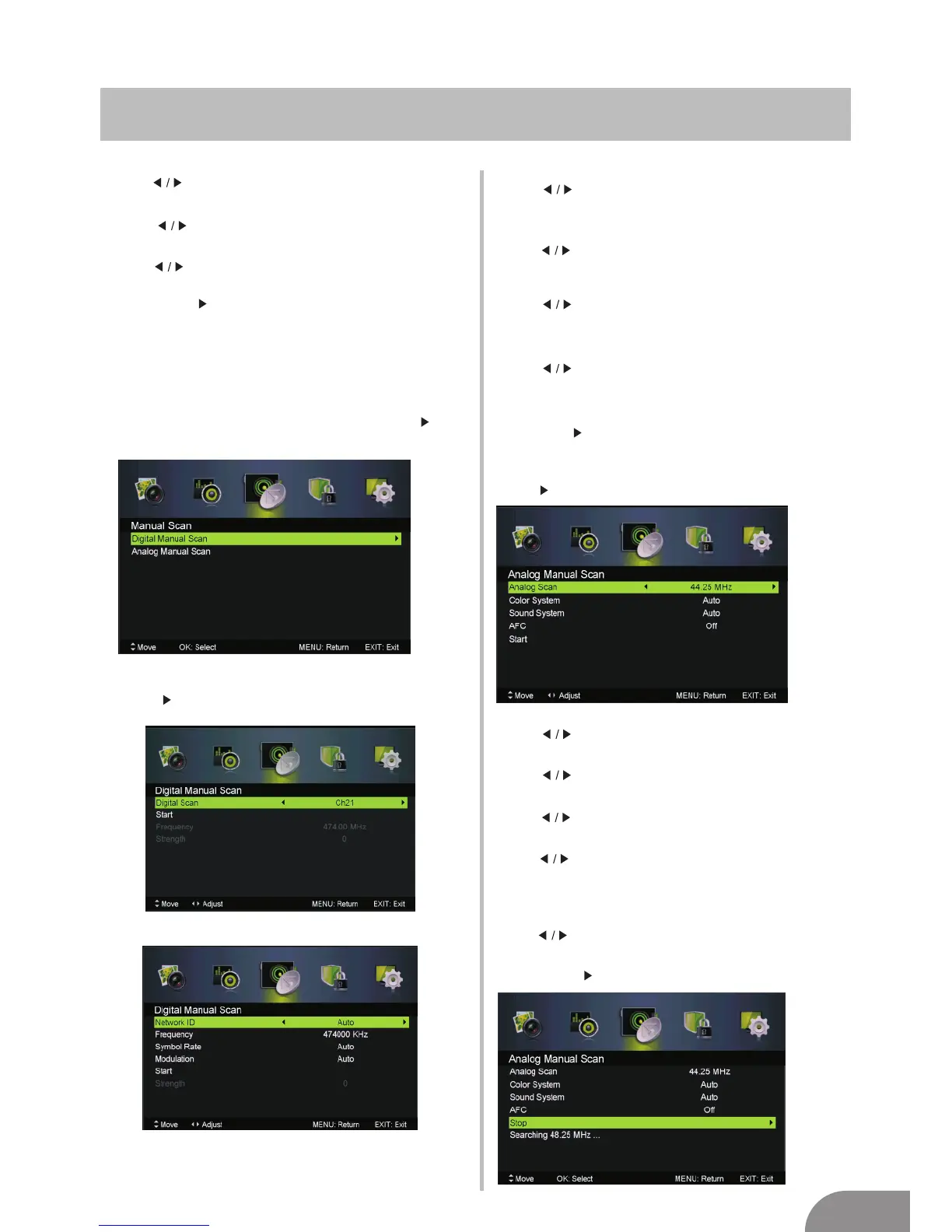
Manual Scan
Manual ScanPress ▼ / ▲ button to select , then press Enter / button
to enter sub-menu.
Digital Manual Scan
Press ▼ / ▲ button to select Digital Manual Scan, then press
Enter / button to enter sub-menu.
Network ID
Press button to select Network ID:Auto or nter
digital numbers.
e
Frequency
Press button to select Frequency:Auto or nter
digital numbers.
e
Symbol Rate
Press button to select Symbol Rate:Auto or nter
digital numbers.
e
Modulation
Press button to select Modulation:Auto,16QAM,32QAM,
64QAM,128QAM,256QAM.
Start
Press Enter / button to start the channel searching.
Analog Manual Scan
Press ▼ / ▲ button to select Analog Manual Scan, then press
Enter / button to enter sub-menu.
Analog Scan
Press button to select Analog Scan.
Color System
Press button to select Color System:Auto,PAL or SECAM.
Sound System
Press button to select Sound System :Auto,DK,BG,I or L.
Modulation
Press button to select Modulation:Auto,16QAM,32QAM,
64QAM,128QAM,256QAM.
AFC
press button to select On or Off.
Start
Press Enter / button to start the channel searching.
Automatic Fine tuning.


 To Next Page