TV Menu
11
Channel Menu
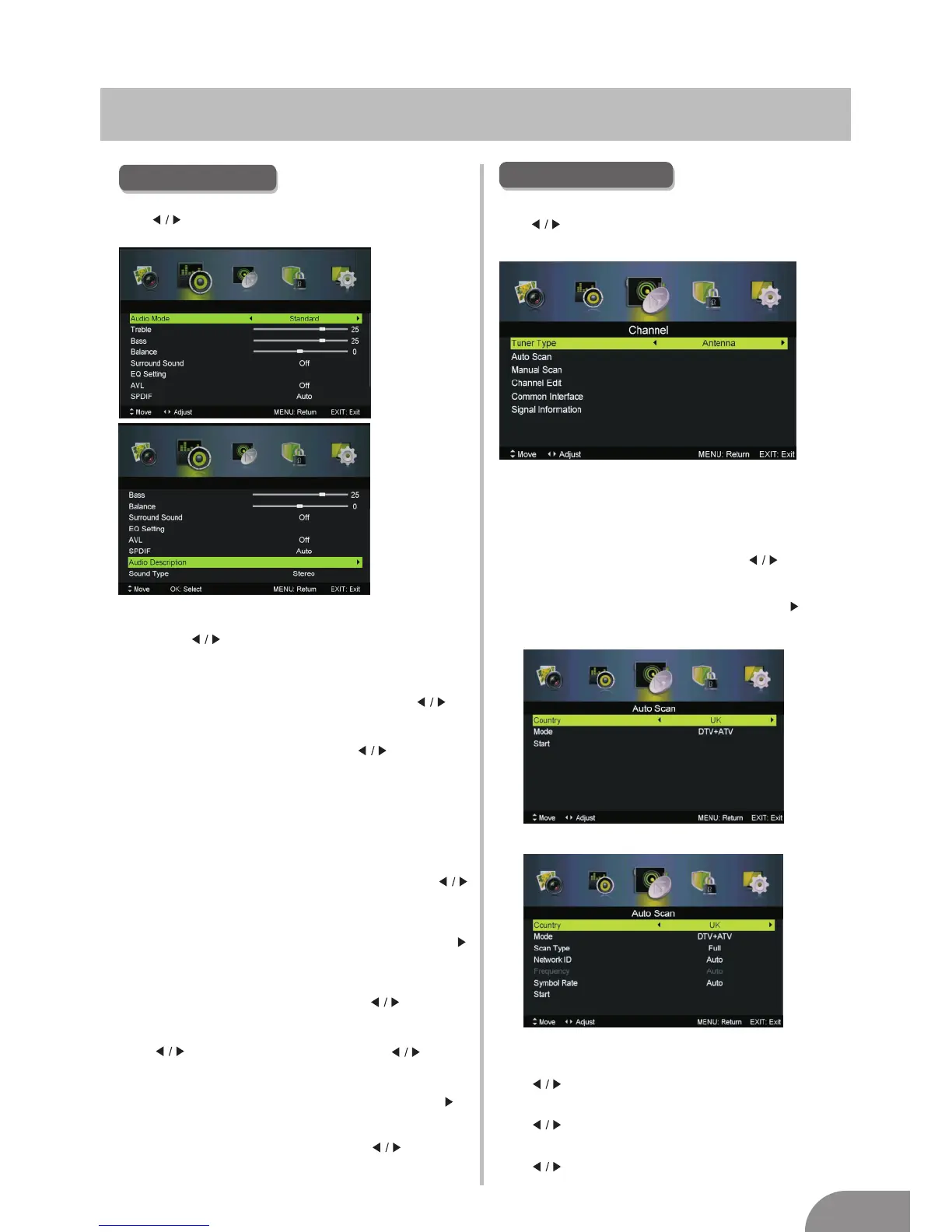
1. Press ▼ / ▲ button to select the option that you want to adjust in the
SOUND menu.
2. Press Enter/ button to adjust.
3. After finishing your adjustment, Press MENU button to save and return
back to the previous menu.
Sound Mode
Sound
Sound ModePress ▼ / ▲ button to select , then press
button to select.
Treble/Bass/Balance
Press ▼ / ▲ button to select option, then press button to adjust.
Treble Adjust the treble effect.Increases or decreases
high-pitched sounds.
Bass Adjust the bass effect.Increases or decreases
lower-pitched sounds.
Balance Adjust the balance between left and right speakers
to adapt to your listening position.
Surround Sound
Press ▼ / ▲ button to select Surround Sound, then press
button to select On or Off.
Press ▼ / ▲ button to select , then press Enter /
button to enter sub-menu.
EQ Setting
EQ Setting
Adjust the curve of 7 bands equalizer.
AVL
Set the auto volume control.
Press ▼ / ▲ button to select AVL, then press button to
select On or Off.
SPDIF
Press button to select SPDIF, then press button
to select Off / Auto / PCM.
Audio Description
Audio DescriptionPress ▼ / ▲ button to select , then press Enter /
button to enter sub-menu.
Sound Type
Press ▼ / ▲ button to select Sound Type, then press button to select.
(Available Sound Type: Stereo,Dual I,Dual II,Mixed).
Press MENU button to display the main menu.
Press button to select CHANNEL in the main menu,then p
ENTER / ▼
ress
to enter.
1. Press ▼ / ▲ button to select the option that you want to select in the
CHANNEL menu.
2. Press Enterbutton to enter sub-menu.
3. Press MENU button to return back to the previous menu.
Tuner Type
Tuner TypePress ▼ / ▲ button to select , then press button to
select
Antenna or Cable.
Auto Scan
Auto Scan
Press ▼ / ▲ button to select
, then press Enter / button to
enter sub-menu.
Country
Press button to select country
Mode
Press button to select Mode: DTV+ATV, DTV, ATV.
Scan Type
Press button to select Scan Type: Advanced,Quick,Full.
SOUND MENU
Press MENU button to display the main menu.
ress
to enter.
Press button select SOUND in the main menu,then p ENTER / ▼
Sound
Tuner Type is Cable
Tuner Type is Antenna


 To Next Page