EasyManua.ls Logo

Crown OC-150A - Mounting and Installation Instructions; Custom Mounting Options; Rack and Cabinet Mounting

Crown OC-150A
37 pages
Print Icon
To Next Page IconTo Next Page
To Previous Page IconTo Previous Page
Loading...
Thare
are
fsur
basie;
ways
to
display
your
8C-%5QA;
custom
mounted,
maunfed
in
the
accesme
5-R
walnut
cabin~t,
standard
19"'
rack
mounted,
or
free
standing
in
its
aaractiwc
vinyl
cover.
GUSTOM
MOUMTED
-
The
OC-15OA
is
shippd
with
endbars
installed.
Whese
endbars
are
used
for
~~st~dm
pasnel
mounting,
sr
$re@-standing,
A
full
-
sized
ternplats
of
the
8C-150A
t'sarrclss@d
in
the
rear
sf
the
mar"ruaO,
"9"his
template
aloa
includes
dimen-
sions
for
the
shetf
whish
is
recommended,
ACCESSORY
CAB!
NEVI
BACK
MOUNT1#6
--
Angle
brackets
are
ussd
far
rack
mskarclting
and
for" insta&la-
tion into
the
5-8
sr
other
larger
CROWN
"'rack""
cabinets.
Ta
prepare
for
such
an
iustallation,
firgt
remsve
the
bur
swket
screws
retaining
the
andbars.
1
Align
the
angle
brackets
to
tha
unit
and
reie?wfi
the
socket
screws.
(Rate:
Sckel
scr8ws
may
fwk
$3
though
they
are
cmrs
threading
but
will
str";raighterr
1
apprawimatejy
halMay
through,)
1
Next
remove
the
Csur
~ubber
feet
from
the
boQom
cover.
Save
the
feet
and
four
screws.
(Mots:
The
front
right
screw
is
a
machine
screw;
the
other
three
are
sheet
metaI
screws.)
Slide
the
OOC-158A
carefully
into
the
frant
opening
ofthe
5-8
and
secure
to
the
cabinet
side
rails
lasing
the
four
thumbscrew-washer
assem-
bfies
supplied
in
the
accessow
pack,
(Be
sure
ts
use
a
nylon
washer
under
each
thymb
Screw
to
prevent
damage
$0
the
surface
sf
the
rack
eats.)
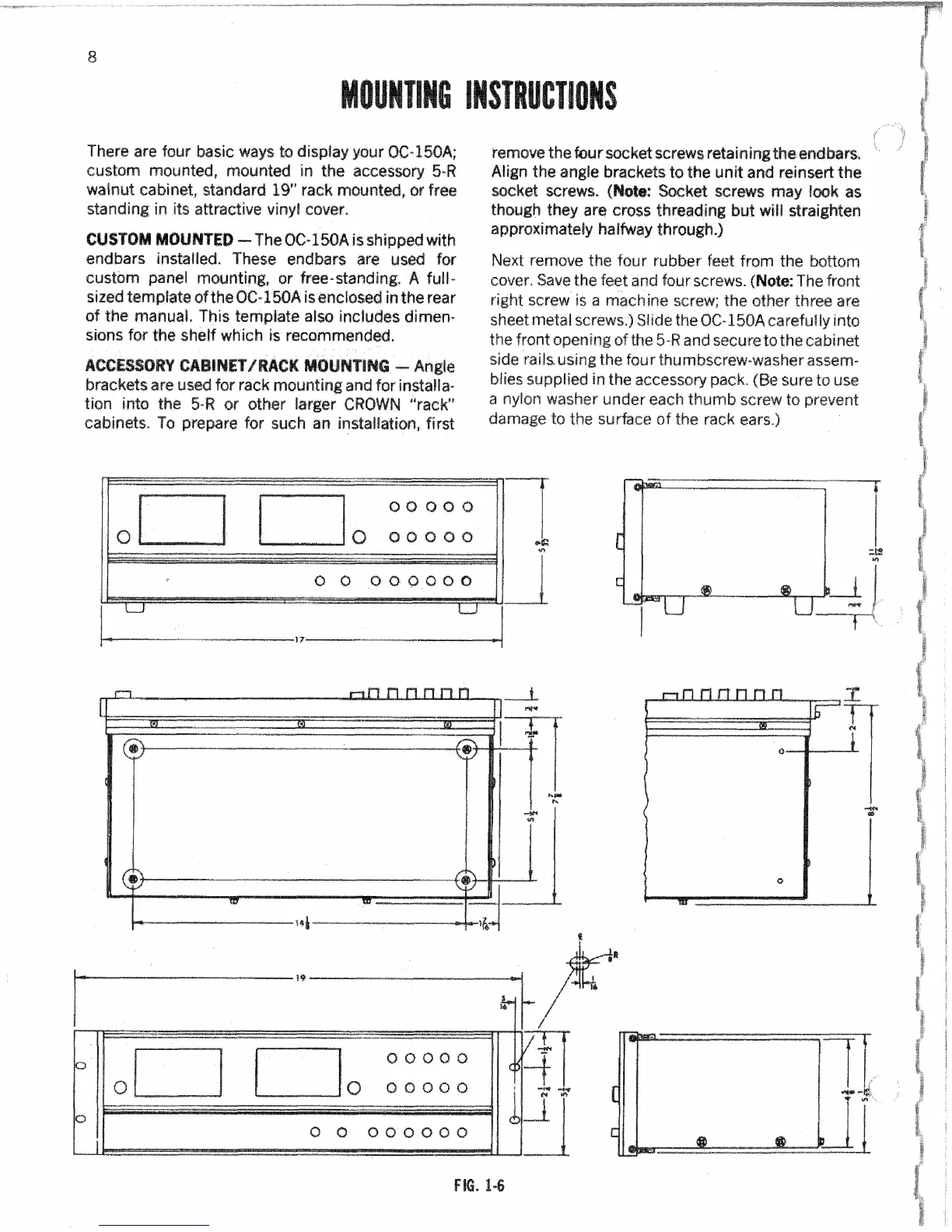
FIG.
1-6

Other manuals for Crown OC-150A