Data Express DX175 User Manual
1 General Information
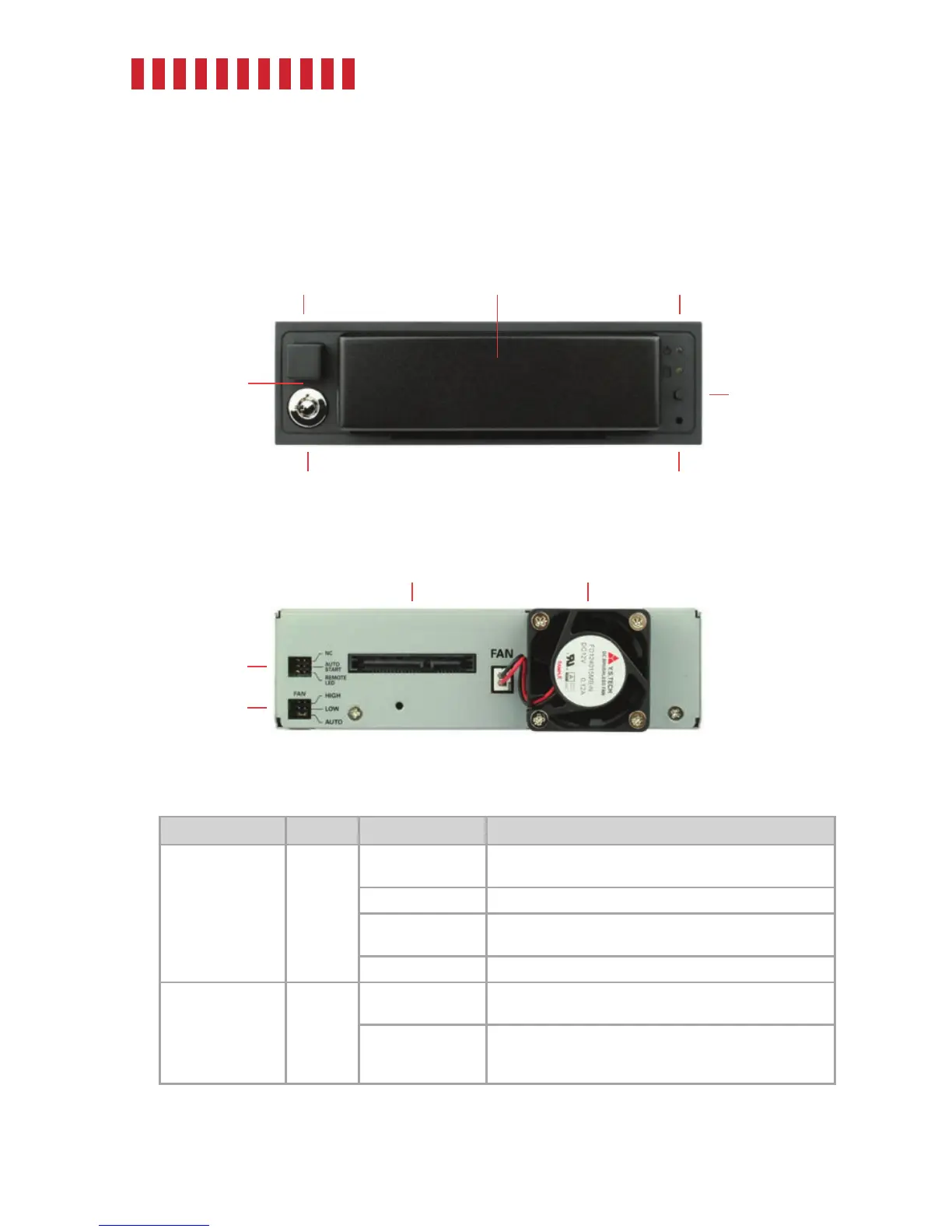
1.1 Identifying Parts
1.2 LED Behavior
LED Color STATE Description
Drive Ready/Error
White/
Red
Flashing White
The carrier is inserted in the frame and the drive inside the
carrier is powering up.
Solid White The drive is powered on and ready for access.
Flashing Red and
White
Fan failure. Please contact Technical Support.
Solid Red DC power failure. Please contact Technical Support.
Drive Activity White
Flashing
The drive inside the bay is being accessed by your
computer. See Section 4.2 for configuration instructions.
Solid
The computer’s SAS or SATA host controller does not sup-
port drive activity polling. See Section 4.2 for configuration
instructions.
2
Front
Eject Button
Carrier Status Lights
Error Reporting
Disable Switch
Keylock
Power Button
Frame
Rear
SATA Power and
Data Connectors
Cooling Fan
Drive Auto
Spinup Config
Fan Speed
Config


 To Next Page