Need help?
Do you have a question about the Cruisair SMX II and is the answer not in the manual?
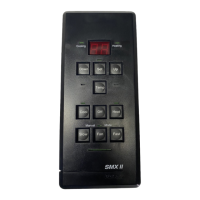
SMX Series switch assembly with soft-touch membrane keys. Includes all programmable functions.
Multiple SMX Online Net units linked together. Has click-type keys, two-speed blower control and optional outside temperature sensing.
Large alphanumeric readout for setpoint, temperatures, programmed values, and error messages.
LED lights when bypass valve operates in cooling mode.
LED lights when bypass valve operates in heating mode.
LED lights when setpoint is displayed. Off when temp is displayed.
Press to display current setpoint. Used to dim data display on SMX II.
Press to raise or lower setpoint. Scrolls through controller IDs on SMX Online.
Press to display inside or outside temperature and setpoint.
Press left or right to scroll controller IDs of systems in the network.
Selects remote control mode for network units.
Selects local display mode, returns to local operation.
Turns off all SMX units on the network.
Selects the daytime operating mode for network units.
Selects the nighttime operating mode for network units.
Selects the absent mode for network units.
Press SET key to display and adjust desired cabin temperature.
Indicates a program fault during self-check or operation.
 General
| Model | SMX II |
|---|---|
| Brand | Cruisair |
| Display | LCD |
| Compatibility | Cruisair marine air conditioning systems |
| Functions | Temperature control, fan speed, mode selection |

 To Next Page