EasyManua.ls Logo

Crumar Spirit - Noise as Sound Source; Noise Scale Exploration

Crumar Spirit
31 pages
Print Icon
To Next Page IconTo Next Page
To Previous Page IconTo Previous Page
Loading...
14
SHAPER
V
PATH
GLICE
;.\
I
/~
UP
I '
DOWN
R-
-8
/.
\'-...
o "KJ
PITCH
BEND
CJLIDE
MODE
OFF
ON
MO
_D
X
AUTO
BHAPER
y
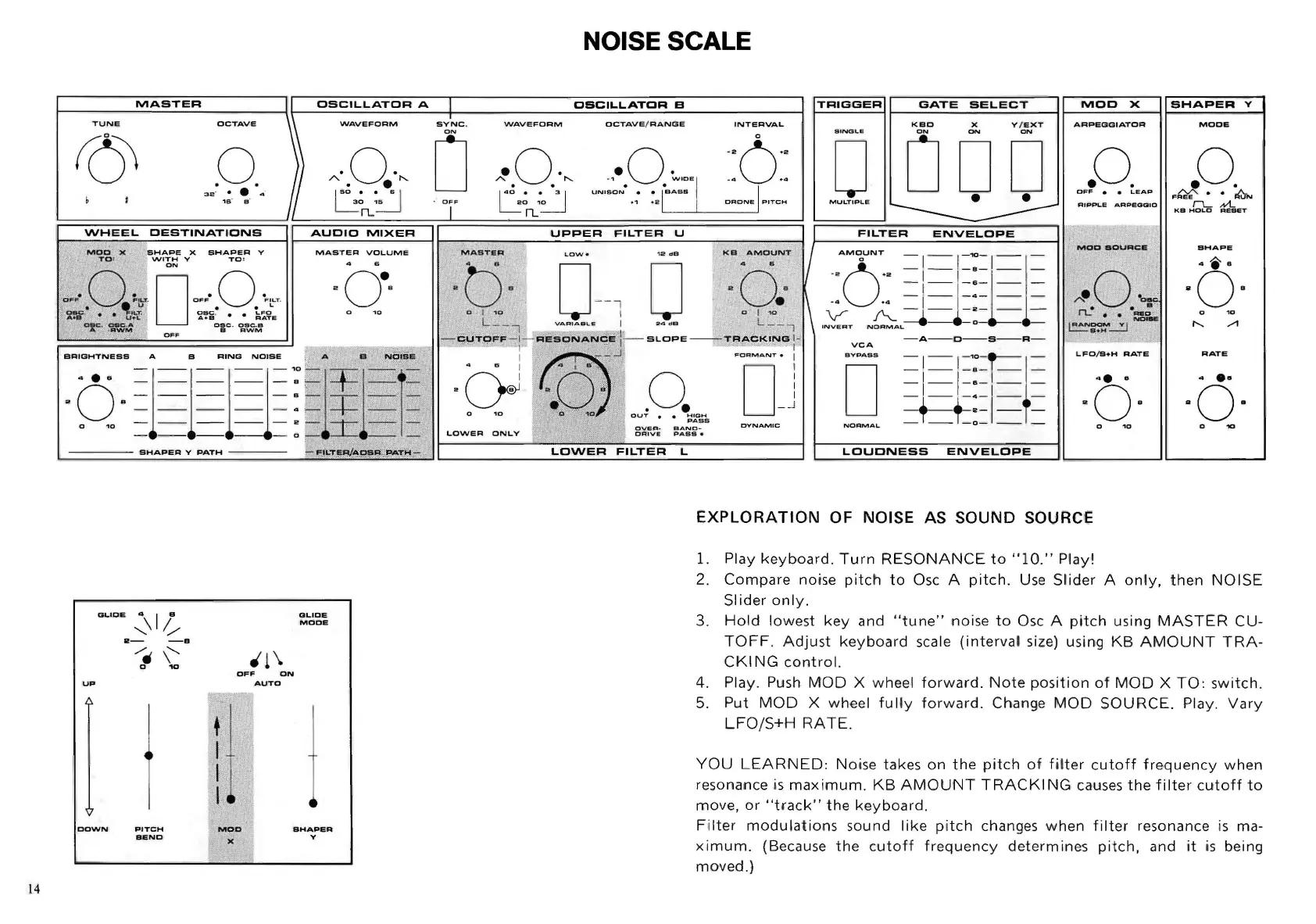
NOISE SCALE
TRIGGER
GATE
SELECT
MOO
X
ARPEGGIATOR
.0.
OFF
LEAP
I
L.FO/S+H
RATE
LOUONESS
ENVELOPE
EXPLORATION
OF NOISE
AS
SOUND SOURCIE
l.
Play
keyboard
.
Turn
RESONANCE
to
" ]
0."
Play!
SHAPER
Y
MODE
.0.
F",
••
~
r-L
Nt..
KB
HOLD
RESET
SHAPE
·6·
o
10
RATE
2.
Compare
noise
pitc
h
to
Osc A
pitch.
Use
SI
'
ider
A
only,
then
NOISE
Slider
only.
3.
Hold
lowest
key
and
"tune"
noise
to
Osc A
pitch
using
MASTER
CU-
TOFF.
Adjust
keyboard
scale
(interva
l size) using
KB
AMOUNT
TRA-
CKING
control.
4. Play. Push
MOD
X wheel
forward
.
Note
position
of
MOD
X
TO
:
switch.
5.
Put
MOD
X wheel
fully
forward
. Change
MOD
SOURCE.
Play.
Vary
LFO/S+H
RATE
.
YOU
LEARNED:
Noise takes
on
the
pitch
of
fi
l
ter
cutoff
frequency
when
resonance.is
maximum.
KB
AMOUNT
TRACKING
causes
the
filter
cutoff
to
move,
or
"track"
the
keyboard.
Filter
modulations
sound
like
pitch
changes
when
filter
resonance
is
ma-
ximum.
(Because
the
cutoff
frequency
determines
pitch,
and
it
is
being
moved
.)