10
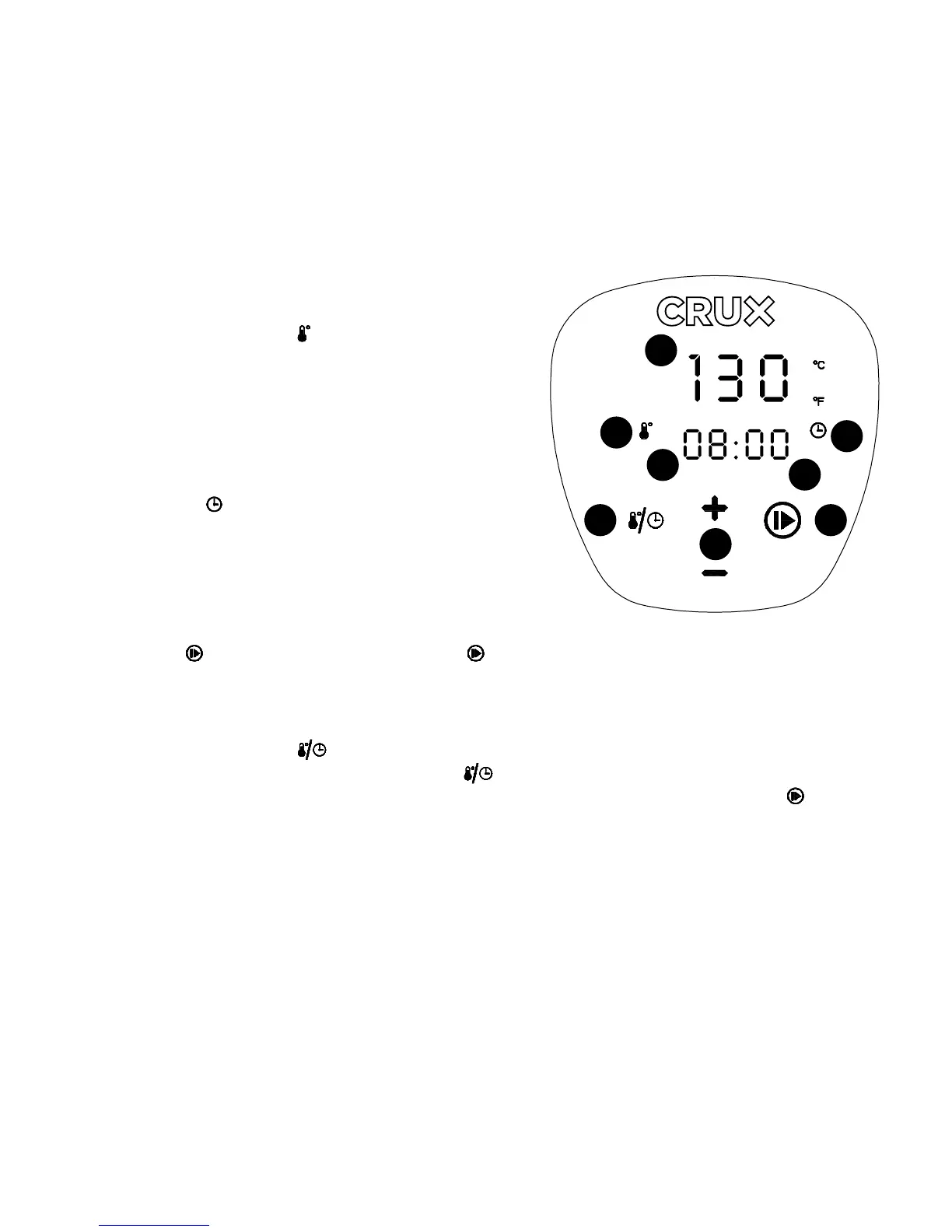
LED Display with Touchscreen Digital Controls
1. CURRENT WATER TEMPERATURE DISPLAY
(°F/°C). Backlighted digital TEMPERATURE
displays water temperature.
2. TEMPERATURE ICON (
) illuminates when the
target water TEMPERATURE (°F/°C) is on display.
3. BACKLIT DIGITAL TEMPERATURE DISPLAY.
Default target water TEMPERATURE flashes
until re-programmed. While in operation, the
current/target TEMPERATURE will be displayed
prominently on the top of the screen.
4. TIME ICON (
) illuminates when the target cook
TIME is on display.
5. BACKLIT DIGITAL TIME DISPLAY. Default target
TIME flashes until re-programmed.
While in operation, remaining TIME will be
displayed as it counts down to 00:00.
6. ON/OFF (
) Button. A lone red ON/OFF ( ) button will appear on the display when
the unit is plugged in. Press the ON/OFF button to turn the unit ON. Press the ON/OFF
button again to confirm settings and to begin operation. While in operation, press and
hold the ON/OFF button for 3 seconds to turn the unit OFF.
7. TIME/TEMPERATURE ( ) Button. Press to re-program TIME or TEMPERATURE.
Press and hold the TIME/TEMPERATURE (
) Button to change from (°F) to (°C).
The hrs. or °F/°C will flash on the display until re-programmed or the ON/OFF (
) button
is pressed.
8. (+) or (-) Buttons. Use the (+) or (-) buttons to adjust the cook TIME from 0:00 minutes
to 99:59 hours in 1 minute increments; or press and hold any button to fast advance or
reverse. Use the (+) or (-) buttons to adjust the cook TEMPERATURE from 32°F to 194°F;
press and hold any button to fast advance or reverse.
Temperature/Time Hold 3 sec. to
Power ON/OFF
1
2
4
67
8
5
3
Figure 2


 To Next Page