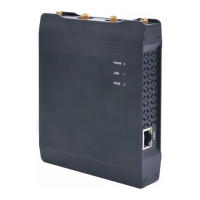
The CVW Professional Wi-Fi Adaptor, model 6689, is a high-speed wireless data transmitter designed to provide a convenient and safe solution for live video scenes, particularly in situations where traditional wiring is problematic due to high cost, short service life, or vulnerability to damage. This device aims to offer a more professional and enjoyable shooting experience by eliminating the need for extensive wiring.
Function Description:
The 6689 acts as a wireless bridge, enabling the transmission of HD video data over a Wi-Fi connection. It supports point-to-point connections, allowing two devices to communicate wirelessly. The system can be configured in either Access Point (AP) or Station (STA) mode, with one end typically set as AP and the other as STA. For scenarios requiring longer transmission distances, the device supports a cascade mode based on WDS (Wireless Distribution System) technology, allowing multiple devices to extend the wireless range. The device is designed for bidirectional Wi-Fi communication, meaning either end can function as a transmitter or receiver interchangeably. It also incorporates features for secure communication, including data encryption.
Important Technical Specifications:
- Model: 6689
- Frequency: 5.15GHz~5.85 GHz
- Antenna Mode: 4x4 MIMO, Beamforming
- Modulation: OFDM
- Power Consumption: Maximum 9.6W (at 300Mbps speed)
- Bandwidth: 20MHz/40MHz/80MHz
- Standard Protocol: 802.11ac/n
- Receiving Sensitivity: <-70dBm
- Range: 900m (Line of Sight - LOS)
- Transmit Power: 19dBm
- Transmission Data Rate:
- 80MHz: 1.7Gbps (433.33 Mbps per stream)
- 40MHz: 500Mbps (200 Mbps per stream)
- 20MHz: 346.8Mbps (86.7 Mbps per stream)
- Operating Voltage: 7-36V
- Operating Temperature: 0-40°C
- Storage Temperature: -20°C-60°C
- Connectivity: RJ45 interface for wired connections, DC IN port for power adapter (SPEC: 5.5mm, positive inside and negative outside).
- Buttons: WPS button for automatic connection establishment, RESET button for factory settings reset.
- Indicators: Power indicator (steady on for normal power, off for abnormal), Wi-Fi connection indicator (blinking for no connection, steady on for successful connection), MODE indicator (displays operating mode).
Usage Features:
- Easy Setup: The device can be connected to a webcam and a computer via network cables. After powering on, it takes 30-60 seconds for the network connection to establish, indicated by the Wi-Fi connection indicator changing from blinking to steady on.
- High Transmission Rate: Supports a maximum transmission rate of up to 500Mbps, ensuring efficient data transfer for HD video.
- Advanced Wireless Technology: Utilizes 4x4 MIMO and beamforming technology at the transmitter terminal for enhanced performance and range.
- Multi-channel Support: Capable of supporting 8-channel connections simultaneously, offering strong penetrating power and long transmission distance.
- Cascading Functionality: Allows for extending the transmission distance by cascading multiple devices in AP mode, with consistent channel settings and configured WDS MAC addresses. However, cascading reduces system bandwidth and is recommended up to Level 3.
- PNP Configuration: Designed for plug-and-play operation, simplifying deployment.
- Web-based Configuration: Device settings, including IP address, wireless mode (AP/STA), ESSID, encryption, and passphrase, can be configured through a web interface accessible via a browser.
- LNA Mode Settings: The device offers high-gain and low-gain modes for its Low Noise Amplifier (LNA). The low-gain mode is suitable for open environments with wireless transmission distances up to 200m, while the high-gain mode is recommended for wall penetration or distances exceeding 200m.
- Firmware Upgrade: Supports software upgrades via the web interface, allowing users to update the device's firmware for improved performance or new features.
- Safety Features: Includes a power switch for easy power control and a WPS button for quick and secure connection setup.
Maintenance Features:
- User-Serviceable Parts: The device does not contain user-serviceable parts. For any repairs, it should be returned to the original factory for maintenance.
- Power Adapter: Users are advised to use the standard power adapter provided with the device, ensuring compliance with the rated voltage range.
- Environmental Considerations: The device should not be exposed to dripping or splashing liquids. It should be placed on a flat, hard, and stable surface. Adequate ventilation is crucial, and air vents should not be blocked. The device should be kept away from direct sunlight and heat sources.
- Electrical Safety: Before connecting any equipment, the power to the product should be turned off. Ensure that the electrical plug type is compliant with the rated voltage range. Avoid placing heavy objects on the power cord and prevent overloading electrical outlets. Disconnect the power cord during lightning storms or when the product is left unattended for extended periods to reduce the risk of electric shock or fire.
- Interference Management: The device is susceptible to interference from 5GHz wireless local area networks or other wireless devices. It is recommended to keep a certain distance from other machines if interference occurs. Do not set up the transmitter and receiver in a metal shelf, as it can hinder wireless communications.
- Troubleshooting: The manual provides guidance for common issues such as the device not being electrified, slow startup, lack of pairing, or excessive distance between devices, offering solutions like checking power, waiting for boot-up, performing pairing, or shortening the distance.
- Regulatory Compliance: The device complies with FCC rules for Class B digital devices and FCC RF radiation exposure limits. Users are cautioned against unauthorized modifications to the equipment, as this could void the authority to operate it.


 To Next Page
 General