English - 5
OPERATION & ADJUSTMENT
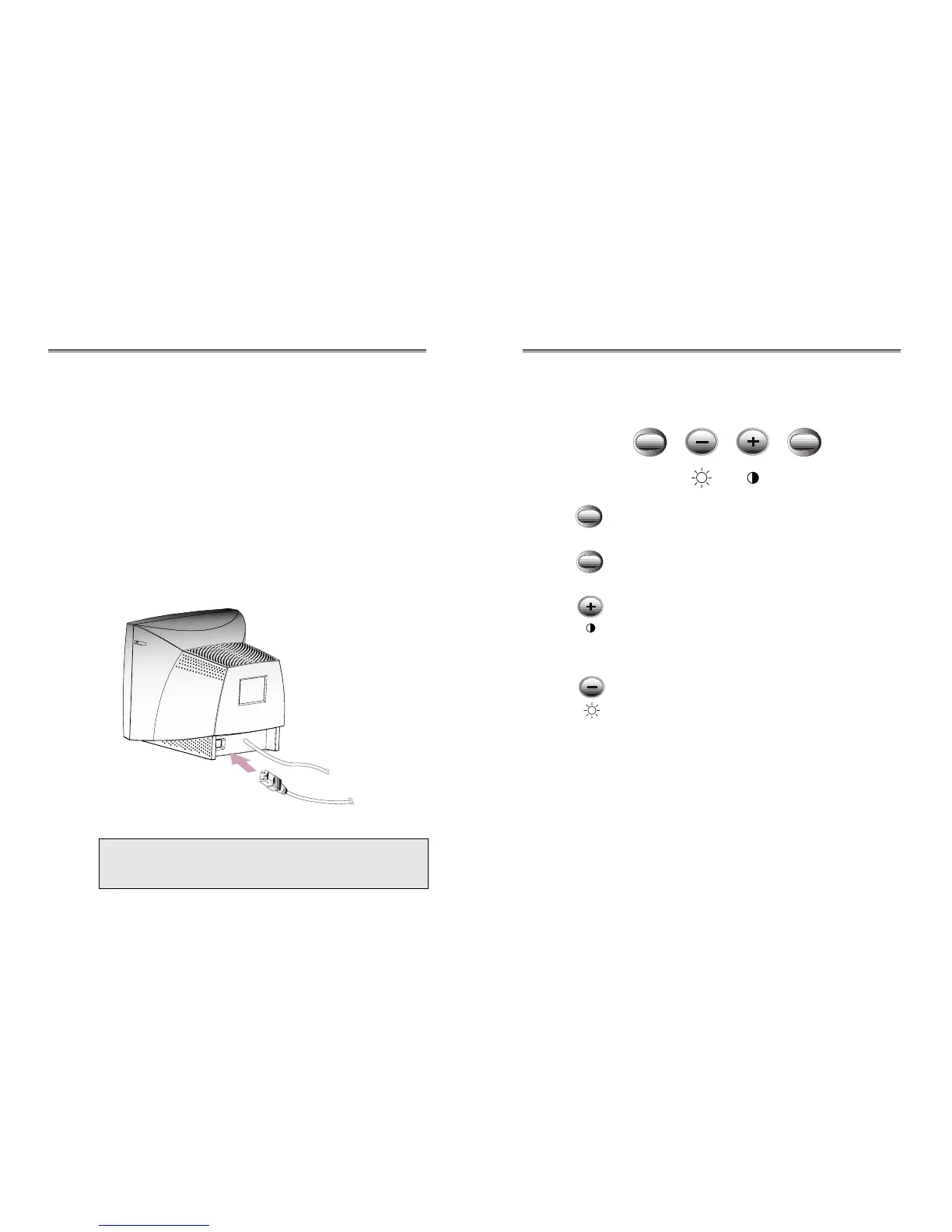
Control Panel
• Launch OSD(On-Screen Display) MENU window.
• Select a sub Menu & function.
• Move a sub Menu & function.
• Increase the value of any selected function.
• Adjust the contrast directly when there is no OSD.
• Move a sub Menu & function.
• Decrease the value of any selected function.
• Adjust the brightness directly when there is no
OSD.
English - 4
CONNECTING THE SIGNAL CABLE AND POWER
CORD
1. Turn off the computer and monitor.
2. Connect the 15 pin D-sub connector to the output port of the
video card in your computer.
3. Tighten the screws of the connector.
4. Plug the power cord into the AC receptacle located on the back
of the monitor.
5. Plug the other end of the power cord into the AC outlet.
If your power cord is PC-to-Monitor type, plug the other end
of the power cord into the AC receptacle in the computer.
Signal Cable
Power Cord


 To Next Page