Network Settings
22
Password Setting Format.
Wi-Fi Password of Internal
Router in the
.
(Password should be set
at least 8 characters. )
CTOUCH
i n t e r a c t i v e d i s p l a y
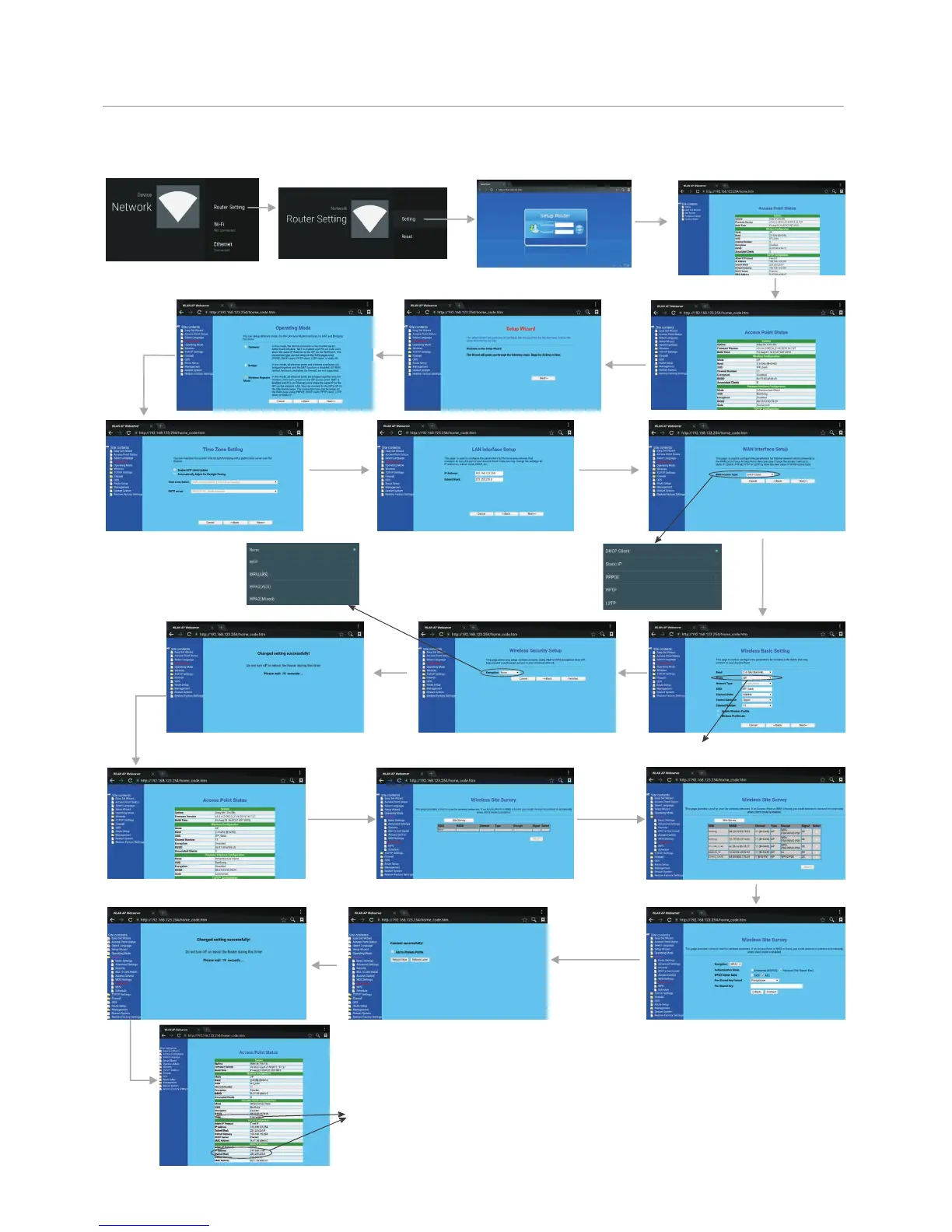
Recommended to select AP
Next
There are five methods to connect with
network, choose your preferred one.
Recommended to select the DHCP
Client connection. Automatically obtain
IP information from your ISP.
Wireless Network Setting ( )Internal router
Next
Next
Finished
Next
Successfully connected,
return to Site contents.
Select
Wireless,
then Site
Survey.
Confirm
Site Survey
Select your desired WiFi signal.
Connect
Input Password
Method 2: Professor model
Input the default UserName: admin, skip the
default password setting as there is no default
password, then press Login button login.
Select Professor Model
Select
Setup
Wizard
Select
Wireless
Repeater
Mode
Next
Get IP address,
Setting successfully.


 To Next Page
 Loading...