Common Functions
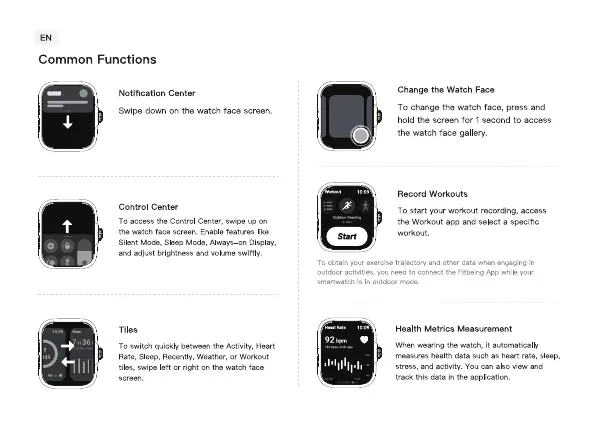
Notification Center
Swipe down on the watch face screen,
Control Center
To access the Control Center, on
watch face screerl features lie
Silent Mode, Sleep Mode, Always—on Display,
and adjust brightness and Wlume swiftly.
T obt
outdocr activities,
smartmatr.h g n
Tiles
To switch quickb,' between the Activity, Heart
Rate. Sleep, Recently. Weather. or Workout
tiles. Swipe left the watch face
Change the Watch Face
TO change the watch face, press and
hold the screen for I second to access
the watch face gallery.
Record Workouts
TO Start your recording,
the Workout app and select a specific
and data when in
d to connect the Fitt*ing App v.•hile
Health Metrics Measurement
When wearing the watch, it automatically
measures health data such as heart rate, sleep,
stress, and activity. You can also view and
track this data in tho application.


 To Next Page