8
Geng Started with CuddeLink
All CuddeLink cameras must have an SD card installed.
The HOME camera saves the images it records & images
from the Remotes cameras on the SD card. We
recommend a 4 or 8GB card. A 4 GB card will hold 10s of
thousands of CuddeLink images.
The REMOTE cameras saves high resoluon images on the
SD card and saves a thumbnail image in a TX_QUEUE
where they are queued for transmission to HOME. A 2GB
card or bigger should be used.
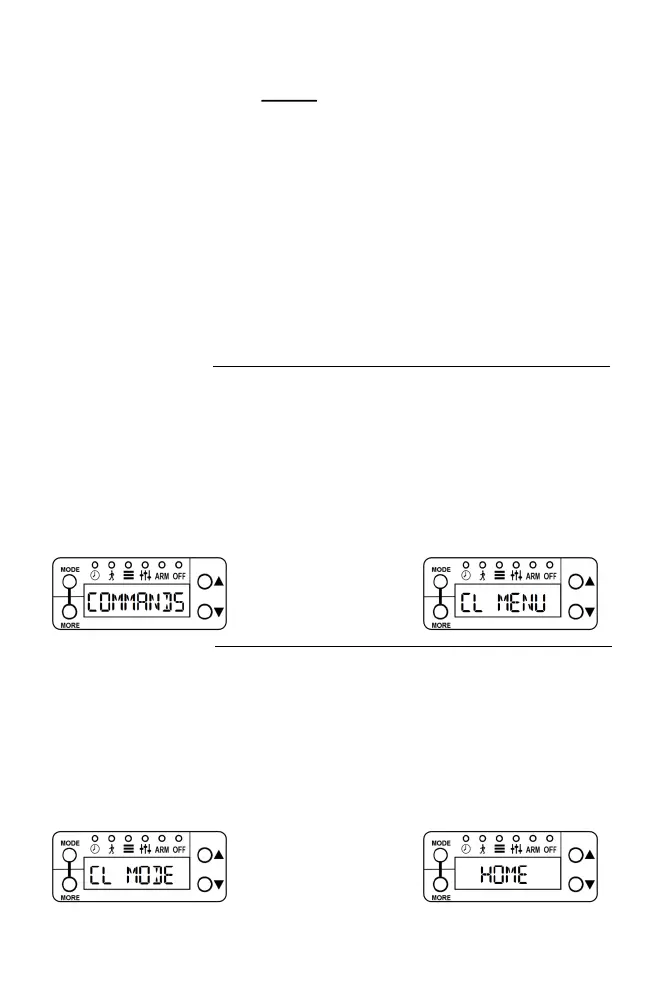
Press MODE then press
MORE
Set up HOME camera
Set the normal camera parameters as explained in the
camera’s manual. Date, me, camera delays, etc.
Set CL MODE to HOME by pressing UP as needed.
Aer CL MODE is set to HOME, press MORE to connue.
Press UP or DOWN to
select Home
This guide assumes you know how to navigate the
camera’s user interface. All the sengs explained in this
secon are in the LINKMENU item. To access the
LINKMENU press MODE unl COMMANDS is selected,
then press MORE unl LINKMENU appears, then press
UP.


 To Next Page