EasyManua.ls Logo

Cuisinart Cook Central - User Manual

Cuisinart Cook Central
2 pages
Print Icon
To Next Page IconTo Next Page
Loading...
Cook Central
Multicooker
QUICK REFERENCE GUIDE
GETTING TO KNOW YOUR CONTROL PANEL
PG-26987
Start/Stop Cooking
Use START/STOP button to start
and stop heat-up process.
NOTE: When combination
cooking (such as browning before
roasting), there is no need to
press the START/STOP button
again when switching to the new
function. The unit is already on.
Cooking Method
Pressing SLOW COOK,
ROAST, BROWN/SAUTÉ,
or STEAM lets you select
cooking mode. LED indicator
will light up.
Cooking Time
Press Time Directionals (+/–) to
set timer for Slow Cook, Roast
and Steam functions (setting
time is optional for Brown/Sauté).
Holding buttons down scrolls
quickly; pressing and releasing
advances more slowly. Time will
appear in LCD display.
Cooking Temperature
Each program has a pre-set
temperature which can be adjusted
by using temperature Directionals
(+/–) (Steam temperature can not
be changed). Holding buttons
down scrolls quickly; pressing and
releasing advances more slowly.
Power
Why won’t my unit turn on?
Check to make sure your unit is plugged into a functional outlet.
Contact Customer Service at 1-800-726-0190.
Why is my unit turning itself off?
If no cooking function has been started, the cooker will enter sleep
mode after 5 minutes of no use. All lights will turn off. Press any button
to “wake up” the unit and operate the unit as normal.
It is possible the unit overheated. Wait for the unit to cool down and
try again. If it does not turn back on, contact Customer Service at
1-800-726-0190.
If all of your water has boiled out during steaming, the unit will shut off
as a safety precaution. To continue steaming, add water to the pot and
restart the program.
If the pot is out of place for more than 15 minutes, when the pot is
replaced, the unit will not resume cooking on it’s own. Restart the
program.
If changing functions when the unit is already cooking, you do not
need to hit the START/STOP button again to select. Doing so will turn
the unit off. Simply press your new function and select your desired
settings; the unit will switch automatically.
The heater will turn off automatically after the cooking time and/or
Keep Warm time have elapsed. This is normal.
If you do not set a cooking time, the unit will cook for the maximum
allowable cooking time before shutting off automatically. This is normal.
Programming
Can I set a timer for the Brown/
Sauté function?
Yes. Setting a timer for brown/sauté is an optional step. Simply set
your timer using the Time Directionals as you would any other function.
Can I change my cooking
function, time or temperature
when the unit is already
cooking?
Yes. Simply use the cooking function, Time and Temperature
Directionals, to change your programming. Note: The unit is already on,
so you do not need to hit the START/STOP button again to select.
Doing so will turn the unit off. Simply press your new function or desired
settings; the unit will switch automatically and adjust accordingly.
Cooking
When should I brown my meat
before slow cooking/roasting?
Browning meat before slow cooking and roasting is an optional step.
It is beneficial, as it adds flavor and color, but the step can be omitted
if time is short. Exception: ground meats.
Which position should the rack
be in for steaming/roasting?
The rack is intended for steaming in the “up” position. The rack is
intended for roasting in the “down” position (see inside).
Can I use the cooking pot on
the stove/in the oven?
The cooking pot was designed specifically for use in this multi-cooker.
We do not suggest using it on the stove or in the oven.
Cleaning
Can I put my unit in the
dishwasher?
All removable parts are top-rack dishwasher safe.
Do not immerse or put the base of the unit in the dishwasher. Clean the
base and control panel with a clean damp cloth.
The pot is nonstick – why is
food sticking?
While the pot does have a nonstick coating, it is possible for food
residue to burn onto the pot, making it difficult to remove.
Food residue is sticking to the
cooking pot surface. How do I
clean it without damaging it?
If food has burned on, fill pot with warm soapy water and allow to soak
before cleaning. If scouring is necessary, use a non-abrasive cleanser
or liquid detergent with a nylon pad or brush.
Error Codes
My display shows flashing
- - - - - - -
Indicates that the pot has been removed from the unit or is not seated
properly. The heater will turn off temporarily if the pot is removed
to avoid damage. Once the pot is returned, the unit should resume
cooking. Note: If the pot is out of place for over 15 minutes, you will
need to restart the program.
My display shows Err
Indicates the unit has overheated. Wait for the unit to cool down and
try again. If the problem persists contact Customer Service.
TROUBLESHOOTING CHART

Question and Answer IconNeed help?

Do you have a question about the Cuisinart Cook Central and is the answer not in the manual?

Summary

TROUBLESHOOTING CHART

Why wont my unit turn on?

Unit not powering on; check outlet or contact service.

Why is my unit turning itself off?

Unit turns off due to sleep mode, overheating, or pot removal.

Error Codes

Display shows flashing codes or 'Err' indicating issues.

GETTING TO KNOW YOUR CONTROL PANEL

Cooking Method

Select cooking mode by pressing buttons; LED indicator lights up.

Cooking Time

Set timer using Time Directionals (+/-); time appears in LCD display.

Cooking Temperature

Adjust temperature using Directionals (+/-); Steam temp is fixed.

Start;Stop Cooking

Use button to start/stop heat-up; no need to press when switching functions.

PROGRAMMING THE COOKING FUNCTIONS

TO SLOW COOK

Fill pot, select temp/time, press START/STOP.

TO ROAST

Place rack/food, select temp/time, press START/STOP.

TO BROWN;SAUTÉ

Select function/temp, press START/STOP to begin heat-up.

TO STEAM

Add liquid, rack, select time, press START/STOP.

SWITCH FROM BROWN TO SLOW COOK OR ROAST

Press new function/settings directly after browning.

Summary

TROUBLESHOOTING CHART

Why wont my unit turn on?

Unit not powering on; check outlet or contact service.

Why is my unit turning itself off?

Unit turns off due to sleep mode, overheating, or pot removal.

Error Codes

Display shows flashing codes or 'Err' indicating issues.

GETTING TO KNOW YOUR CONTROL PANEL

Cooking Method

Select cooking mode by pressing buttons; LED indicator lights up.

Cooking Time

Set timer using Time Directionals (+/-); time appears in LCD display.

Cooking Temperature

Adjust temperature using Directionals (+/-); Steam temp is fixed.

Start;Stop Cooking

Use button to start/stop heat-up; no need to press when switching functions.

PROGRAMMING THE COOKING FUNCTIONS

TO SLOW COOK

Fill pot, select temp/time, press START/STOP.

TO ROAST

Place rack/food, select temp/time, press START/STOP.

TO BROWN;SAUTÉ

Select function/temp, press START/STOP to begin heat-up.

TO STEAM

Add liquid, rack, select time, press START/STOP.

SWITCH FROM BROWN TO SLOW COOK OR ROAST

Press new function/settings directly after browning.

Overview

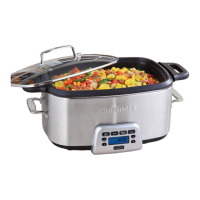
The Cuisinart Cook Central™ Multicooker is a versatile kitchen appliance designed to simplify various cooking methods in one pot. It combines the functionalities of a slow cooker, roaster, brown/sauté pan, and steamer, offering convenience and efficiency for a wide range of recipes.

Function Description

The device features a control panel with dedicated buttons for each cooking method: SLOW COOK, ROAST, BROWN/SAUTÉ, and STEAM. An LED indicator illuminates to show the selected mode.

  • SLOW COOK: This function allows for traditional slow cooking. Users can fill the cooking pot with ingredients, cover it with the lid, and then select the desired temperature (HIGH, LOW, SIMMER, or WARM) and a cooking time of up to 24 hours. Pressing START/STOP initiates the slow cooking process.
  • ROAST: For roasting, the rack is placed in the cooking pot in the Roast position, food is placed on the rack, and the pot is covered. Users then press ROAST, select a temperature between 250°F and 450°F, and a cooking time of up to 6 hours. The START/STOP button begins the process. Two beeps sound when the roasting temperature is reached, and the timer starts counting down.
  • BROWN/SAUTÉ: This function is used for browning or sautéing ingredients. Users select BROWN/SAUTÉ, choose a temperature between 250°F and 500°F, and press START/STOP to begin heating. Once the selected temperature is reached (indicated by two beeps), ingredients can be added to the cooking pot. For best results, it's recommended to brown ingredients in batches to avoid crowding the pot. Setting a timer for brown/sauté is optional.
  • STEAM: To steam, approximately 1 quart of water or other liquid is added to the cooking pot. The rack is placed in the Steam position, and the pot is covered. Users press STEAM (the temperature is preset), select a cooking time of up to 12 hours, and press START/STOP. Two beeps sound when the steam temperature is reached, and the timer begins counting down. Food is then carefully placed on the rack, and the lid is replaced.

Usage Features

The Cook Central™ Multicooker is designed for ease of use and flexibility.

  • Switching Functions: A key benefit of this multicooker is the ability to switch between functions seamlessly. For example, after browning ingredients, users can directly switch to SLOW COOK or ROAST without needing to press the START/STOP button again, as the unit is already on. This streamlines the cooking process, especially for recipes requiring multiple steps.
  • Temperature and Time Adjustment: Users can adjust the cooking temperature using the temperature Directionals (+/-) for all functions except Steam, which has a preset temperature. Similarly, Time Directionals (+/-) are used to set timers for Slow Cook, Roast, and Steam. Holding these buttons down allows for quick scrolling, while pressing and releasing them advances the settings more slowly.
  • Optional Timers: While cooking times can be programmed, the unit will cook at the selected temperature until manually turned off if no time is set. It will automatically shut off after the maximum allowable cooking time for each function (24 hours for Slow Cook, 6 hours for Roast, 1 hour for Brown/Sauté, and 1.5 hours for Steam).
  • Preheating Indicators: For Roast and Steam functions, two beeps sound when the selected temperature is reached, indicating that it's time to add food or that the cooking process is about to begin.
  • Safety Features: The unit includes safety mechanisms such as automatic shut-off if all water boils out during steaming, or if the pot is out of place for more than 15 minutes. It also has an overheat protection feature, which will cause the unit to shut down if it gets too hot.
  • Browning for Flavor: Browning meat before slow cooking or roasting is highly encouraged as it adds significant depth and flavor to the finished dish. This step can be skipped if time is short, except for ground meats, which should always be browned.
  • Grease Removal: If excess grease or water accumulates, the cooking pot can be carefully removed from the base using pot holders to pour out the liquid, then returned to continue cooking.
  • Overheat Protection: The unit will indicate an "Err" message if it overheats. In such cases, it's important to allow the unit to cool down before attempting to use it again. Prolonged use at 500°F for over an hour is not recommended as it can harm the nonstick coating or overheat the unit.

Maintenance Features

Proper care and maintenance ensure the longevity and optimal performance of the Cook Central™ Multicooker.

  • Dishwasher Safe Parts: All removable parts of the unit are top-rack dishwasher safe, making cleanup convenient.
  • Base Cleaning: The base unit and control panel should not be immersed in water or put in the dishwasher. Instead, they should be cleaned with a clean, damp cloth.
  • Nonstick Pot Care: While the cooking pot has a nonstick coating, food residue can sometimes burn onto the surface, making it difficult to remove. If this occurs, fill the pot with warm, soapy water and allow it to soak before cleaning. For stubborn residue, a non-abrasive cleanser or liquid detergent with a nylon pad or brush can be used.
  • Error Code Interpretation: The display may show flashing error codes or "Err." If the pot is removed or not seated properly, the heater will temporarily turn off. Once the pot is returned, the unit should resume cooking. However, if the pot is out of place for more than 15 minutes, the program will need to be restarted. An "Err" message indicates the unit has overheated, requiring it to cool down before use.

The Cuisinart Cook Central™ Multicooker is designed to be a versatile and user-friendly appliance, simplifying complex cooking tasks into a single, efficient unit. Regular maintenance and adherence to usage guidelines will ensure its continued performance.

Cuisinart Cook Central Specifications

General IconGeneral
Product TypeMulti-Cooker
Capacity6 quarts
Non-Stick PotYes
FunctionsSlow Cook, Steam, Sauté, Simmer, Warm
MaterialStainless Steel
Timer24-hour programmable timer
LidTempered glass lid
Dishwasher Safe PartsCooking pot and glass lid

Related product manuals