EasyManua.ls Logo

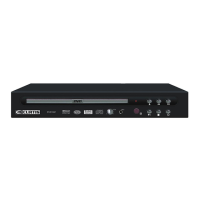
Curtis DVD1046 - User Manual

Curtis DVD1046
19 pages
Print Icon
To Next Page IconTo Next Page
Loading...
Please read this User Manual carefully to ensure proper use of this product and
keep this manual for future reference.
DVD/CD/CD-R/CD-RW PLAYER
DVD 1046
USER MANUAL
MP
3
DVD 1046

Questions and Answers

  • R
    Roberto CarterAug 15, 2025
    What to do if the Curtis DVD Player remote control does not function?
    • R
      Raymond FletcherAug 15, 2025
      If the remote control for your Curtis DVD Player isn't working, first ensure the batteries are installed correctly, paying attention to the polarities. If that doesn't solve the issue, try replacing the batteries altogether. Finally, make sure you're pointing the remote directly at the sensor on the DVD player and are within 5 meters of it.
  • C
    Charles WalkerAug 18, 2025
    Why is there no sound coming from my Curtis DVD1046?
    • C
      cedwardsAug 18, 2025
      If your Curtis DVD Player displays no sound, ensure that all equipment is connected properly. Also, verify that neither the TV nor any audio equipment is muted. Lastly, double-check that the audio output setting is correct.
  • J
    Jared MoralesAug 21, 2025
    What to do if Curtis DVD Player buttons are not functioning?
    • Y
      Yvonne HeathAug 21, 2025
      If your Curtis DVD Player unit or remote control buttons aren't working, try turning the unit off and then back on. Alternatively, turn off the unit, disconnect the AC power cord for 5 to 10 minutes, and then reconnect it.
  • M
    mooreheatherAug 25, 2025
    Why my Curtis DVD1046 DVD Player cannot read disc?
    • Q
      qreynoldsAug 25, 2025
      If your Curtis DVD Player cannot read a disc, it may be because the disc is scratched or defiled, in which case you should change the disc. It could also be that the disc code is different from the unit's code, so you should change the disc. Finally, a PAL to NTSC error might be the cause, so set the video output to AUTO.
  • D
    David MillerAug 27, 2025
    Why picture is distorted during fast forward or reverse on Curtis DVD1046?
    • J
      johnsondorisAug 27, 2025
      If your Curtis DVD Player shows a distorted picture during fast forward or reverse, this is normal for advance or reverse.
  • I
    Isabel BarrettAug 30, 2025
    How to fix no (4:3)(16:9) picture on Curtis DVD1046 DVD Player?
    • M
      Mario PalmerAug 30, 2025
      If your Curtis DVD Player shows no (4:3)(16:9) picture, choose the correct setup at TV TYPE item that matches the TV set.
  • J
    Jerry SmithSep 2, 2025
    How to fix a Curtis DVD Player with no power?
    • D
      Danielle MaldonadoSep 2, 2025
      To resolve a 'no power' issue with your Curtis DVD Player, ensure the power cord is securely plugged into the power outlet. You may try turning it on/off once.
  • R
    Rachel VillarrealSep 5, 2025
    Why can't I change the angle on my Curtis DVD1046?
    • E
      Erica CarterSep 5, 2025
      If you can't change the angle on your Curtis DVD Player, this function depends on software availability.
  • M
    Matthew WalkerSep 8, 2025
    Why audio soundtrack and/ or subtitle language not found in settings of Curtis DVD1046?
    • B
      broblesSep 8, 2025
      If you cannot find the audio soundtrack and/or subtitle language in the settings of your Curtis DVD Player, it is because the audio soundtrack and/or subtitle language does not exist in the disc, so the language selected at the initial settings will not be seen/heard. Also, alternative audio soundtrack (or An alternative language is not selected with discs which contain subtitle) language cannot be more than one language selected.
  • K
    karen39Sep 12, 2025
    What to do if there is no playback menu on Curtis DVD Player?
    • K
      Katelyn BrockSep 12, 2025
      This function is suitable for VCD with playback control disc.

Curtis DVD1046 Specifications

General IconGeneral
Remote ControlYes
Progressive ScanYes
OutputsComposite Video, Stereo Audio
Audio OutputStereo
Power SupplyAC 120V, 60Hz
Playable Media FormatDVD, CD, JPEG
Supported Disc FormatsCD
Video OutputComposite

Related product manuals