
 Need help?
Do you have a question about the Custom Built eBikes VLCD-6 and is the answer not in the manual?
Press the power button for 1 second to turn the device on.
Press the power button for 5 seconds to turn the device off.
Press the power button to cycle through ODO and TRIP modes.
In TRIP mode, press power and shift down for 3 seconds to reset trip distance.
Short press the assist button to decrease the assist level.
Press the assist button for 2 seconds to toggle LCD backlight and headlight.
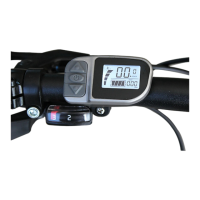
The VLCD-6 is a display and control unit for custom-built e-bikes, designed to provide riders with essential information and control over their electric bicycle's functions. It serves as the primary interface between the rider and the e-bike's electrical system, allowing for monitoring of ride data and adjustment of various settings.
The VLCD-6 unit primarily functions as a display for ride metrics and a control panel for the e-bike's assistance levels and other settings. It features a clear display that shows information such as total distance (ODO), trip distance (TRIP), and potentially other data like speed and battery level, although these are not explicitly detailed in the provided excerpt. The unit integrates a power button and two "assist" buttons (Assist+ and Assist-) for intuitive operation.
The VLCD-6 offers several key usage features:
The provided excerpt does not detail specific maintenance features for the VLCD-6 unit itself. However, the ability to adjust the wheel diameter and speed limit can be considered part of the initial setup and calibration, which contributes to the accurate and proper functioning of the e-bike system. Regular cleaning of the display and ensuring secure connections would be general maintenance practices for such a device. The user guide itself serves as a primary maintenance tool by providing instructions for proper operation and adjustment.
 General
| Brand | Custom Built eBikes |
|---|---|
| Model | VLCD-6 |
| Category | Bicycle Accessories |
| Language | English |

 To Next Page
